
Google reviews are critical for local businesses. They influence trust, visibility, and consumer decisions. Here’s why they matter and how to get more reviews:
- Why reviews matter: Reviews impact Google rankings, with 17% of local pack ranking factors tied to review signals. Businesses with higher ratings and more reviews are more likely to appear in search results and attract customers.
- Key stats: 98% of consumers read online reviews, and 76% of “near me” searches lead to visits within 24 hours. Positive reviews directly drive customer actions.
- How to get reviews:
- Set up and optimize your Google Business Profile (complete details, add photos, enable messaging).
- Ask customers for reviews at the right time (after a great experience).
- Use direct links, QR codes, and follow-up messages to make leaving reviews easy.
- Respond to all reviews (positive and negative) to show engagement and build trust.
Consistency is key. Aim for 5–10 new reviews monthly to maintain visibility and credibility. Automating requests and responses with tools like Review Overhaul can save time and improve results.
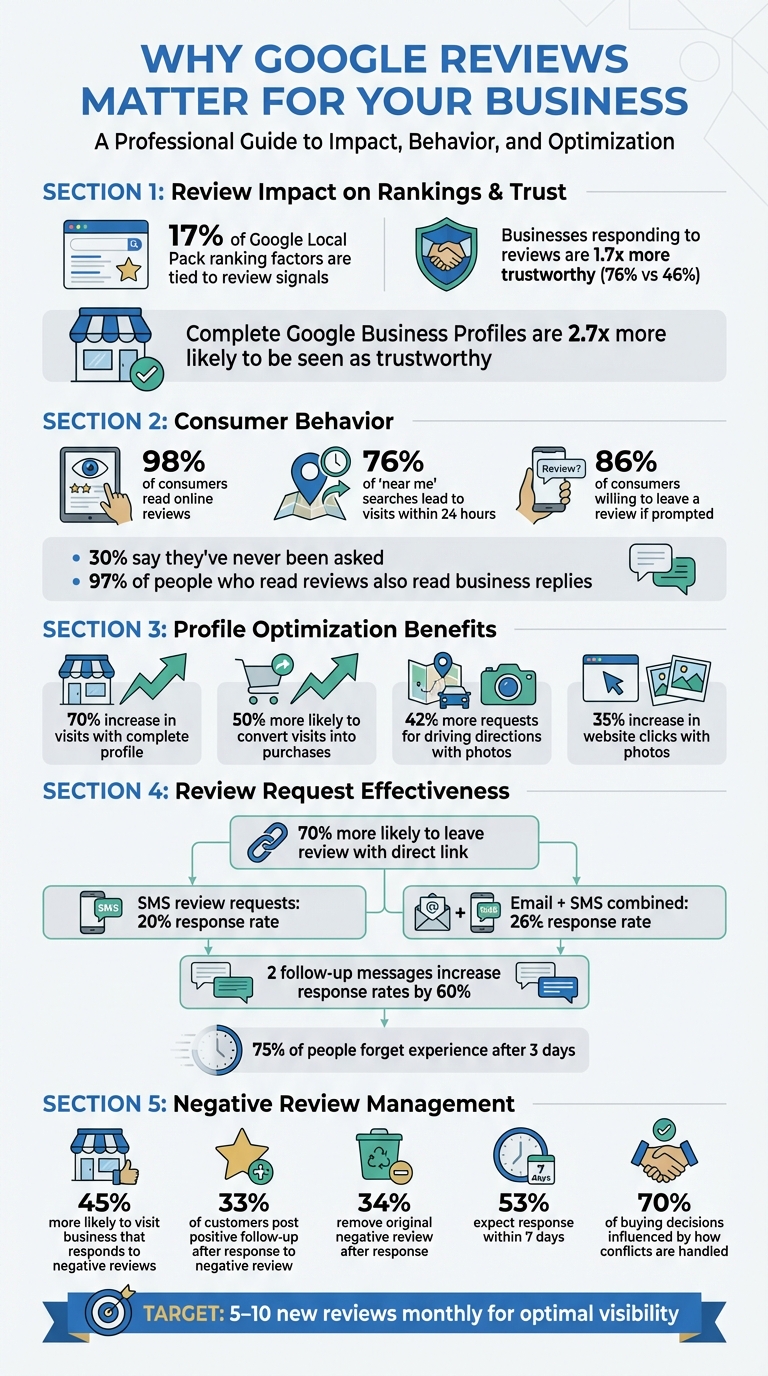
Google Reviews Impact: Key Statistics for Local Business Success
How to Get More Google Reviews for Your Business (My 5-Star Method) ⭐⭐⭐⭐⭐
Set Up and Optimize Your Google Business Profile
For customers to leave reviews, they first need to find your business – and that begins with having a well-organized Google Business Profile. A complete profile not only builds credibility but also improves your visibility. In fact, businesses with a fully completed profile are 2.7 times more likely to be seen as trustworthy by customers. These businesses also see a 70% increase in visits and are 50% more likely to convert those visits into purchases.
Start by verifying your business on Google. Verification unlocks the ability to manage reviews and access all profile features. After that, focus on consistency – keep your business details, like name, address, and phone number, uniform across platforms to boost both Google’s algorithmic trust and customer confidence. Fill in every field in your profile dashboard, including your business name, location, hours, website, services, and attributes like “Wi-Fi available” or “outdoor seating.” These details help Google connect your business with the right searches and make it easier for customers to engage with you.
Keep Your Business Information Accurate
Accuracy is crucial. Make sure your NAP (name, address, phone number) is consistent across your website, social media, and directories. Any inconsistencies can confuse Google’s algorithm, potentially hurting your local search rankings. Regularly update your hours, especially for holidays or other temporary changes. Be specific about your services. For instance, if you’re a plumber, list services like “Install faucet” or “Fix water heater” to improve your chances of appearing in targeted searches.
Upload Photos and Write Clear Descriptions
Photos are a powerful tool in grabbing customer attention. Businesses with photos see 42% more requests for driving directions and a 35% increase in website clicks. Include key images like your storefront, interior, and a snapshot of your team or service in action.
“The quality of your images reflects the quality of your business. High-resolution, clear photos show professionalism and attention to detail.” – Melon Local
Stick to high-quality, well-lit, and realistic photos that meet Google’s guidelines. Avoid heavy filters and keep any added text or logos minimal – less than 10% of the image area. Regularly updating your photos with seasonal themes or new offerings also signals to Google that your business is active and engaged.
Turn On Messaging Features
Enabling the messaging feature in your Google Business Profile creates a direct communication channel with potential customers. This feature allows you to answer questions instantly and even share your review link after a positive interaction. SMS review requests have a 20% response rate, and combining SMS with email can increase that to 26%. Messaging also gives you the chance to resolve customer concerns privately before they turn into public negative reviews. Activate chat in your profile dashboard and train your team to share your review link once they’ve successfully addressed customer queries.
Ask Satisfied Customers for Reviews
The easiest way to gather more Google reviews is simple: just ask. 86% of consumers are willing to leave a review if prompted, yet 30% say they’ve never been asked. The trick lies in knowing the right time to ask, making the request feel personal, and ensuring the process is hassle-free. Timing and approach can make all the difference.
Choose the Right Time to Ask
Timing is everything. The best moment to request a review is during a “delight moment” – when your customer is happiest and most likely to recommend your business. For service businesses like plumbers, HVAC technicians, or salons, ask right after the job is finished or follow up within 24 hours while the positive experience is still fresh.
For eCommerce, wait 7–10 days after delivery so customers have had time to try the product. If you’re in the software or subscription space, request reviews after key onboarding milestones or when the customer achieves a success with your product. Always assess satisfaction first – if a customer seems unhappy, focus on resolving their issue rather than asking for a review.
Make Your Requests Personal
Once you’ve identified the right moment, make your request personal. Generic, automated messages often get ignored. Adding the customer’s name and referencing specific details about their experience can dramatically improve response rates. For service-based businesses, have the technician or service provider who worked directly with the customer make the request.
Framing the request as a favor can also make a big impact. For example, saying something like, “It helps other neighbors know what to expect”, can increase success rates by up to 33%. Train your team to use simple, natural scripts to avoid any awkwardness. A straightforward line like, “If you were happy with the service today, would you mind leaving us a quick review? It only takes a minute”, works wonders.
“Asking in the moment, with a genuine and pressure-free tone, works really well.” – Varvara Langer, Owner, Black Cat Web Studios
Give Clear, Simple Instructions
Don’t make customers search for your business on Google. Instead, provide a direct review link that opens the review window instantly. You can find this link in your Google Business Profile dashboard under “Ask for reviews.” If you operate in-person, consider using QR codes on receipts, business cards, or signage, so customers can scan and leave a review on the spot.
70% of people are more likely to leave a review when given a direct link or clear instructions. For less tech-savvy customers, create a short instructional video or a simple step-by-step guide. You can also include the review link in automated “Thank You” emails or text messages sent right after the service is completed.
Use Follow-Up Emails and Text Messages
Once you’ve sent out personalized review requests, follow-up messages can help capture responses from those who didn’t act right away. Not every customer leaves a review immediately, but sending timely reminders can significantly improve your chances. In fact, sending two follow-up messages after the initial request can increase response rates by 60%. The trick lies in perfect timing, keeping messages short and friendly, and automating the process to ensure consistency.
Send Follow-Ups at the Right Time
Timing is everything when it comes to follow-up messages. For most service-based businesses, reaching out within 24 to 48 hours after the service is ideal. Why so soon? Because 75% of people forget their experience after just three days. Waiting too long means missing the window when customers are most likely to recall their positive experience.
The “3×3 Method” is a helpful strategy: use 3 channels (SMS, email, QR codes), reach out at 3 specific times (immediately, 24 hours later, and 3 days after), and complete all follow-ups within 3 days. Depending on your business type, you might tweak this timing. For example:
- Restaurants: Follow up within 2–4 hours.
- Service providers: Reach out 24–48 hours after the appointment.
- eCommerce: Wait 7–10 days after delivery.
Even the day and time of your follow-up matter. Messages sent mid-week (Tuesday through Thursday) tend to get 10% more responses. Aim to send them during prime hours – between 10:00 AM and 12:00 PM or 6:00 PM and 8:00 PM – when people are more likely to check their phones. For SMS, stick to regular business hours (8:00 AM–6:00 PM) to avoid irritating your customers.
Write Clear Follow-Up Messages
A good follow-up message is short, personal, and easy to act on. If you’re using SMS, keep it between 120 and 160 characters, including a direct link to leave a review. Adding a personal touch – like using the customer’s name and referencing the specific service they received – can double your response rate. For example:
“Hi Sarah, thanks for choosing us for your HVAC repair yesterday! Would you mind leaving a quick review? It helps neighbors know what to expect. [link]”
When it comes to effectiveness, SMS has an edge. While email follow-ups alone yield a 15% response rate, SMS on its own achieves 20%. Combining both methods, however, can push response rates up to 26%. SMS also boasts a 98% open rate within 90 seconds and a 36% click-through rate, making it a powerful tool for quick action. Always include a direct link to simplify the process and make it as easy as possible for customers to leave feedback.
Keep your tone conversational and low-pressure. Let customers know that even a brief review is helpful and that the process takes just 30 seconds. If you need to send additional follow-ups, reference your earlier message to gently remind them without being pushy.
Automate Your Follow-Up Process
Manually managing follow-ups can be overwhelming and inconsistent. This is where automation becomes a game-changer. Tools like Review Overhaul can automatically send email and SMS follow-ups after a purchase or service milestone, ensuring every customer gets a timely reminder without requiring extra effort from you. For example, you can set up a sequence where the first message goes out on day two, a follow-up on day five, and a final reminder on day eight.
Automation doesn’t mean losing the personal touch. These systems can pull customer names, service details, and other data from your CRM, making each message feel tailored. You can also segment your audience – for instance, targeting only those customers who gave high satisfaction scores in a Net Promoter Score (NPS) survey. This approach helps you focus on happy customers who are more likely to leave glowing reviews, while giving you the chance to address any issues privately with less satisfied customers before they post negative feedback.
sbb-itb-50c3429
Make It Easy to Review with QR Codes and Links
QR codes and direct links make it simple to gather on-site reviews, with 77% of customers saying they’re willing to leave a review when asked. By combining these tools with follow-up strategies, businesses can streamline the review process even further. The goal is to make leaving a review so quick and effortless that customers can do it right from their phones in just a few seconds.
Display QR Codes in High-Traffic Areas
Placing QR codes in spots where customers are already using their phones is a smart way to encourage reviews. For example, checkout counters and payment terminals are ideal locations. In restaurants or cafes, table tents are effective because diners can scan the code while waiting for their meal or wrapping up their visit. Salons, dental offices, and wellness centers can place QR codes at reception desks to capture feedback while the experience is still fresh.
Take Foxley Lane Dental as an example. Led by Principal Dentist Dr. Punita Shah, the clinic uses printed business cards featuring QR codes and a space for a staff member’s name. This personal touch has helped them gather over 300 detailed reviews. To ensure smooth scanning, make sure your QR codes are at least 0.8 x 0.8 inches for dynamic codes or 1.2 x 1.2 inches for static ones. Always test them on multiple devices to confirm they work seamlessly.
Add Review Links to Receipts
Adding direct review links to receipts is another way to capture customer feedback at the peak of their satisfaction. For instance, local SEO consultant Corina Burri includes a call-to-action on her invoices, encouraging clients to leave a Google Business Profile review. This approach has resulted in an impressive 25% conversion rate.
For printed receipts, consider placing a QR code in the footer. For emailed receipts, include a shortened URL or a clickable button labeled “Rate us on Google”. Just make sure the process is simple – customers should be able to leave a review in two taps or less on their mobile devices. Anything more complicated can discourage them from completing the task.
Create Signs That Encourage Reviews
Visible signage can also prompt immediate reviews. Use window decals, posters, or framed signs near exits with clear calls-to-action like “Scan to Review Us on Google” or “Tell Us How We Did”. This ensures customers immediately understand what action to take.
You can also integrate NFC (Near Field Communication) technology for a tap-and-go review option. Amax Marketing, for example, uses NFC cards and stands, which have generated over 80% of their Google reviews – showing just how effective this method can be. To increase trust and scan rates, customize your QR codes with your brand colors and logo.
Respond to Every Review
Engaging with reviews is a smart way to build trust and draw in more customers. Did you know that businesses responding to reviews are perceived as 1.7 times more trustworthy (76% vs. 46%)? Even more striking, 97% of people who read reviews also read the business’s replies. This means your responses are just as visible as the reviews themselves, making them a key part of shaping how people see your business.
Taking the time to respond doesn’t just enhance your credibility – it can also boost your local search rankings. Google’s local search algorithm considers review engagement when ranking businesses. By actively replying to feedback, you signal to Google and potential customers alike that your business is attentive, reliable, and worth checking out. In fact, 45% of customers are more likely to visit a business that responds to negative reviews. Each response you post showcases professionalism and helps you connect with new customers.
Thank Customers for Positive Reviews
When someone leaves a glowing review, don’t let it go unnoticed. A simple “thank you” can go a long way in showing your appreciation. Make your response personal – use the reviewer’s name and reference specifics they mentioned, like a service they enjoyed or a team member they praised. Adding a personal sign-off, like your name or initials, can make the interaction feel even more genuine.
Keep your tone friendly but professional, and avoid slipping into promotional language. Google discourages overly salesy replies, and customers can sense when a response feels more like an ad than a heartfelt acknowledgment. Instead, focus on gratitude and reinforcing the positive experience they shared.
Address Negative Reviews Professionally
Negative reviews can be tough to swallow, but how you handle them can make all the difference. 33% of customers who get a response to their negative review end up posting a positive follow-up, while 34% remove the original review altogether. That’s a big shift, but it only happens when you respond thoughtfully and quickly – ideally within 24 hours.
Start by investigating the issue. Check your records and talk to your team to get the full picture. Then, use the “Acknowledge, Address, Invite” framework: recognize the customer’s feelings, explain the steps you’re taking to resolve the problem, and invite them to continue the conversation privately by sharing a phone number or email address. For example, Collective Hearts, a jewelry brand, turned a 1-star review into a glowing update by responding promptly with a personal apology and direct contact information. The customer praised the resolution publicly after updating their review.
Stay calm, even if the review feels unfair. Over 70% of buying decisions are influenced by how customers feel they’re treated during a conflict. Avoid being defensive or sarcastic – future customers are watching how you handle criticism. A composed, empathetic response can leave a lasting positive impression.
Get Help with Review Responses from Review Overhaul
If managing reviews feels overwhelming, consider professional help. Crafting thoughtful replies to every review takes time – something many busy business owners simply don’t have. Review Overhaul’s professional review response services can take this task off your plate. They’ll create polite, personalized replies that match your brand’s voice, whether it’s for a glowing 5-star review or a tricky 1-star complaint.
Review Overhaul also keeps an eye on your reviews across platforms, so you never miss an opportunity to respond. Starting at $199/month, their plans include review generation, monitoring, and response services, helping you maintain a strong reputation and an active Google Business Profile. By staying consistent with your engagement, you show both Google and potential customers that your business is responsive and dependable.
Use Review Overhaul to Manage Your Reviews
Running a business is no small feat, and juggling customer feedback on top of everything else can feel overwhelming. That’s where Review Overhaul steps in, taking the hassle out of managing reviews so you can focus on what truly matters: growing your business.
This platform simplifies the review process from start to finish – automating requests, consolidating feedback across platforms, and offering tools tailored to businesses of all sizes. Whether you’re a solo entrepreneur or managing multiple locations, Review Overhaul has plans to fit your needs. Pricing starts at $199/month for essential features, with full-service options available for $399/month. Let’s break down how this tool can revolutionize your approach to reviews.
Automate Review Requests
Manually asking customers for reviews can eat up valuable time. Review Overhaul eliminates this burden by seamlessly integrating with your existing systems – whether it’s your CRM, POS, or scheduling software. Once a transaction is complete or a service wraps up, the platform automatically sends out review requests via email, SMS, or both. This ensures you’re reaching customers while their experience is still top of mind.
And it works. Studies show that combining email and SMS outreach significantly increases response rates. To further boost engagement, Review Overhaul uses drip sequences to gently remind customers who don’t respond right away.
Another standout feature is sentiment filtering. Before directing customers to a review site like Google, the platform sends a quick survey – such as an NPS (Net Promoter Score) – to gauge satisfaction. Happy customers are directed to leave public reviews, while less satisfied ones are funneled to a private channel where you can address their concerns directly. This approach not only increases positive reviews but also helps you resolve issues before they escalate.
Track and Analyze Your Reviews
If you’re not measuring your feedback, you’re missing valuable insights. Review Overhaul’s centralized dashboard gathers reviews from Google and other platforms, giving you a real-time overview of customer sentiment.
But it doesn’t stop at star ratings. The platform’s AI-powered sentiment analysis digs deeper, identifying recurring themes in your feedback – whether it’s praise for a specific employee or complaints about wait times. This allows you to pinpoint areas for improvement and celebrate what’s working well.
Want to know how you stack up against competitors? The platform’s benchmarking feature compares your review volume and ratings with local rivals, helping you identify where you excel and where there’s room to improve.
Another key metric is review velocity – how consistently you’re getting new feedback. Google rewards businesses that maintain a steady flow of reviews, so aiming for 5–10 fresh reviews per month is ideal. Review Overhaul tracks this for you, sending alerts if your review activity slows down so you can adjust your strategy.
Handle Negative Reviews Quickly
Negative reviews are inevitable, but how you handle them can make all the difference. Research shows that 53% of customers expect a business to respond to negative feedback within 7 days. Review Overhaul ensures you never miss this critical window, monitoring your review platforms and sending instant alerts when negative feedback appears.
The platform uses a Four-Step De-escalation Framework to guide your responses:
- Start by thanking the reviewer for their feedback.
- Offer a genuine apology.
- Provide a direct contact (like a phone number or email) to take the conversation offline.
- Keep your public response short and professional.
This approach not only shows the reviewer that you’re taking their concerns seriously but also signals to potential customers that you’re committed to resolving issues.
For businesses that face more challenging situations, the Premium Plan ($399/month) includes a crisis response feature. This tool helps you craft thoughtful, brand-aligned responses to defuse tense situations. Additionally, the Amplify feature highlights positive reviews, ensuring your best feedback gets the spotlight it deserves. Together, these tools help you build trust and protect your reputation.
Conclusion
Building a strong Google review profile takes dedication, but the rewards are well worth the effort. The strategies we’ve covered – optimizing your Google Business Profile, timing your review requests, following up with email or SMS, using QR codes for convenience, and responding to all feedback – work together to create a solid foundation. Consistency is the key. Even a steady stream of 5–10 new reviews each month signals to both Google and potential customers that your business is active and reliable. By implementing these steps, you ensure your approach stays organized and impactful.
The numbers speak for themselves: reviews contribute to about 17% of Google Local Pack ranking factors. This means they play a direct role in determining whether your business shows up in those all-important top three map results when people search for local services. Together, these strategies not only protect your online reputation but also boost your visibility.
To simplify this ongoing process, automation can be a game-changer. Managing reviews manually can quickly become overwhelming, especially when you’re busy running your business and serving customers. That’s where Review Overhaul can help. Starting at $199/month, this tool takes care of everything, from sending timely review requests to analyzing sentiment trends and crafting professional responses.
As Madeleine Costa puts it: “Reviews are one of the only chances to validate that you are who you say you are and that you do work with quality and integrity”. Each review is an opportunity to build trust, improve your online presence, and grow your business. Start applying these strategies now, and you’ll likely see a noticeable impact in no time.
FAQs
How can I ask customers for Google reviews without coming across as pushy?
The secret to getting Google reviews is keeping the process natural and customer-centered. Timing is everything – reach out soon after a positive experience, like completing a service or a purchase, while the interaction is still fresh in their mind. A friendly, personalized message can go a long way. For example: “We hope you’re loving your new HVAC system! If you have a moment, we’d really appreciate it if you could share your thoughts on Google.”
Make it simple for customers by providing a direct link to your Google Business Profile. You can include this in a follow-up email, a QR code on a receipt, a thank-you card, or even in-store signage. Quick, non-intrusive messages like “Thanks for choosing us! We’d love to hear your feedback” work well in emails or texts.
Be mindful of Google’s policies – offering rewards for positive reviews is a no-go. Instead, highlight the importance of honest feedback and how it helps you improve. And don’t forget to respond to reviews, whether they’re glowing or critical. Showing that you value customer input encourages others to share their experiences too.
Why is it important to respond to both positive and negative Google reviews?
Responding to reviews – whether glowing or critical – is a key part of building trust and shaping your business’s reputation. When you reply to positive reviews, it’s an opportunity to express gratitude, strengthen connections with happy customers, and inspire others to share their own experiences. On the flip side, addressing negative reviews head-on shows you’re willing to take responsibility, resolve problems, and possibly even win back dissatisfied customers.
Engaging with reviews also sends a strong message to potential customers: you value feedback and are committed to providing top-notch service. Plus, staying active in these conversations can boost your local search rankings, making it easier for new customers to discover your business. By responding consistently, you present your brand as both reliable and approachable.
How can optimizing my Google Business Profile help improve local search rankings?
Optimizing your Google Business Profile is one of the smartest moves you can make to boost your local search rankings. By keeping your business details accurate, complete, and always up-to-date, you’re making it easier for potential customers to find you – and trust you.
Another key factor? High-quality Google reviews. Reviews act as trust signals for Google, and they make up about 17% of the factors that influence local search rankings. The more positive reviews you earn, the better your chances of standing out in Google Maps and local search results. Plus, a well-maintained profile doesn’t just improve rankings – it helps build trust with your audience, leading to more clicks, calls, and visits.
