
That notification for a new one-star review feels like a personal attack. After all the sweat you've poured into your business, seeing your work unfairly torn down by one comment is incredibly frustrating.
We know how it feels to watch your phone go quiet right after a fake or malicious review goes live. This isn't just about a star rating—it's about your reputation and your livelihood being put on the line.
We Help You Fight Back
Review Overhaul provides a clear plan to dispute and remove damaging reviews. We guide you through Google's complex process so you can reclaim your narrative and protect the business you've built.
With our help, your online reputation will accurately reflect the quality of your work. You'll see trust restored, new customers walking through the door, and that frustrating anxiety replaced with peace of mind.
"Review Overhaul helped us get a fake one-star review removed in days. Our rating jumped from 4.2 to 4.6, and we saw a 15% increase in online reservations the next month." – Local Cafe Owner
Stop letting fake reviews define your business. Schedule your free reputation audit today and let us build a strategy that drives real growth.
Spotting the Reviews You Can Actually Dispute
Let's be honest, not every bad review is going to disappear. But a surprising number of them absolutely can be removed if they cross the line. The trick is learning to see them not just as frustrating comments, but as clear violations of Google's rules.
This isn't about getting rid of opinions you don't like. It's about identifying content that simply doesn't belong there. For example, a scathing review from a disgruntled ex-employee isn't customer feedback; it's a conflict of interest. A sudden flood of one-star ratings from brand-new accounts? That’s likely a spam attack.
Knowing how to dispute a Google review starts with knowing what Google actually cares about.
What to Look For: A Quick Guide to Policy Violations
Most business owners feel powerless because they're not sure what's "reportable." Once you know the specific categories Google uses, you can shift from feeling frustrated to taking confident, targeted action.
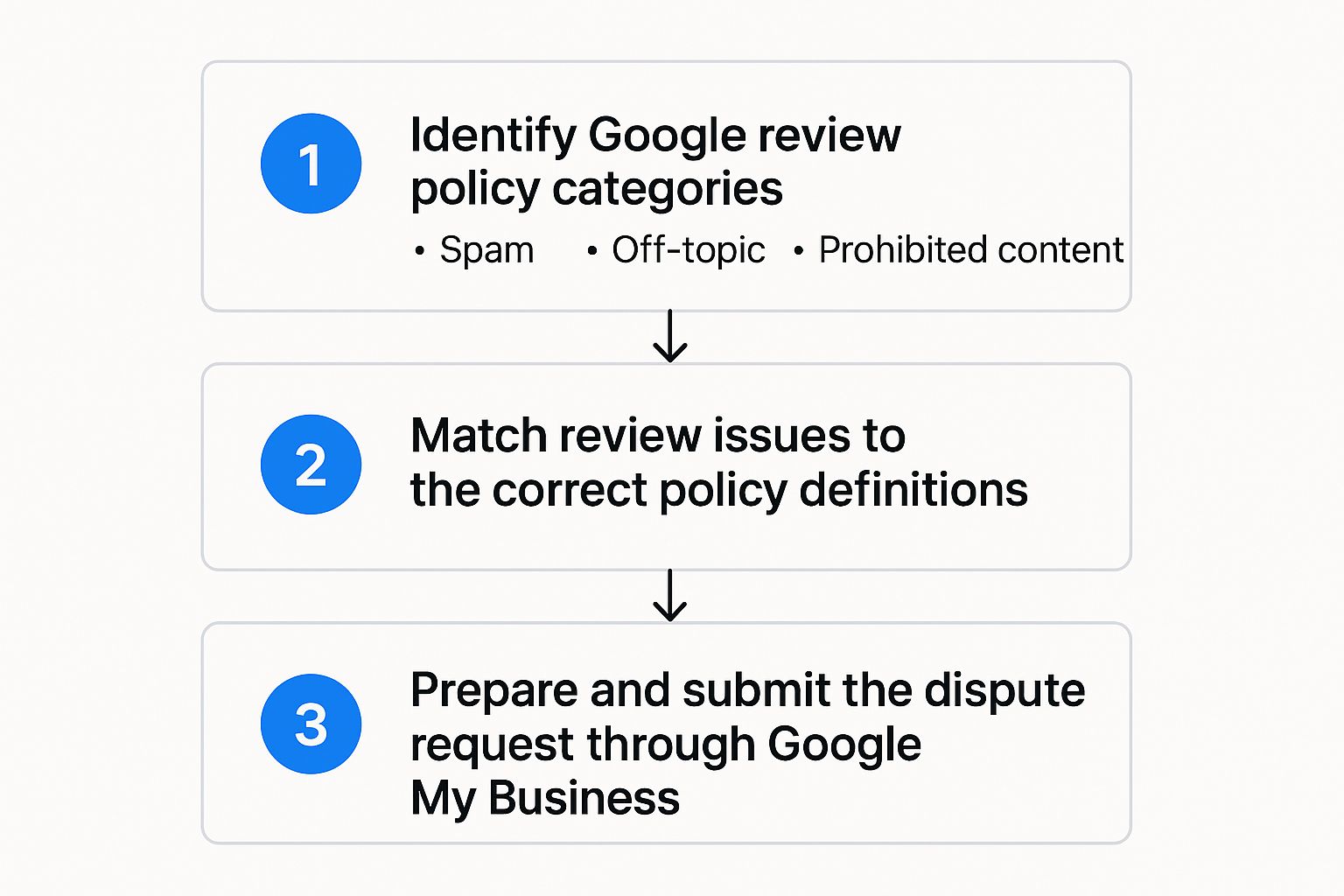
Here are the big ones you should always be on the lookout for:
- Spam & Fake Content: Think reviews from bots, accounts with no other activity, or anything clearly meant to game your rating.
- Off-Topic Rants: If someone complains about a product you don't even sell, the traffic on the way to your shop, or a political issue, it's not relevant to your business.
- Prohibited & Hateful Content: This is a big bucket covering everything from harassment and hate speech to impersonating someone else or sharing private information.

To make this even easier, here's a quick cheat sheet breaking down the most common violations you'll encounter.
Google Review Policy Violations You Can Flag
This table breaks down the types of reviews that violate Google's policies, with some real-world examples to help you spot them in the wild.
| Violation Type | What It Means | Real-World Example |
|---|---|---|
| Spam & Fake Content | Reviews from bots, fake accounts, or content meant to manipulate ratings. | "I've never been here but I know it's terrible. Avoid at all costs!" from an account with a generic name and no profile picture. |
| Conflict of Interest | A review from a current/former employee, competitor, or family member. | An overly glowing 5-star review from someone you know is the owner's cousin, or a 1-star review from an employee you just let go. |
| Off-Topic | The review isn't about an experience with your business. | "The parking in this neighborhood is impossible. I couldn't even get to the store. One star." |
| Harassment | Personal attacks, threats, or bullying directed at you or your staff. | "The cashier, Sarah, is the rudest person I've ever met. She's a total idiot and should be fired." |
| Hate Speech | Content that promotes violence or hate against individuals or groups based on race, religion, gender, etc. | Any review containing slurs or discriminatory language. |
| Impersonation | The reviewer is pretending to be someone else (like a celebrity or public official). | A review left under the name of a local city council member claiming they had a bad experience, when they clearly didn't. |
Remember, Google makes the final call based on its own rulebook, not just on whether a review feels unfair to you.
Key Takeaway: The most successful disputes shift from saying, "This review is unfair!" to proving, "This review violates Google's 'Conflict of Interest' policy." An objective, evidence-based approach is always your best bet.
Getting familiar with these rules is your first real step toward cleaning up your profile. If you want to dive deeper, our complete guide on how to remove a review from Google Business has even more strategies and examples to help you build a rock-solid case.
Gathering Evidence for a Stronger Case
Walking into a dispute with Google empty-handed is a guaranteed way to have your request denied. To give yourself a fighting chance, you need to hand them clear, undeniable proof that a review flat-out violates their policies. This isn't about simply telling Google a review is unfair; it's about showing them why with evidence they can't ignore.

Think of yourself as a detective. If you suspect a competitor is behind a string of bad reviews, look for patterns. Do they all mention the same rival? Did they appear out of nowhere in a short time frame? If a review comes from a "customer" you've never heard of, you need to be ready to prove they don't exist in your records. That means digging into your CRM, appointment logs, or sales receipts.
Building Your Evidence File
The whole point here is to make the decision as easy as possible for the person at Google reviewing your case. A well-organized evidence file is your best friend.
Here’s what I always recommend clients pull together:
- Screenshots: Grab a clean screenshot of the review itself. If the user is harassing you on other platforms (Facebook, Instagram, etc.), screenshot those conversations too. It paints a much bigger picture.
- Timestamps: Note the exact date and time of the review. This is crucial for establishing a timeline, especially if a negative review pops up suspiciously right after, say, you had to let an employee go.
- Internal Records: This is your silver bullet. Pull up any data from your point-of-sale system, email chains, or customer database that directly contradicts what the reviewer is claiming.
- Witness Information: If an employee was attacked by name in a review, getting their side of the story in writing can add a ton of credibility and context to your dispute.
Fraudulent reviews are a massive headache. In fact, some studies predict that in 2025, up to 11% of Google reviews could be fake. Google is already removing tens of millions of them, but many still slip through. When you consider that nearly 88% of consumers trust online reviews as much as a recommendation from a friend, you see how much is at stake. You can read more about the latest Google review trends and statistics to get a sense of the scale of this issue.
Expert Tip: Don't just dump a folder of files on Google. Guide them. In your dispute form, briefly explain what each piece of evidence shows. For example: "See attached screenshot from our booking system, which confirms no appointment was ever made under the reviewer's name." Clean, simple, and direct.
Your Action Plan for Submitting the Dispute
Okay, you've got your evidence lined up and you're ready to make your case to Google. Knowing exactly where to click and what to say is half the battle. Let's walk through it so you can report the review confidently and get it off your profile.
First things first, head over to your Google Business Profile and find the review in question. Look for the three little dots right next to the reviewer's name. Give those a click, and a small menu will pop up. From there, you'll want to select 'Report review.'
Selecting the Right Violation
This next step is crucial. Google will show you a list of reasons for reporting the review, and you need to pick the one that perfectly matches the evidence you've gathered. Don't just pick one at random.
Whether it’s "Conflict of interest" because it’s from a competitor or "Harassment" because of the language used, selecting the most accurate violation dramatically improves your odds. You're essentially doing the initial sorting for the Google moderator, making their job easier.
When you're presented with the options, think back to the evidence you collected.
- Is it from a former employee? That’s a classic Conflict of interest.
- Does it contain threats or slurs? That falls under Hate speech, harassment, or bullying.
- Is it completely unrelated to your business? You’re looking at Off-topic.
Choosing the right category makes the whole process smoother. After you select the violation, Google sometimes gives you an optional text box to add more detail. This is your chance to briefly state your case.
Keep it short, professional, and stick to the facts. For instance: "This review is a conflict of interest. The user was a former employee terminated for cause on [Date]. This review does not reflect a genuine customer experience." That’s it. No emotion, just the facts.
Pro Tip: While you're waiting for Google to review your dispute—which can take a few days—that negative review is still live. It's a good idea to post a professional reply. Our guide on how to respond to negative Google reviews can show you how to handle it gracefully and minimize any potential damage.
What to Do If Google Rejects Your Request

It’s incredibly frustrating. You submit a dispute for a clearly fake or inappropriate review, only to get that generic email from Google saying it doesn’t violate their policies. It feels like hitting a brick wall.
But here’s something most business owners don’t realize: that first rejection is almost always automated. It’s not the final verdict. Giving up now is exactly what the spammers and trolls want you to do.
The key is to push past that initial "no" and get your case in front of a real person.
Escalating Your Dispute to a Human Agent
Once your first flag is rejected, flagging it again won't help. The trick is to bypass the automated system and contact Google Business Profile Support directly. This is where you can actually plead your case.
When you reach out, make sure you have your case ID from the original dispute email. It’s your ticket to getting them up to speed quickly.
In your appeal, you’ll want to be direct and clear. Focus on these points:
- Pinpoint the exact policy violation. Don't just say the review is "fake." Instead, state, "This review violates the policy on conflict of interest."
- Connect your evidence to the violation. Explain how your proof confirms the breach. For example, "We have no record of this individual in our customer database, as shown in the attached screenshot."
- Keep it professional. Venting your frustration won't help. Just stick to the facts and let your evidence do the talking.
This follow-through is a fundamental part of good reputation management strategies for businesses. It’s about being persistent when you know you're in the right.
It's surprising, but very few businesses actually see this process through. In fact, only about 5% of businesses actively engage with their online reviews by responding or disputing them. This means simply by being persistent, you're already way ahead of the curve.
Escalating your dispute shows you’re serious and gives a human support agent the context they need to overturn that initial automated decision. Don't let a robot have the final say.
From Frustration to a Stronger Reputation
There's nothing quite like the feeling of seeing an unfair review finally disappear from your profile. That's the end goal, right? But this process is about so much more than just deleting a single bad comment. It's about taking back control of your business's story from an anonymous critic and making sure your online image truly reflects the hard work you put in every day.
When your star rating is an honest reflection of your service, something amazing happens. Your overall rating climbs, and you'll notice new customers start to trust you, picking up the phone with confidence. You're turning that initial wave of stress into real, measurable growth and, honestly, a lot more peace of mind.
A Local Cafe's Turnaround
I remember working with a small local cafe that got hit with a one-star review. After a little digging, it was pretty clear a competitor had left it, pretending to be a customer. We helped them document the conflict of interest, appeal the initial rejection, and within a week, Google took it down.
The result? Their rating jumped from a shaky 4.2 to a solid 4.6. The very next month, they saw a 15% increase in online reservations.
This is a perfect example of what we're talking about. Getting a fake review removed isn't just a vanity metric; it restores trust, and that trust directly translates into more business. It’s a powerful move to protect both your revenue and your reputation.
Of course, dealing with reviews isn't just a reactive game. The best defense is a good offense. A great next step is to get familiar with social media reputation monitoring so you can spot and handle potential issues before they escalate.
Ready to see a similar turnaround for your business? Schedule a free reputation audit today.
Got Questions About Disputing Reviews? We've Got Answers.
When you're staring down a fake or unfair review, a lot of questions pop up. It’s totally normal. Let's walk through some of the most common ones I hear from business owners.
Should I Respond to a Bad Review Before I Flag It?
Absolutely. It’s almost always the right move to post a professional, calm public response first.
Think of it this way: your reply shows every other potential customer browsing your reviews that you’re attentive and care about feedback. While your public comment won't sway Google's decision on whether to remove the review, it speaks volumes about your business to everyone else.
How Long Does Google Take to Make a Decision?
Patience is key here. You’ll typically hear back from Google within a few days, but don't panic if it takes longer. I've seen complex cases take up to two weeks for a final verdict.
What Happens to the Reviewer if Their Review Is Removed?
If Google sides with you, they'll notify the reviewer that their post violated policy. For serious or repeat offenders, Google might take further action against their account, but that's out of your hands. Your main goal—getting that harmful content off your profile—is accomplished.
Seeing how all these pieces fit together is crucial. Understanding how reputation management drives revenue for small businesses reframes these actions. You're not just fighting a bad review; you're actively protecting your brand and your bottom line.
Remember, winning a dispute isn't about proving the reviewer is wrong—it's about proving they broke the rules. Stick to the facts, keep it brief, and give Google clear, policy-based reasons to remove the review.
Frequently Asked Questions
Here are some quick answers to other common questions that come up during the review dispute process.
| Question | Answer |
|---|---|
| Can I dispute a review just because it's negative? | No, a review must violate a specific Google policy (like hate speech, spam, or a conflict of interest) to be eligible for removal. Disliking the content isn't enough. |
| What kind of evidence should I provide? | Screenshots, customer records (if applicable), or any documentation that proves a policy violation can strengthen your case. Be concise and relevant. |
| What if my dispute is denied? Can I appeal? | Yes, you have one opportunity to appeal a denied dispute. Make sure you have new, compelling evidence to present before you do. |
| Will removing one bad review really make a difference? | Yes! Removing even one fraudulent review can significantly lift your overall star rating and improve how potential customers perceive your business. |
Hopefully, this clears things up! Navigating this process is a learned skill, but it's one that pays off.
Ready to turn your online reputation into your strongest asset? The team at Review Overhaul is here to help. Schedule your free reputation audit today and let us build a strategy that drives real growth for your business.
