
Your online reputation directly impacts how customers perceive your business – and your revenue. Here’s the good news: with a focused 30-day plan, you can significantly improve your online presence.
Key Takeaways:
- Reviews matter: 90% of consumers read reviews, and 60% avoid businesses with less than 4 stars.
- Revenue impact: A 1-star improvement can increase revenue by 5–9%, while responding to reviews can boost earnings by 35%.
- Search visibility: Reviews influence local search rankings, affecting how often customers find you online.
30-Day Overview:
- Week 1: Audit and update your Google Business Profile and other listings.
- Week 2: Respond to reviews to build trust and address negative feedback.
- Week 3: Request more reviews through in-person asks, email, SMS, and automation tools.
- Week 4: Maintain consistency across directories, use social media for reviews, and track progress.
By following this step-by-step plan, you’ll improve customer trust, increase visibility in local searches, and drive more leads to your business.
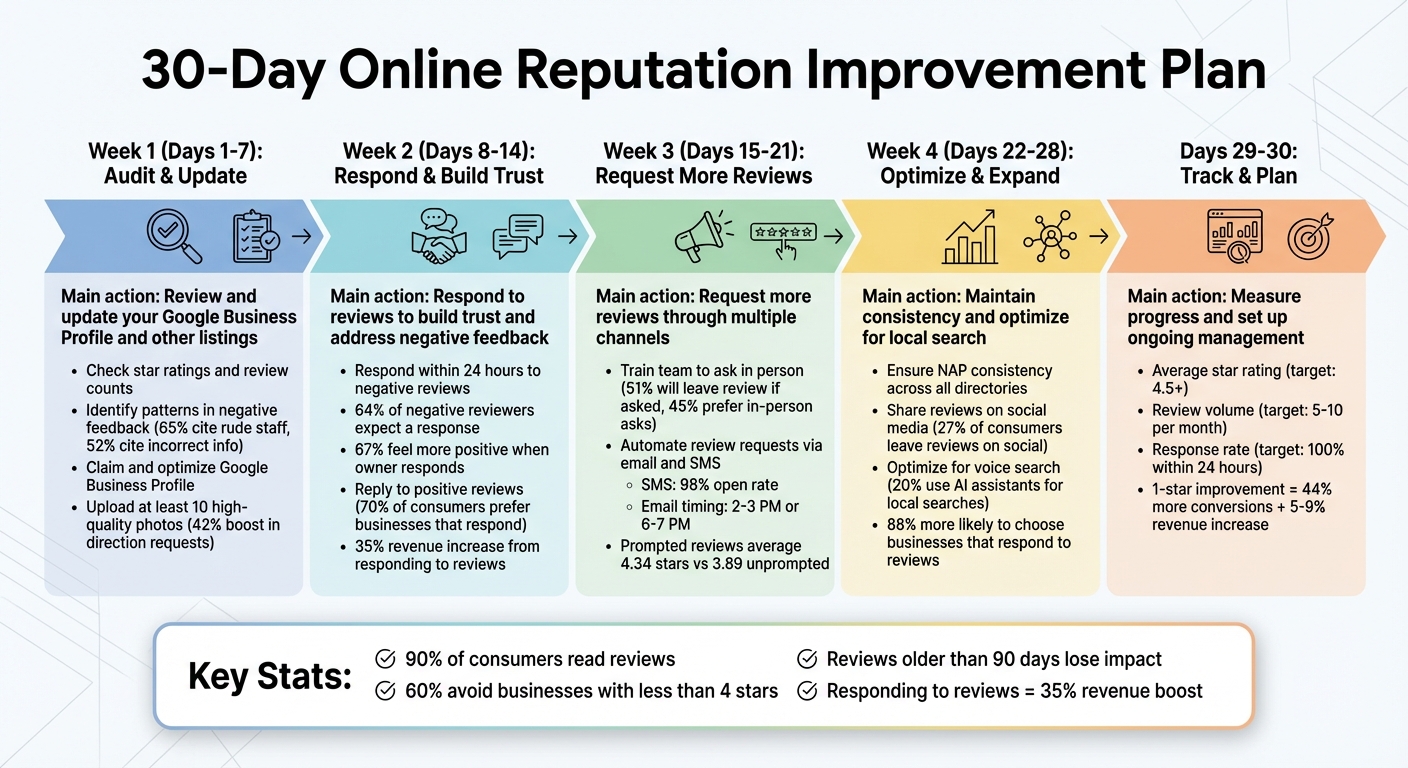
30-Day Online Reputation Improvement Plan
Days 1-7: Review and Update Your Online Profiles
Review Your Current Online Reputation
Start by assessing how your business is currently perceived online. Check your star ratings and review counts on platforms like Google, Yelp, and any industry-specific sites. Keep track of these metrics in a spreadsheet, noting details like how often you receive reviews and whether your last review is older than 90 days.
Don’t just focus on ratings – dig into the content of the reviews. Patterns in negative feedback can reveal recurring problems. For instance, rude staff is a common complaint, responsible for 65% of negative reviews, while incorrect business information, like hours or addresses, leads to 52% of complaints. Categorize these issues to tackle the root causes, not just the symptoms.
Expand your research beyond formal review sites. Search for your business name on platforms like Nextdoor, Reddit, and local Facebook groups. Set up Google Alerts to stay informed about mentions of your business. To stay organized, consider creating a monthly tracking sheet that includes metrics like review count, average rating, response rate, and response time. Compare these figures to those of your main competitors.
Once you’ve gathered this information, focus on securing and optimizing your most important profile: Google Business.
Claim and Update Your Google Business Profile
Your Google Business Profile is a must-have for local visibility. If you haven’t claimed it yet, head to business.google.com and start the process. Verification typically takes 5–7 days via postcard. Once verified, update every detail to ensure accuracy. Use your exact business name as it appears on your signage – don’t try to stuff it with extra keywords – and make sure your address and phone number match across all directories. Choose a specific primary category (e.g., “Plumbing Service” instead of “Contractor”) and add secondary categories to improve your reach in local searches.
Upload at least 10 high-quality photos showcasing your storefront, team, and completed work. Businesses with photos experience a 42% boost in requests for directions and a 35% increase in website clicks. Also, update your regular and holiday hours to avoid frustrating potential customers. Use the full 750-character description field, prioritizing the most important details in the first 250 characters for maximum visibility.
Enable the messaging feature in your dashboard to capture leads directly from search results. Use the Questions & Answers section to post common customer queries along with detailed responses – this helps shape how customers view your business. Don’t forget to add attributes like “wheelchair accessible” or “free Wi-Fi”, and list all your services with descriptions and pricing where applicable.
Once your profile is updated, simplify management with tools that automate these tasks.
Use Review Overhaul for Profile Management
Managing your online presence manually can quickly become a time drain, taking 2–3 hours per week for each location. That’s where tools like Review Overhaul come in handy. This platform consolidates your business information into one dashboard, ensuring your name, address, and phone number are consistent across directories – a critical factor, as 85% of home services business listings are found to have missing or incorrect details.
Review Overhaul also sends real-time alerts for new reviews or mentions, so you can respond within a crucial 24-hour window. It tracks key metrics like average rating, review frequency, response rate, and response time, giving you a clear picture of your progress over time. Plus, its AI-driven sentiment analysis identifies recurring themes in customer feedback, helping you catch issues or opportunities that might otherwise go unnoticed.
For businesses with multiple locations, automation becomes even more valuable. You can also add UTM tracking to your Google Business Profile link to measure how many leads your optimized profile generates.
With these tools in place, you’ll be ready to tackle proactive review responses in the next phase.
Days 8-14: Respond to Reviews to Build Trust
Address Negative Reviews with Professional Responses
Ignoring negative reviews isn’t an option – 64% of negative reviewers expect a response, and 62% of customers are willing to give your business another shot if their issue is resolved. Timing is everything: aim to respond within 24 hours to prevent the situation from escalating.
Start by carefully reviewing the complaint to pinpoint the issue. Was it poor customer service, misinformation, or a service mishap? Address the reviewer by name and reference specific details from their feedback. Offer a brief, sincere apology – overly lengthy explanations can alienate 47% of customers.
Next, provide a clear solution, whether it’s a refund, a redo of the service, or scheduling a follow-up. Include direct contact details to take the conversation offline, but never share personal customer information in public responses – this could breach privacy and make your business appear defensive. If you receive a one-star review without a comment, politely request the reviewer to reach out directly to resolve their concern.
The effort pays off: 67% of negative reviewers feel more positive about a brand when the owner responds thoughtfully, and businesses that engage with reviews see a 35% increase in revenue compared to those that don’t. After resolving the issue, consider asking the customer if they’d be willing to update their review to reflect the resolution. Interestingly, 70% of customers who revised their negative reviews did so because their issue was resolved after a second interaction.
Once you’ve addressed negative feedback, shift gears to amplify the impact of positive reviews.
Share Positive Reviews on Your Website and Social Media
Your timely responses to reviews – both positive and negative – build trust and reinforce your brand’s credibility. Positive reviews, in particular, are marketing gold. Over 70% of consumers are more likely to choose a business that actively responds to reviews. While only 40% of happy customers expect a reply, going the extra mile can deepen their loyalty.
When responding to positive reviews, keep it short but meaningful. Thank the customer by name, mention something specific they highlighted – like a service or team member – and invite them back with a friendly suggestion for their next visit. Aim for two to four sentences: show gratitude, personalize your response, and include a light call to action. Businesses that consistently reply to positive reviews often experience a 10-15% boost in customer retention.
Don’t stop there – repurpose glowing reviews. Feature them on your website, social media, and in email newsletters to enhance your credibility. If a review mentions a specific team member, share it internally to recognize their efforts and encourage excellent service. You can also weave relevant keywords into your responses to subtly improve your SEO for important search terms.
“A negative review with a proper response might have more of an impact on a consumer than a positive review with a mere ‘thanks!’” – Stephanie Heitman, Associate Director of Content, LocaliQ
Keep in mind that 97% of people who read reviews also check the business’s responses. Every reply is a chance to show potential customers how you handle feedback. Think of your response space as a free billboard to demonstrate professionalism and care – it’s a powerful way to make a lasting impression.
Days 15-21: Get More Positive Customer Reviews
Train Your Team to Ask for Reviews
Your team plays a crucial role in gathering customer reviews. In fact, 51% of customers will “always or usually” leave a review if asked, and 45% prefer being asked in person. Train your staff to make these requests during peak satisfaction moments – like right after a successful service or when a customer expresses appreciation.
Make sure your team understands how reviews help grow the business and improve local search rankings. Provide them with simple scripts they can personalize. For instance, Reviews To The Top suggests, “We’d love to hear your feedback on Google,” while Moz recommends, “It would be so helpful if you’d consider leaving a review about our business – we’re trying to get the word out to our neighbors.” Adding a personal touch, like using the customer’s name or referencing their visit, can make the request feel more genuine.
Equip your team to handle complaints effectively before customers leave. Research shows 65% of negative reviews stem from poor or rude customer service. Training your staff to resolve issues on the spot can prevent these situations from escalating into one-star reviews. You can also reinforce review requests with subtle physical reminders, such as window decals or notes on receipts, to encourage feedback without being overbearing.
Once your team is trained, automate the review request process to make it even more efficient.
Use Review Overhaul’s Review Request Tools
Review Overhaul simplifies the process of collecting customer reviews by automating requests via email, SMS, and QR codes. By integrating with your CRM, the system can automatically send review prompts right after a service is completed. This eliminates the need for manual follow-ups and ensures every satisfied customer gets a timely and professional nudge.
The tool provides customers with a direct link to your Google Business Profile or preferred review platform, removing the hassle of searching for your business online. You can also print QR codes on receipts, business cards, or display them at your location, allowing customers to scan and leave feedback in seconds. This way, no customer gets overlooked due to human error.
Pair automation with targeted follow-ups through email and SMS to maximize the number of reviews you collect.
Send Email and SMS Campaigns to Request Reviews
Timing is key when asking for reviews. Aim to send requests within 24–48 hours of service. SMS messages are particularly effective, with a 98% open rate, making them perfect for quick, post-service reminders. Email campaigns, on the other hand, are ideal for more detailed follow-ups and allow you to include visuals, like a photo from the service provided.
When crafting SMS messages, keep them short (under 160 characters) and include a direct link for leaving a review. For emails, personalize the subject line and body with the customer’s name and details about their service. Research suggests the best times to send review requests are between 2–3 PM or 6–7 PM. If you don’t get a response, send a single follow-up – 2–3 days later for SMS or within a week for email. Avoid multiple reminders to ensure you’re not perceived as spam.
Prompted reviews tend to score higher, averaging 4.34 stars compared to 3.89 stars for unprompted reviews. Additionally, 70% of online reviews come from post-transactional emails. Make the process mobile-friendly and include a one-click rating option in emails to capture feedback quickly and boost completion rates.
Days 22-28: Improve Social Proof and Local Search Rankings
Keep Local Listings Consistent Across Directories
Once you’ve optimized your profile, the next step is maintaining consistency across all online directories. Your NAP (Name, Address, Phone Number) must be identical everywhere. Even small discrepancies – like listing “ABC Plumbing” in one place and “ABC Plumbing LLC” in another – can confuse search engines and hurt your local search rankings.
Take time to audit your online listings and ensure every detail matches perfectly. This includes minor elements like abbreviations (“Street” vs. “St.”) or suite numbers. Before making updates, align with your team to confirm the correct, canonical version of your NAP.
Why does this matter? Because 52% of consumers have left negative reviews after encountering incorrect business information online. Platforms like Yelp or Bing Places are often the first touchpoints for potential customers, and inaccurate details could cost you their trust. Tools like Review Overhaul can help by automating data distribution to major directories and monitoring for inconsistencies, saving you time and protecting your reputation.
Use Social Media to Encourage and Share Reviews
Social media isn’t just about engagement – it’s also a powerful tool for building social proof. With 27% of consumers leaving reviews on platforms like Facebook and Twitter, it’s a channel you can’t afford to ignore. Start by sharing positive customer feedback. Repost genuine reviews and testimonials on your social media profiles to highlight customer satisfaction.
Make it easy for followers to leave reviews by adding direct links to your Google Business Profile or other review sites in your social media bios and posts. For physical locations, consider using QR codes on signage or promotional materials to guide customers directly to your review page. Personal outreach also goes a long way – sending a quick thank-you message on Facebook or Twitter after a positive interaction feels more authentic than a generic email blast.
Timely responses are just as critical. In fact, 88% of consumers are more likely to choose a business that actively responds to reviews – both good and bad. Engage with mentions, tags, and direct messages to show customers you value their input. To keep your social media presence balanced, try the 30/30/30 rule: dedicate 30% of your content to self-promotion, another 30% to sharing others’ content, and 30% to fun or engaging posts. The remaining 10% should be reserved for real-time interactions.
Optimize for Voice Search Queries
Voice search is becoming a key part of how customers find local businesses. With 20% of consumers using AI assistants for local searches and 42% relying on unbranded terms like “coffee near me”, it’s clear that optimizing for voice search can connect you with high-intent customers ready to act.
To adapt, write your content and FAQs in a conversational tone. Focus on answering common questions naturally, using everyday language. Phrases like “near you” in headers and body text can act as an effective alternative to “near me”, helping boost your visibility.
Incorporate schema markup for elements like opening hours, price range, and services to ensure search engines and AI tools can easily extract accurate information. Keep your business profile up-to-date, as 76% of people conducting a local search on their phone visit a nearby business within 24 hours. Voice search optimization ensures you’re front and center when customers are ready to make a decision.
sbb-itb-50c3429
Days 29-30: Track Progress and Plan for Ongoing Management
Measure Changes in Key Performance Metrics
It’s time to see how far you’ve come. Compare your current performance to your starting point. Ideally, your average star rating should be edging closer to 4.5 stars or higher – this is the sweet spot for earning customer trust.
Here’s why this matters: improving your rating by just one full star (say, from 3.0 to 4.0) can increase Google Business Profile conversions by 44%, while potentially boosting revenue by 5–9%.
Keep an eye on your review volume, aiming for 5–10 fresh reviews each month to keep your profile active and relevant. Recent reviews are especially important – feedback older than 90 days tends to lose its impact on potential customers.
Another key metric? Your response time. Maintaining a 100% response rate within 24 hours could boost revenue by as much as 35%.
To track leads and sales, add UTM tracking to your Google Business Profile link and analyze the data through Google Analytics. Also, monitor conversion actions like website clicks, direction requests, and phone calls. Ideally, these actions should grow by around 10% month-over-month.
Once you’ve established these benchmarks, consider integrating automated tools to monitor your progress consistently.
Set Up Review Alerts and Response Procedures
After evaluating your performance, it’s crucial to put systems in place to maintain your momentum. Start by setting up automated review alerts to catch every new piece of feedback. Tools like Review Overhaul can consolidate reviews from platforms such as Google, Yelp, and industry-specific sites into one easy-to-manage dashboard. Additionally, use Google Alerts to track mentions of your business name (and common misspellings) across the web.
Next, establish a clear response procedure for your team. Assign a specific team member to check and respond to reviews daily, ensuring a response within 24 hours. To make this process smoother, create a library of professional response templates. These templates should cover common scenarios, from thanking customers for glowing reviews to addressing concerns raised in negative feedback, all while maintaining your brand’s tone.
Responding promptly shows customers that you value their input. It helps build trust not only with your current customers but also with those considering your business.
Online Reputation Management Tutorial: Key Strategies, Tips, Tools, and its Benefits
Conclusion
Your 30-day plan has laid the groundwork for ongoing success. But this is just the start of a journey that requires consistent effort. As Miriam Ellis, a Local SEO expert at Moz, wisely notes:
“Review management is an ongoing local search marketing task, and even a business with a good or great rating today can never stop working at reputational maintenance via stewardship of reviews”.
Here’s a key insight: over 50% of consumers disregard reviews older than 90 days, and Google gives preference to businesses with a steady flow of fresh feedback when determining rankings in the Map Pack. If you stop prioritizing new reviews, your visibility – and ultimately your business – will take a hit.
Reputation management isn’t something you can set and forget. Commit to spending 2–3 hours each week to keep your momentum going. Break it down like this: dedicate 15 minutes daily to monitor and respond to reviews, and set aside 1–2 hours weekly to send review requests and analyze your results. This steady effort is what separates thriving businesses from those that fade into the background. And with automated tools, staying consistent becomes much easier.
Tools like Review Overhaul streamline the process by automating review alerts and centralizing management, making it simple to maintain strong local rankings and a positive reputation. Businesses that succeed over the long haul treat reputation management as an ongoing priority – not a quick fix.
Your reputation is stronger than ever. Keep dedicating a few hours each week, and you’ll see continued growth in trust, rankings, and revenue.
FAQs
What’s the best way to respond to negative reviews and protect my business’s reputation?
Responding to negative reviews offers a chance to highlight your dedication to customer care. Aim to reply quickly – within 24 hours if possible – to show you’re paying attention. Use a professional yet empathetic tone, acknowledge the specific concern raised, and steer clear of generic replies. A heartfelt apology paired with a clear plan of action, like offering to resolve the matter offline via phone or email, can often transform an unhappy customer into a loyal one.
Make your responses personal by referencing details from the review. If there was an error on your part, explain what steps you’re taking to ensure it doesn’t happen again. For complaints that seem baseless, keep your cool, stick to the facts, and politely suggest continuing the conversation privately. Thoughtful, consistent replies not only help address individual grievances but also build trust with future customers, boosting your online reputation in the process.
What are the best ways to ask customers for reviews?
The secret to getting customer reviews lies in making the process easy, timely, and personal. Timing is everything – ask for a review shortly after a positive interaction, like completing a service or delivering a product, while the experience is still fresh in their mind.
Keep it simple by including a direct link to your Google Business Profile or another review platform. Personalize your request by addressing the customer by name and referencing the specific service or product they received. This adds a genuine touch and shows you’re paying attention.
One thing to avoid? Offering incentives or directly asking for a high rating. Not only can this violate platform rules, but it can also damage your trustworthiness. Instead, focus on sincerity. Lastly, track your review requests to see how customers respond and fine-tune your approach as needed.
Why is it important to keep your business information consistent across online directories?
Maintaining a consistent NAP – that’s your Name, Address, and Phone Number – across all online directories is key to boosting your local search rankings. When this information is accurate and uniform everywhere, it tells search engines like Google that your business is dependable and credible.
On the flip side, inconsistent details can create confusion for both potential customers and search engines. This can hurt your visibility in local search results. By ensuring your NAP is consistent, you not only improve your chances of ranking higher but also make it easier for customers to locate and reach out to your business.
