
Your online reputation can make or break your business. Here’s why it matters and how to manage it effectively:
- 87% of customers read reviews before making a decision. A star rating below 4.0 can deter half of your potential clients.
- Reviews impact Google rankings and visibility, directly influencing your revenue.
- Platforms like Google Business Profile, Yelp, Facebook, and industry-specific sites (e.g., ZocDoc, Angi) shape your reputation.
Key Steps to Take:
- Track Reviews Everywhere: Use tools like Google Alerts or platforms like Review Overhaul to monitor mentions and reviews in real time.
- Respond Quickly: Address all reviews – positive or negative – within 24–48 hours. Thoughtful responses build trust.
- Analyze Feedback: Identify patterns in complaints or praise to improve your services.
- Stay Consistent Across Platforms: Ensure your business details (name, address, phone) are accurate everywhere.
Takeaway: Reviews and online mentions are public, permanent, and influence customer decisions. Managing them well ensures your business stays competitive and trusted.
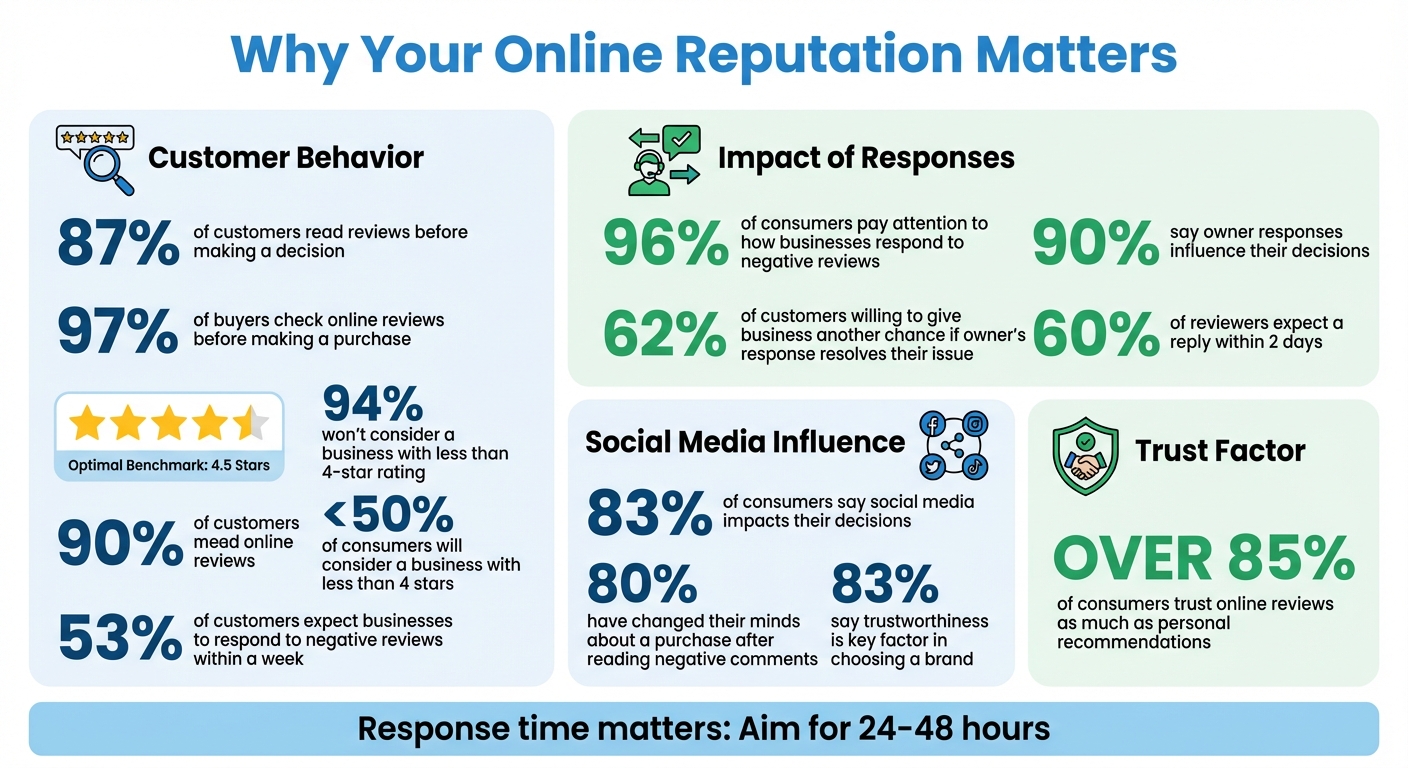
Online Reputation Management Statistics: Why Reviews Matter for Your Business
Monitor your Online Reputation in 4 easy steps
Step 1: Set Up Your Reputation Monitoring System
To stay on top of your business’s online presence, start by listing every platform where your business appears, ensuring all information is consistent. Then, set up real-time alerts to track mentions and feedback as they happen. This proactive approach will help you maintain control over your reputation.
List and Standardize Your Business Profiles
Begin by identifying every place your business is listed online. Focus on major platforms like Google Business Profile, Apple Maps, Facebook, and Yelp. These are likely where most of your customers will encounter your business first. After that, look into platforms specific to your industry – such as ZocDoc or Healthgrades for healthcare, or Houzz and Angi for home services.
You may find listings you didn’t create yourself. Many directories generate basic profiles automatically using publicly available data. Make sure to claim and verify these profiles so you can control the information and respond to customer reviews.
The key to an effective online presence is consistent NAP data – your Name, Address, and Phone number. Even minor differences, like using “Street” on one site and “St.” on another, can confuse customers and lower your search rankings.
“Incomplete and inconsistent online listings, as well as listings with bad or outdated data, can confuse and misdirect consumers and impact your traffic and revenue performance.” – Migs Bassig, Reputation Management Specialist, ReviewTrackers
To stay organized, audit your website and other profiles for consistency. Using a simple spreadsheet to track each platform, its URL, and your NAP details will make this process easier.
Configure Alerts for Real-Time Updates
Set up Google Alerts, a free tool that tracks online mentions of your business. Use quotation marks around your business name (e.g., “Your Business Name”) to ensure accurate results, and choose immediate notifications. You can also filter alerts by region to avoid irrelevant mentions. Don’t forget to set alerts for common misspellings of your business or owner name to catch mentions you might otherwise miss.
Activate notifications directly on platforms like Google Business Profile, Yelp, and Facebook. Go into the settings and enable email or push notifications for new reviews and messages. This eliminates the need for constant manual checks.
If you have high-profile employees or executives, monitor their names as well. Their online presence can influence your business’s reputation. Once your alerts are in place, streamline your monitoring process by centralizing review tracking.
Use Review Overhaul for Centralized Monitoring
Review Overhaul is a tool that consolidates reviews from platforms like Google, Yelp, Facebook, and industry-specific sites into a single dashboard. This means you can view all feedback in one place, saving you the hassle of logging into multiple accounts.
The platform also provides real-time notifications for new reviews and mentions, allowing you to respond quickly and address concerns before they escalate. For businesses with multiple locations, Review Overhaul offers multi-level reporting, making it easy to compare performance across locations and identify areas needing improvement.
Additionally, Review Overhaul automates tasks like tracking feedback and sending review requests, cutting down on manual work. Its analytics and sentiment analysis features help you identify patterns in customer feedback – whether it’s recurring complaints or consistent praise – that you might overlook otherwise.
With over 85% of consumers trusting online reviews as much as personal recommendations, having a centralized monitoring system ensures you’re always aware of what customers are saying. This approach builds on the foundation of alerts and profile standardization, giving you the tools to protect and strengthen your online reputation effectively.
Step 2: Monitor Reviews and Ratings
With your monitoring system set up, it’s time to make checking reviews a regular part of your routine. Reviews can pop up on a variety of platforms – Google Business Profile, Facebook, Yelp, and even industry-specific sites like Angi for contractors or Healthgrades for healthcare providers. If you’re manually logging into each platform, it’s free but can quickly become a time sink. Plus, there’s always the risk of missing something important. A consistent approach ensures you stay on top of customer feedback.
Check Reviews on Major Platforms
Start with the heavy hitters. Google Business Profile is where most local searches happen, so log in and head to the “Reviews” tab to see all customer feedback in one place. On Facebook, check the “Reviews and Recommendations” section of your business page. Yelp has its own dashboard – Yelp for Business – where you can manage your reviews and responses. Don’t forget niche platforms that cater to your industry. For instance, Houzz is great for contractors, ZocDoc is key for medical practices, and Nextdoor can be a goldmine for neighborhood-based services.
Make it a habit to check major platforms daily and smaller ones weekly. To save time, enable email notifications so you’re alerted whenever a new review is posted. Why is this important? Because 53% of customers expect businesses to respond to negative reviews within a week. Being prompt isn’t just courteous – it’s essential for maintaining trust.
Identify Patterns in Customer Feedback
Once you’ve gathered reviews from different platforms, take a step back and look at the bigger picture. What are your customers consistently saying? Use tools like word clouds to highlight recurring phrases such as “quick service” or “friendly staff.” Pay attention to your star ratings too – if certain locations or services are consistently rated lower, it could point to underlying issues that need fixing.
Keep in mind that online ratings carry serious weight. Studies show that fewer than 50% of consumers will consider a business with less than four stars. For most businesses, aiming for a 4.5-star average or higher is a good benchmark. Also, watch for spikes in review activity. A sudden increase could mean you’re running a successful campaign – or it could signal a brewing problem. Compare your ratings and review frequency with competitors by searching for phrases like “[Competitor Name] reviews” to see how you stack up.
Simplify Review Monitoring with Review Overhaul
If managing multiple platforms feels overwhelming, tools like Review Overhaul can make life easier. This platform consolidates all your reviews into one place, flagging urgent feedback and sending real-time alerts whenever a new review is posted. For businesses with multiple locations, it can even compare performance across branches, helping you identify which ones need extra support. Considering that 97% of buyers check online reviews before making a purchase, having a streamlined system to capture and act on customer feedback isn’t just helpful – it’s crucial for building trust and driving decisions.
sbb-itb-50c3429
Step 3: Track Social Media and Web Mentions
Reviews are just one part of the story. Social media chatter can influence your reputation just as much as online reviews. In fact, 83% of consumers admit that social media impacts their decisions, and 80% have changed their minds about a purchase after reading negative comments. That’s why it’s essential to monitor mentions of your business beyond just review sites. Social platforms, where real-time interactions happen, require your immediate attention.
Stay on Top of Social Media Conversations and Messages
Make sure notifications are enabled across all your social media accounts. For example:
- On Facebook, activate email or push notifications for comments, tags, and direct messages through your business page settings.
- Instagram allows similar settings for comments and story mentions – don’t miss out on being alerted.
- On X (formerly Twitter), enable notifications for mentions and direct messages to stay in the loop.
- For LinkedIn, keep an eye out for B2B testimonials and feedback.
It’s a good idea to check platforms like Facebook and X daily, while LinkedIn and Instagram can be reviewed weekly. Also, pay attention to branded hashtags you’ve created for campaigns or promotions. If customers are using your hashtag, they’re engaging with your brand, and it’s crucial to know what they’re saying. Responding promptly to these interactions is key.
Set Up Alerts for News and Blog Mentions
Google Alerts can be a powerful tool for keeping tabs on mentions of your business. Set up alerts using your exact business name in quotes (e.g., “Main Street Bakery”) to capture relevant mentions. You can refine the alerts by region, source, and how often you want updates. Don’t forget to include common misspellings of your business name and related industry terms. For instance, if you’re a plumber in Austin, Texas, you might create alerts for phrases like “Main Street Plumbing Austin” or “Main Street Plumbing reviews.”
To avoid irrelevant results, use the minus sign to exclude certain terms. For example, if your bakery shares a name with a popular book, you could set an alert like “Main Street Bakery” -book to filter out unrelated mentions.
Log and Analyze Mentions
Once you’ve set up alerts and notifications, it’s time to systematically track and analyze every mention. This is a great complement to monitoring reviews on dedicated platforms. Consider using a spreadsheet to organize your findings. Include columns for:
- The date of the mention
- The source (platform or URL)
- Sentiment (positive, negative, or neutral)
- Any follow-up actions you took
For example, if someone posts a complaint on X, note that you responded with a direct message to resolve the issue. If a local blogger writes a glowing review, record that you shared it on Facebook and thanked the author.
This log serves two purposes. First, it helps you identify trends over time. For instance, if you notice a spike in complaints about slow service, you can address the issue before it escalates. Second, it provides a record you can refer to if a reputation issue grows. Tracking sentiment also gives you a clearer picture of whether your reputation is improving or declining, which is critical for making informed decisions about your strategy.
Step 4: Respond to Feedback and Make Improvements
Did you know that 96% of consumers pay attention to how businesses respond to negative reviews? Even more telling, 90% say that owner responses influence their decisions. That means how you handle feedback isn’t just about damage control – it’s a chance to build trust and loyalty. Once you’ve set up a system for tracking reviews, the next step is putting that feedback to good use.
Create a Plan for Responding to Reviews
Timeliness matters. Aim to respond to all reviews – good or bad – within 24 to 48 hours. This is especially crucial for negative feedback, as 60% of reviewers expect a reply within two days. But don’t stop there; positive reviews deserve attention too. A warm, personalized thank-you shows you’re paying attention and value your customers.
Ditch the generic responses. Instead of saying, “Thanks for your review”, try something more personal: “Thanks, Sarah! We’re thrilled Mark was able to fix your AC so quickly.” For negative reviews, acknowledge the issue, apologize sincerely, and offer a way to resolve it offline, such as providing a phone number or email.
“Owner responses are public relations media. The responses you write to happy or unhappy reviewers aren’t just for a single customer to read – they’re for all future potential customers to read”.
Address Critical Feedback Quickly
Not all reviews are created equal. Start with the most urgent – 1- and 2-star reviews. Respond to these within 24 hours, offering a specific apology and a clear solution, like a refund or discount. Whenever possible, move the conversation offline to work out the details privately. Once resolved, consider posting a brief follow-up on the original review thread. This shows others that you take concerns seriously and are committed to making things right. In fact, 62% of customers are willing to give a business another chance if the owner’s response resolves their issue. Quick, thoughtful responses can turn dissatisfied customers into loyal ones.
Turn Feedback Into Action
Feedback isn’t just about fixing problems – it’s a roadmap for improvement. Use the insights from customer reviews to identify patterns and make meaningful changes. For example, if you notice repeated complaints about slow service or a particular staff member, it’s time to address training or operational adjustments.
Keep track of complaints and resolutions in a simple spreadsheet to spot trends. If lunch hour wait times are a common issue, consider adjusting staffing levels during peak hours. Even positive feedback can highlight what’s working well and what you should double down on. By regularly analyzing reviews and implementing changes – whether through new policies, staff training, or product tweaks – you can transform criticism into opportunities to grow and improve your business over time. Every piece of feedback is a chance to get better.
Conclusion
Your online reputation is more than just a side task – it’s a cornerstone of your business’s success. Consider this: 87% of consumers check reviews before making a purchase, and 94% won’t even consider a business with less than a four-star rating. The steps outlined here – setting up alerts, tracking reviews across platforms, monitoring social media mentions, and responding thoughtfully – can help you stay ahead and build trust with your audience.
Make it a habit to check your profiles regularly, respond to feedback within 24 hours, and use customer insights to make meaningful improvements. Why? Because 83% of people say trustworthiness is the key factor in choosing a brand. Every review is a chance to show your commitment to customer satisfaction.
“A proactive approach to managing this perception is no longer optional; it’s a critical component of sustainable growth.” – UserWay
This is where centralized review management becomes essential. As your business grows, manually keeping up with reviews across multiple platforms can feel impossible. Tools like Review Overhaul streamline the process by centralizing monitoring, automating review requests, and sending real-time alerts. This allows you to focus on what matters most – running your business – while ensuring you maintain the trust and visibility that attract new customers.
FAQs
How can I keep my business information consistent across all online platforms?
Consistency plays a crucial role in building trust – not just with your customers, but with search engines too. A smart way to start is by creating a master file containing your business’s key details: name, address, phone number (NAP), hours of operation, and website URL. This file serves as your central reference point when updating platforms like Google Business Profile, Yelp, or Facebook. If any of these details change, update the master file first, then make adjustments across your listings to keep everything aligned.
It’s also important to regularly audit your profiles to spot outdated or incorrect information. While automated tools can alert you to discrepancies, it’s always a good idea to double-check manually for accuracy. To stay on top of things, consider scheduling a quarterly review of your listings against your master file. Keeping your information up to date not only strengthens your local SEO but also reinforces trust with your customers.
What’s the best way to handle negative reviews online?
The smartest way to handle a negative review is to respond quickly, calmly, and with professionalism. Start by recognizing the reviewer’s experience and offering a sincere apology to show you value their input. Address their specific concerns without sounding defensive, and outline a clear next step – like inviting them to reach out directly so you can work toward a resolution offline.
When crafting your reply, keep your tone friendly and professional. Make it personal by using the reviewer’s name if possible, and steer clear of generic or overly scripted responses. If the issue stems from a mistake on your end, briefly explain what happened and share the steps you’re taking to ensure it doesn’t happen again. Wrap up your response by thanking them for highlighting the issue and encouraging them to give your business another shot. This thoughtful approach can help restore trust and show your dedication to delivering great service.
What’s the difference between monitoring social media and review sites?
Social media monitoring involves keeping tabs on real-time mentions, comments, hashtags, and the overall sentiment surrounding your brand on platforms like Twitter, Facebook, Instagram, and LinkedIn. This helps you stay in the loop with trends, casual chatter, or potential issues so you can respond promptly.
In contrast, review site monitoring focuses on structured feedback from platforms like Google Business Profile, Yelp, or the Better Business Bureau. Reviews on these sites often include star ratings and are tied to specific customer experiences. They can also play a crucial role in influencing your local search rankings.
To sum it up, social media monitoring captures the fast-paced, informal buzz across multiple platforms, while review site monitoring dives into detailed, purchase-related feedback from a handful of dedicated review sites. Both offer valuable insights but serve different purposes.
