
Voice search is changing how people find local businesses. If your business isn’t optimized for voice search, you’re missing out on potential customers. Here’s what you need to know:
- Voice search is growing: Over 50% of smartphone users rely on voice technology daily, and 46% of searches have local intent.
- Google Business Profiles are key: Voice assistants pull data like hours, location, and reviews directly from your profile.
- Reviews and accuracy matter: Positive, recent reviews and up-to-date information improve your chances of being the top result.
Top Tools for Voice Search Optimization:
- Review Overhaul: Focuses on reviews and profile updates. Starts at $299/month.
- Whitespark: Affordable local citation and review management. $1/month per location.
- BrightLocal: Advanced auditing and data consistency. Plans start at $39/month.
Key features to look for:
- Tools that optimize for conversational queries.
- Automated review and Q&A management.
- Consistent and accurate business listings.
Voice search is already here. Choosing the right tool to refine your Google Business Profile can help your business stand out in this growing space.
The Ultimate Guide to Voice Search & Local SEO Optimization
sbb-itb-50c3429
Best Voice Search Tools for Google Business Profiles
Using the right tools can sharpen your Google Business Profile for voice search. Below are three platforms designed to boost your profile’s performance in voice-driven queries.
Review Overhaul
Review Overhaul zeroes in on industries like healthcare, hospitality, legal, and auto repair – fields where voice search plays a significant role.
This platform enhances voice search visibility by generating fresh reviews, ensuring accurate listings, and crafting profiles in a natural, conversational tone. Pricing starts at $299/month for basic services like review generation and monitoring, while the $499/month plan includes full-service optimization, such as crisis response.
Whitespark
Whitespark specializes in local citation building and profile monitoring. Its Local Rank Tracker shows where your business ranks in local searches, while the Reputation Builder automates review requests to keep your ratings high – something voice assistants prioritize. Additionally, Whitespark’s profile protection feature tracks all changes to your Google Business Profile, letting you reject unwanted third-party edits with a single click. At just $1/month per location, it’s an excellent choice for businesses with multiple locations.
But Whitespark doesn’t stop at citation and review management. It also emphasizes the importance of deep auditing for better results.
BrightLocal
BrightLocal offers a powerful auditing toolset. It examines over 300 data points to uncover NAP (Name, Address, Phone) inconsistencies and duplicate listings that can hurt your voice search visibility. The GBP Audit provides 18 months of data – three times more than Google’s standard insights. Combined with Active Sync, it ensures your information stays consistent across major platforms like Google Business Profile, Apple Maps, and Bing, which are key sources for voice assistants like Siri and Alexa.
"The GBP Audit tool provides a complete look at the health of all my clients’ local profiles. We’ve found this to be extremely helpful in explaining the importance to the owners, fixing any issues, and providing real data on the performance of their profile." – JD Hilditch, CEO/Founding Partner, Voyage Media Works
BrightLocal’s plans start at $39/month, and the platform boasts a 4.8/5 star rating from over 1,200 customer reviews.
Key Features to Look for in Voice Search Tools
When it comes to optimizing for voice search, tools that enhance your Google Business Profile are essential. Here are the key features to prioritize.
Voice Query Optimization
Voice search isn’t just about keywords – it’s about capturing how people naturally speak. For example, someone might ask, "Where can I find an emergency plumber near me?" rather than typing a shorter query. Effective tools should help you identify these conversational, long-tail phrases and seamlessly incorporate them into your Google Business Profile descriptions and posts.
The best tools go a step further by using AI-powered Q&A management. They can generate common questions and provide structured answers tailored for voice assistants. Additionally, they automate the implementation of LocalBusiness and FAQPage schema in JSON-LD format, making your data easy for search engines to process. Why does this matter? Schema markup can boost your chances of appearing in voice search results by 40%.
Finally, real-time customer feedback management is another must-have feature, as it directly impacts your visibility in voice search rankings.
Review and Reputation Management
Voice assistants often recommend businesses with strong, recent reviews. Tools that track review velocity (how quickly reviews are being left) and sentiment are crucial. Aim for at least 30% of your reviews to be from the past 90 days, with a response rate of 90% or higher. Consistent, positive feedback is key to building trust and credibility in the voice search world.
"Search algorithms increasingly weigh how authentic and recent your feedback appears, making review velocity and consistency essential for visibility." – Jeff Schwerdt, Reviewly.ai
The right tools can automate review requests, generate polished responses, and monitor sentiment trends across platforms. Since voice assistants often highlight "top-rated" businesses, keeping your reviews fresh and positive directly influences whether your business gets recommended in spoken results.
Local Listing Consistency
Accurate and consistent NAP (Name, Address, Phone) information is non-negotiable. Did you know that 58% of consumers use voice search to find local businesses? Any inconsistencies in your listings can confuse both algorithms and potential customers. Tools that offer automated synchronization across directories are invaluable for maintaining accuracy.
Also, pay attention to operating hours. Voice assistants frequently filter results by "open now", so keeping your hours up-to-date across platforms is critical. Look for tools that not only standardize your information but also protect it from unauthorized changes. Advanced platforms even track engagement metrics like photo views, direction requests, and Q&A interactions, which are becoming increasingly important in voice search rankings.
Voice Search Tool Comparison
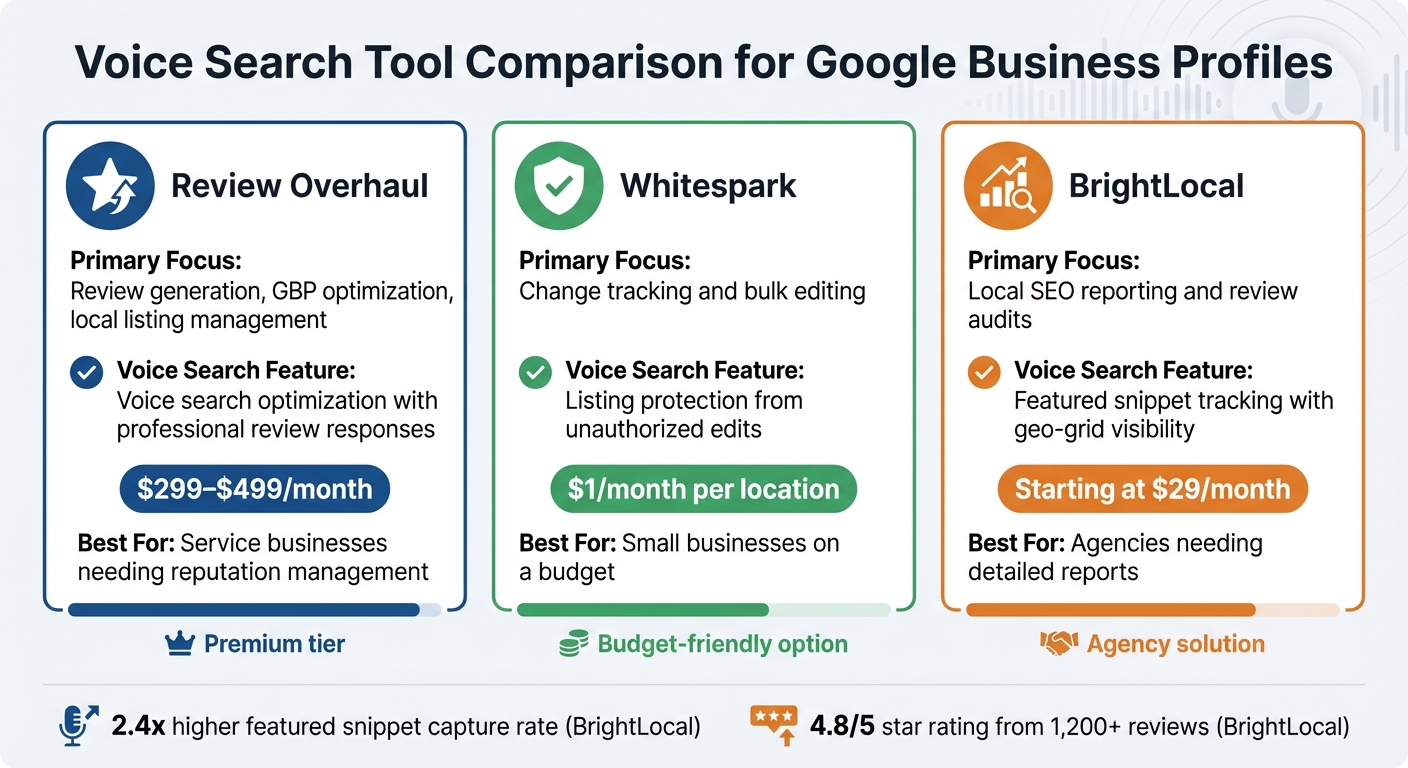
Voice Search Tool Comparison for Google Business Profiles
The table below breaks down how key tools support Google Business Profile (GBP) optimization while addressing voice search requirements.
| Tool | Primary GBP Optimization | Voice Search Feature | Pricing | Best For |
|---|---|---|---|---|
| Review Overhaul | Review generation, GBP optimization, local listing management | Voice search optimization with professional review responses | $299–$499/month | Service businesses needing reputation management |
| Whitespark | Change tracking and bulk editing | Listing protection from unauthorized edits | $1/month per location | Small businesses on a budget |
| BrightLocal | Local SEO reporting and review audits | Featured snippet tracking with geo-grid visibility | Starting at $29/month | Agencies needing detailed reports |
Review Overhaul stands out for integrating GBP optimization with voice search features. It emphasizes professional review responses and consistent listings, boosting visibility with voice assistants. This makes it a strong choice for service-based businesses focused on managing their reputation.
Whitespark, with its change tracking and bulk editing tools, is ideal for small businesses. Its ability to protect listings from unauthorized edits ensures your GBP stays accurate and secure, all at an affordable price.
For agencies, BrightLocal provides advanced tools like geo-grid visibility for tracking featured snippets. This technology offers detailed local SEO performance insights and boasts a 2.4x higher featured snippet capture rate, making it invaluable for granular neighborhood-level reporting.
These options can help you find the right tool to match your business needs.
How to Choose the Right Tool for Your Business
Voice search optimization has become a must – over 50% of adults use voice search daily, and 58% have recently used it to find local businesses. With your Google Business Profile serving as the main data source for voice assistants, picking the right tool is a crucial step.
Start by evaluating your current performance. Free tools like Google’s Rich Results Test or PageSpeed Insights can help identify whether your challenges are technical – such as slow loading speeds or missing schema markup – or content-related, like a lack of conversational FAQs. This initial audit will clarify whether you need a tool that tackles technical issues, content gaps, or both.
The next step is to match the tool to your business size and goals. For solo service providers, tools that focus on generating phone calls and establishing trust quickly are key. Larger, multi-location businesses often require enterprise-level tools with features like bulk editing and centralized management. Agencies managing multiple clients should look for tools that offer white-labeling and multi-client dashboards. The goal is to align the tool with your specific operational needs.
"Tools support your strategy; they don’t replace a solid voice optimization plan. The best voice optimization comes from understanding user intent and creating helpful content." – Yue Zhu, Product Manager, Seenos.ai
By combining a detailed audit with a tool tailored to your business scale, you can create a strong foundation for improved voice search visibility. Automated review management for healthcare, for example, can be a game-changer.
Pay attention to review velocity and automation, as voice assistants tend to favor highly rated businesses. Research shows that businesses using dedicated voice optimization tools see a 2.4x improvement in featured snippet capture rates. For service-driven businesses, platforms that integrate Google Business Profile optimization with voice search features – like automated review responses and consistent local listings – offer the best chance to stand out to voice assistants.
FAQs
How can I check if my Google Business Profile appears in voice search?
Want to know if your Google Business Profile shows up in voice search? Start by tracking its visibility in local search results. Voice assistants pull information from your profile, including details like reviews and your overall online presence.
To make this easier, consider using tools that offer listing management and tracking features. These can help you keep an eye on how your profile performs in voice search rankings and identify areas for improvement.
Which Google Business Profile fields are most important for voice assistants?
When it comes to voice assistants, certain Google Business Profile (GBP) fields are absolutely key. Your business name, address, and phone number (NAP) are at the top of the list, as they’re crucial for location-based voice searches. Beyond that, details like operating hours, business categories, and descriptions play a big role in helping voice assistants understand what your business offers and when it’s available.
Don’t overlook the impact of customer reviews and ratings either. Voice search often prioritizes businesses with strong ratings and positive feedback – making your reputation a deciding factor in whether or not you’re featured.
How many recent reviews do I need to improve voice search visibility?
Reviews are a big deal when it comes to local SEO, especially for voice search. While there isn’t a magic number of recent reviews you need, having frequent and up-to-date reviews can help you climb the local pack rankings. Keeping a consistent stream of reviews is crucial for improving how your Google Business Profile shows up in voice search results.
