
Are you a business owner watching potential customers scroll right past you on Google? It's a frustrating feeling knowing your business is invisible to people searching nearby, all because your online profile lacks the trust and authority that comes from being verified. This isn't just a technical glitch; it's a roadblock costing you customers and revenue every single day.
You're losing business to competitors who appear more credible and established online. But what if you could change that? What if you could finally unlock your profile's full potential, build instant trust with searchers, and turn your Google listing into a powerful customer-attraction tool?
Review Overhaul provides a clear, simple path to get your Google Business Profile verified and optimized. We guide you through the exact steps needed to establish your legitimacy with Google, making you the obvious choice for local customers. Imagine your business finally showing up prominently in Google Maps, with a profile that builds confidence and drives a steady stream of calls and visits.
Our clients see a dramatic shift. They go from being overlooked to being the top choice in their area. With a fully verified and optimized profile, you'll not only gain peace of mind but also see a tangible increase in customer engagement and sales.
"Review Overhaul streamlined our entire Google verification and review process. We saw an immediate uptick in calls and our online reputation has never been stronger." – Satisfied Small Business Owner
The choice is clear. You can continue struggling with a hidden, untrusted profile, losing customers to the competition. Or you can take control, build a powerful online presence, and start growing your business.
Ready to get seen and chosen by more customers? Schedule your free reputation audit today and let's put your business on the map.
Why Your Business Needs GBP Verification Now
Ever feel like you’re shouting into the void when it comes to local Google searches? It’s a common frustration. Many business owners watch potential customers walk right past their digital doorstep and over to a competitor, often for one simple reason: their own listing lacks the credibility that verification provides.
This is where Google Business Profile (GBP) verification becomes a game-changer. It’s far more than a bureaucratic hoop to jump through; it's the bedrock of your local reputation. Without that small but mighty verification check, you’re essentially a ghost to the countless potential customers searching nearby.
Unlock Trust and Visibility
A verified profile does more than just add a badge to your listing—it's a powerful signal of trust to both Google and your customers. The numbers don't lie: customers are a staggering 2.7 times more likely to view a business with a complete, verified profile as reputable. That trust quickly translates into real-world engagement and, ultimately, more sales.
The impact on visibility is just as dramatic. Verified businesses see a massive jump in views and engagement.
- On average, verified listings rack up 21,643 views annually in Google searches.
- More importantly, customers are 50% more likely to make a purchase from a verified business.
Verification isn't just a one-off task; it's a foundational element of any effective local SEO strategy.
Gain A Competitive Edge
To put it plainly, verification is your ticket to the game. It’s what enables you to show up in the highly-coveted "Map Pack" and makes it significantly easier for local customers to find you. If you want to understand how to rank higher in Google Maps, know that it all starts with a verified profile.
Here is a quick overview of the advantages a business owner can expect after successfully verifying their Google Business Profile.
| Benefit | Impact on Your Business |
|---|---|
| Increased Trust | Customers are 2.7 times more likely to consider your business reputable. |
| Enhanced Visibility | Unlocks eligibility for the "Map Pack" and improves local search ranking. |
| Full Profile Control | Allows you to respond to reviews, add photos, and manage all your business info. |
| Competitive Advantage | Puts you on a level playing field with (or ahead of) local competitors. |
| Higher Engagement | Verified listings see more clicks, calls, and direction requests. |
By completing the google business profile verification, you're not just checking a box. You are actively taking control of your online narrative and building a dominant presence in your community.
Choosing Your Verification Method
So, you're ready to get your Google Business Profile verified. Great. The first thing to understand is that Google doesn't have a one-size-fits-all approach. They offer a few different ways to prove you're a legitimate business, and the options you see will depend entirely on your specific situation.
This is the critical first step to taking full control of how your business appears on Google Search and Maps. Review Overhaul can guide you to pick the fastest route and avoid getting stuck in verification limbo.
This quick overview shows the general flow of the verification process.
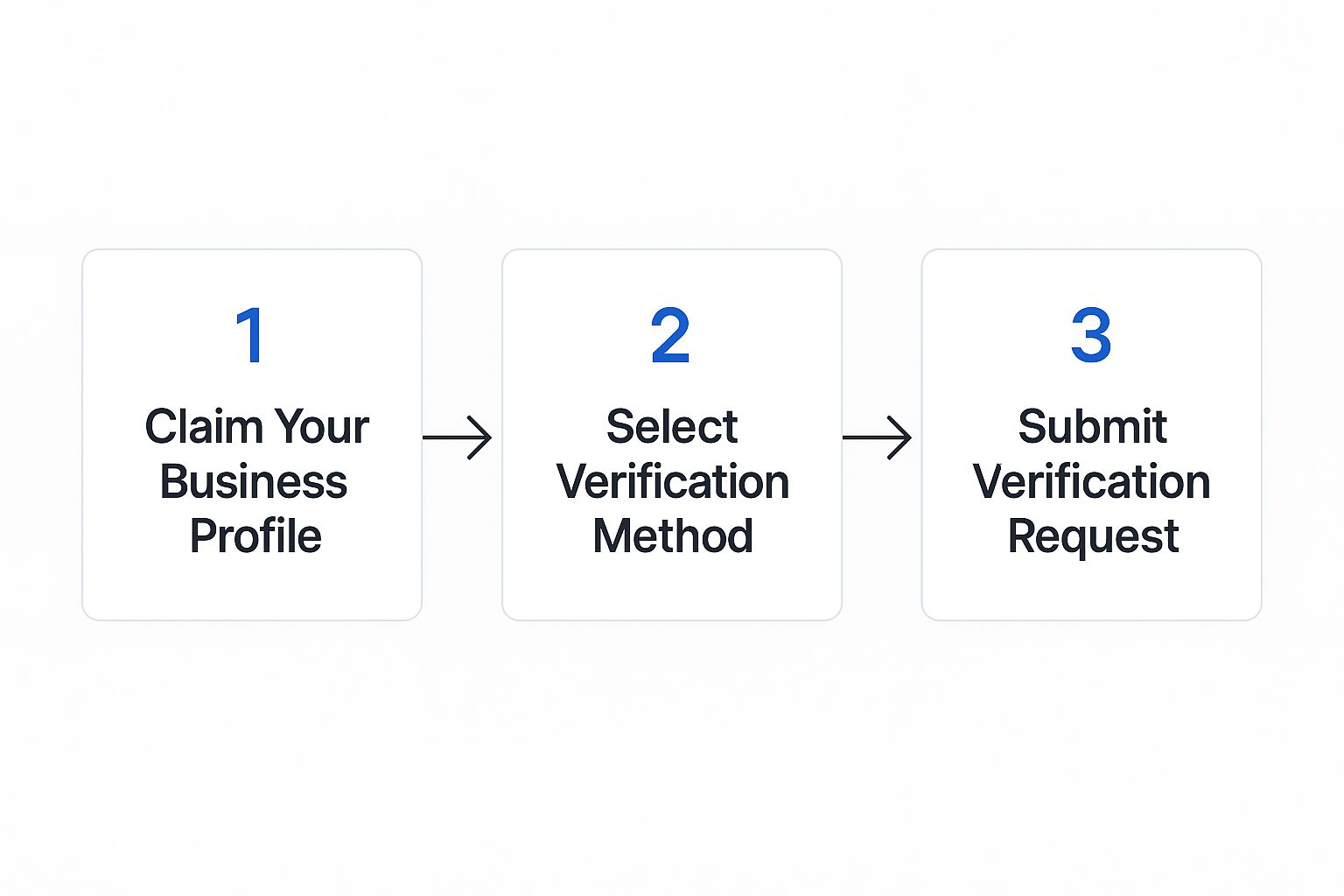
As you can see, once you've claimed the profile, the real decision point is choosing the right verification method before you hit "submit."
Understanding Your Verification Options
When you get to the verification stage, Google will present you with one or more options. These are determined by factors like your business category, how long you've been in business, and your existing online presence. It's important to know that the options for your google business profile verification aren't the same for everyone.
Some methods are nearly instant, while others, frankly, require a bit of patience. Here are the most common methods you'll likely run into:
- Postcard Verification: This is the old-school, classic method. Google mails a physical postcard with a unique verification code to your business address.
- Phone Call or Text: A much faster option. Google might offer to verify you with an automated call or a text to your official business phone number.
- Email Verification: Similar to the phone option, this is reserved for certain businesses. A code is sent to an official business email (like name@yourcompanydomain.com).
- Video Verification: This one is becoming more common. You'll need to record a short video that shows clear proof of your business—think signage, your physical location, and equipment.
Which Method Is Right for You?
The best choice really comes down to your circumstances. For a brick-and-mortar business like a retail shop or a cafe, postcard or video verification are the most probable routes. Why? Because they physically tie your business to a specific address.
On the other hand, if you run a service-area business—say, you're a plumber operating out of a home office—you might be offered different options that don't depend on a public-facing storefront.
Our best advice? Be prepared for any method Google throws at you. Have key documents like business licenses or utility bills with your business name and address on them scanned and ready. This can save you a massive headache, especially if your first attempt fails.
Navigating these options is a fundamental part of the setup. If you're just starting and want a full walkthrough of creating your profile, be sure to check out our step-by-step guide to Google Business setup. A little preparation goes a long way toward a smooth verification.
How to Prepare for Video Verification
Google is cracking down on fake listings, which means video verification is no longer a rare request—it's becoming a standard, mandatory step for many businesses. The thought of recording a video for Google can feel a bit daunting, especially when it pops up unexpectedly. But with a little bit of prep work, you can sail through the process without a hitch.
The entire point of the video is to give Google undeniable proof that your business is legitimate. They need to see that you operate where you say you do, and that you're actually the person who should be managing the profile. Getting this right on the first try is the key to a fast approval.
Our Simple 3-Step Plan for Video Success
Before you even touch your phone's camera, let's get everything in order. Review Overhaul simplifies this into a clear plan.
-
Gather Your Proof:
- Permanent Business Signage: Your main sign outside with the business name and address, plus any logos or signs inside your location.
- Your Physical Location: A tour of your workspace, whether it's a retail floor, an office, a workshop, or a branded service vehicle.
- Proof of Business Operations: Branded equipment, tools of the trade, inventory on shelves, or marketing brochures.
- Proof of Management: Show you can unlock the front door with a key or access a "Staff Only" area.
-
Set the Stage:
- Ensure Good Lighting: Make sure your space is well-lit. A dark, grainy video is one of the quickest ways to get rejected.
- Tidy Up: Treat it like a client is about to walk in. A clean space looks more professional and makes details easier to see.
-
Record Your Video:
- Start Outside: Capture the street sign and your building's address number. Then, walk toward your entrance, getting a clear shot of your main business sign.
- Film a Continuous Take: The video must be one continuous recording. Don't stop and start, and don't edit it. A shaky camera can make things hard to see, so keep your movements slow and steady.
- Show Everything: Once inside, do a slow, 360-degree pan of your workspace to give the reviewer a complete picture. Hold up an official document like a business license or utility bill with your name and address for extra proof.
Expert Tip: To sidestep common errors, it's worth checking out these common mistakes in GMB profile setup. Following a clear plan shows you're a professional and makes the verifier's job easier, leading to a successful outcome.
Common Reasons for Verification Delays or Denials
Getting your Google Business Profile verification stuck in limbo can be incredibly frustrating. A stalled or denied profile is a major roadblock that keeps your business hidden from potential customers. The stakes are high: every day your profile isn't live is another day a competitor is connecting with customers who should have been yours.
If you know the common pitfalls, though, you can usually sidestep them altogether. From our experience, the most frequent problems come from simple, yet critical, mistakes in your business data.
Diagnosing Common Verification Problems
More often than not, the issue boils down to your NAP (Name, Address, Phone Number) information. If the details you've given Google don't perfectly mirror what's on your website or other directories, you’re raising a red flag. Google's system is built on consistency, and conflicting data makes it question your legitimacy.
Another major hurdle we see all the time is a physical address that doesn't play by Google's rules. This is a big one. Common missteps include:
- Using a P.O. Box or a shared virtual office address. Google wants to see a real, dedicated physical location or a clearly defined service area.
- Placing your map pin incorrectly. If the pin on Google Maps doesn't land precisely where your business is, the system might reject it.
- Lacking permanent signage at your address. This is especially crucial for video verification. Google needs to see your business name clearly displayed.
It's important to understand that Google has gotten much stricter. They will automatically suspend profiles for things like duplicate listings or outdated information. To dive deeper, you can discover more insights about the state of Google Business Profiles on birdeye.com.
Avoiding Suspensions and Denials
The best way to prevent these problems is to run a full audit of your online presence before you even start the verification process. Make absolutely sure your NAP is identical across every single platform. This consistency is not just about passing verification; it's a foundational element of understanding why local SEO is important for long-term growth.
If you do get denied, don't panic. Read Google’s feedback carefully, fix the specific issues they point out, and then resubmit your request. Taking a proactive and meticulous approach from the start is the most reliable way to get your business listed and start attracting new customers.
How to Maintain Your Verified Status

Getting that Google Business Profile verification is a huge win, but it's the starting block for your local marketing, not the finish line. Keeping that trust—and turning your profile into a customer-generating machine—requires ongoing effort. A verified profile that goes stale is a missed opportunity.
Think of your profile as a living, breathing part of your business. The most fundamental part of this is keeping your information razor-sharp accurate. If your hours change, your phone number gets updated, or you move—your profile should be the first place you reflect that.
Turn Your Profile Into an Engagement Hub
Beyond just the facts and figures, an effective profile is an interactive one. This is where you can really pull ahead of the competition. Two areas need your consistent attention: customer reviews and Google Posts. You must respond to reviews—the good, the bad, and the neutral—to show you care.
Google Posts are your direct line to your audience, letting you share what's new and interesting.
- Announce Updates: Got a new product? A big sale coming up? Let people know.
- Promote Special Offers: Use posts to share limited-time deals that drive customers to act now.
- Show, Don't Just Tell: Post high-quality photos of your work, your team, or your location.
Don't underestimate the competition. Recent data shows that around 64% of businesses have a verified Google Business Profile. If your profile is static, you're effectively invisible to potential customers who are finding your more active competitors.
This isn't just about keeping your verification badge. It's about using the powerful tools Google gives you to their full potential. To learn more about transforming your profile into a serious asset, read our guide to maximize your visibility with Google My Business.
Your GBP Verification Questions Answered
Going through the Google Business Profile verification process often brings up a few common questions. Let's tackle some of the most frequent hurdles business owners run into so you can get your profile live and working for you.
How Long Does Verification Usually Take?
The time it takes to get verified really comes down to the method Google offers you. The options can vary quite a bit.
- Postcard: This is the classic method. You should see the postcard arrive in the mail within 14 days.
- Phone or Email: These are the gold standard for speed. Verification is often instant, taking just a few minutes.
- Video Verification: After you submit a recording, you can expect a decision from Google's team within a few business days.
What If My Verification Postcard Never Shows Up?
It’s a common frustration: you’ve waited patiently, but the postcard is nowhere in sight. If it's been over two weeks, don't worry just yet.
First, log back into your GBP dashboard and meticulously check the business address you entered. Is it perfect? A crucial point to remember is that P.O. boxes are not allowed and will prevent the postcard from ever being sent. If the address is correct, you can request a new code.
What Should I Do If My Verification Fails?
Seeing that "verification failed" message can be disheartening, but it’s usually a fixable problem. The first thing you should do is carefully review any feedback Google sent.
Most failed attempts come down to simple mistakes. Go over your profile with a fine-toothed comb. Is your business name, address, and phone number (NAP) perfectly consistent everywhere? Even a tiny typo can cause a denial.
Once you’ve found and fixed any issues, you can appeal the decision right from your GBP dashboard. Making sure all your information is perfectly aligned is the surest way to succeed on your next try.
Feeling overwhelmed by the verification process or struggling with a stubborn listing? Let the experts at Review Overhaul handle it for you. We manage every detail of your GBP optimization so you can focus on running your business. Schedule your free reputation audit today.
