
Are you frustrated watching competitors with worse service get all the new customers? It's a painful feeling, knowing that potential clients are searching for you right now, but your business is practically invisible online. A bad review or a poorly optimized profile can quietly cost you thousands in lost revenue.
You're an expert at what you do, but your online reputation isn't reflecting that quality. The problem isn't your business; it's that your Google Business Profile is failing to connect you with the customers who need you most. This leaves you feeling overlooked and stuck, watching others get the calls that should have been yours.
At Review Overhaul, we provide a clear, step-by-step plan to fix this. We act as your guide, helping you take control of your online presence without the guesswork. Our simple 3-step process transforms your profile from a liability into your most powerful customer-acquisition tool.
With an optimized profile, you'll see what success looks like:
- Top-tier visibility in local search results.
- A stellar reputation built on authentic, positive reviews.
- A steady stream of calls and website clicks from ready-to-buy customers.
"Working with them was a game-changer. Our phones started ringing more, and we finally started appearing at the top of Google searches for our area." – Satisfied Business Owner
This is your chance to stop losing customers and start building the thriving business you deserve. Continue down this path, and you risk becoming irrelevant online. Or, you can take action today, claim your local authority, and achieve the growth and peace of mind you've been working for.
2. Build a Foundational Profile for Local Dominance
Think of your Google Business Profile as the bedrock of your local SEO strategy. Getting the fundamentals right from the start isn't just about filling out fields; it's about strategically feeding Google the exact data it needs to understand, trust, and ultimately promote your business.
Let's start with the absolute basics.
Your business name needs to be your actual business name. It must precisely match what's on your storefront, your official documents, and your branding. It’s tempting to add a city name or a primary keyword—"Joe's Pizza – Best Pies in Brooklyn"—but this is a classic mistake. Google's guidelines are strict, and "keyword stuffing" your name is a fast track to a penalty or even a suspension.
This initial setup and verification process is the gateway to everything else. It’s Google’s way of confirming you are who you say you are.
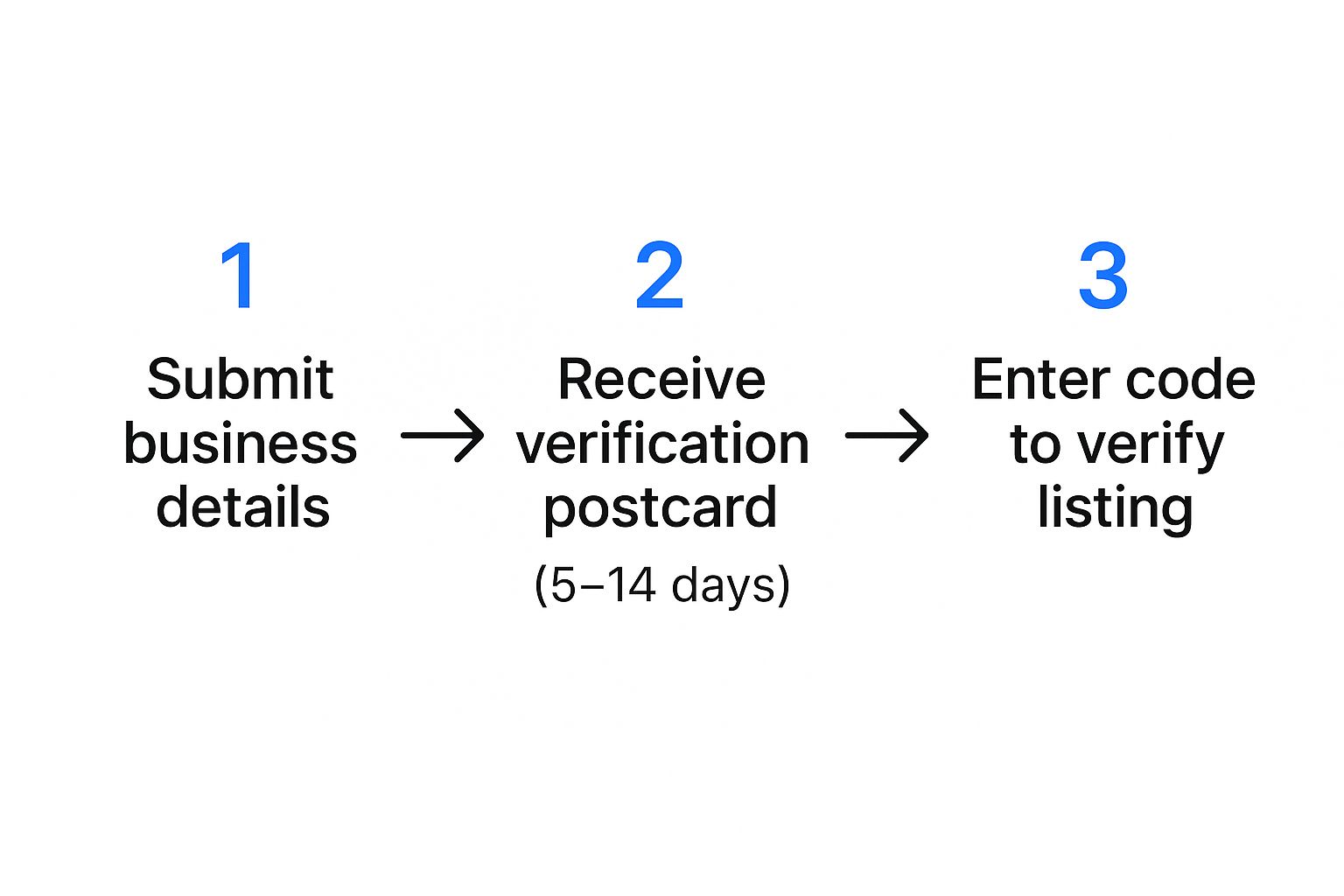
Once you're verified, you've essentially told Google your business is legitimate and ready for the public. This unlocks the full suite of features we'll be diving into.
Tell Google Exactly What You Do
Next up are your business categories. Your primary category is the single most important classification on your entire profile. It defines the core of your business for Google. If you’re a pizzeria, your primary category should be "Pizza restaurant," not the generic "Restaurant." Specificity wins every time.
Then, you can add relevant secondary categories to capture everything else you offer. A cafe might have "Coffee shop" as its primary but add "Bakery" and "Sandwich shop" as secondary categories if those are significant parts of its business. Don't go overboard; only choose categories for services you genuinely provide.
From my experience, I've seen businesses jump in local rankings just by tightening up their categories. An accurately chosen primary category, supported by specific secondary ones, directly translates to higher visibility and more qualified leads. It's a non-negotiable for serious local businesses.
Craft Your Narrative and Define Your Turf
Your business description is your 750-character elevator pitch. This is your chance to tell your story and connect with customers on a human level. What makes you different? What problem do you solve better than anyone else? Use this space to highlight your unique value proposition, weaving in relevant terms naturally.
Finally, you need to clearly define your service area. This is essential for both brick-and-mortar shops and service-area businesses (SABs). If you’re a plumber who travels to clients, list the specific cities or postal codes you cover. This helps Google understand your immediate local reach.
To wrap up this foundational stage, let's look at the must-haves in a simple checklist format.
Core Profile Optimization Checklist
This table covers the absolute essentials. If you only have 30 minutes to work on your profile, these are the items that will deliver the most impact.
| Element | Optimization Action | Why It Matters |
|---|---|---|
| Business Name | Ensure it matches your legal, real-world name exactly. | Builds trust and prevents penalties for keyword stuffing. |
| Primary Category | Select the single most specific and accurate category. | The #1 factor in telling Google what your core business is. |
| Secondary Categories | Add relevant categories for other significant services. | Captures "discovery" searches and shows the full scope of your business. |
| Business Description | Write a compelling, 750-character summary of your value. | Connects with customers and differentiates you from competitors. |
| Service Area | Define specific zip codes, cities, or a radius. | Tells Google exactly which customers to show your profile to. |
| Contact Info | Add your phone number, address (if applicable), and website. | Provides essential, trust-building information for both users and Google. |
Completing every single field, right down to the less obvious ones like your supported payment methods, paints a complete picture for Google. The more information you provide, the more Google trusts your listing, and the more likely you are to be rewarded with visibility in the coveted local 3-pack.
Go Beyond the Basics with Advanced Profile Features
Once you've nailed down the fundamentals, it's time to dig into the features that truly make a Google Business Profile work for you. Think of your profile not as a static directory listing, but as an active, breathing extension of your business. This is where the real magic happens, turning casual searchers into paying customers.
Actively managing your profile sends a steady stream of positive signals to Google. It’s like telling the search engine, "Hey, we're here, we're open, and we're ready for business." This ongoing activity is a cornerstone of effective Google My Business listing optimization.
Build a Virtual Storefront with Products and Services
Many business owners skip the Products and Services section, which is a massive missed opportunity. You can build a detailed catalog of your offerings right on your profile, saving customers a click and giving them instant answers. This level of detail helps you rank for more specific, long-tail searches and gives people the confidence to book an appointment.
Drive Engagement and Urgency with Google Posts
Google Posts are essentially free ad space on your profile. They’re perfect for sharing timely updates, running promotions, or highlighting events. Since most posts expire after seven days, they create a natural sense of urgency and encourage you to keep your content fresh. Consistent posting is one of the clearest signals you can send to Google that you’re on top of your game.
Here are a few ways businesses use Posts effectively:
- Flash Sales: "This week only: 20% off all services!" is a great way to drive immediate traffic.
- Event Promotion: Got a webinar or an in-store event coming up? Post about it to get the word out.
- New Offerings: Announce a new menu item or a recently added service to create buzz.
- Company Culture: Share a photo of your team or a recent award to show off your brand's personality.
Expert Tip: Businesses that commit to posting weekly almost always see a measurable increase in profile actions, like phone calls and website visits. It's a small time investment with a significant payoff.
Tell Your Story with High-Quality Visuals
In local search, pictures do more than just talk—they sell. Google's own data shows that businesses with photos get 42% more requests for driving directions and 35% more clicks to their websites. But it's not just about quantity; quality is what truly matters.
Your goal is to give potential customers a genuine feel for your business before they ever step inside. Make sure you upload high-resolution images, including:
- A crisp, professional logo and an engaging cover photo.
- Clear photos of your storefront and the inside of your location.
- Action shots of your team helping customers.
- High-quality pictures of your products or services.
Don't forget about video. A quick 30-second tour or a client testimonial can be incredibly powerful for building trust. All these engagement signals are critical, as they tie directly into the most important local search ranking factors that Google’s algorithm rewards.
Turn Reviews into Your Strongest Marketing Asset
Customer reviews are today’s word-of-mouth, plain and simple. They’re the most powerful form of social proof you have. It’s that sinking feeling when a negative review pops up—it can feel like a personal attack. But this is exactly where you can flip a potential negative into a massive win.

When a potential customer sees a business that got a tough review and responded with professionalism and empathy, it builds incredible trust. This is what active reputation management looks like, and it shows everyone you stand behind your service.
Develop a Proactive Review Strategy
You can't just cross your fingers and hope for good reviews. You need a simple, repeatable process to encourage your happiest customers to share their thoughts. The data is clear: a staggering 62% of customers will leave a review if you just ask them.
Here are a few simple methods that work wonders:
- Email Follow-up: A day or two after a successful project or purchase, send a brief thank-you email with a direct link to your Google review page.
- Text Message Request: In many service industries, a quick text with a review link gets an amazing response rate. Keep it short and friendly.
- In-Person Ask: When you’re wrapping up a great conversation with a happy client, just say, "We would be so grateful if you could take a moment to share your experience on Google."
The goal is to generate a steady, natural flow of feedback. This consistently fresh activity is a signal that Google’s algorithm loves, and it helps you avoid a situation where a few negative comments stop you from getting customers from your competitors.
Responding to Every Review The Right Way
Responding to reviews is not optional. It’s a direct signal to Google and your customers that you're engaged and you care about feedback—both good and bad. A thoughtful response can neutralize a bad experience and amplify a great one.
For positive reviews, "Thank you" is fine, but a personalized reply is far better. Reference a specific detail they mentioned. For instance, "Thank you, Sarah! We're thrilled you enjoyed the new patio seating. We can't wait to see you again soon!"
For negative reviews, the stakes are higher, but so is the potential reward. I always recommend this simple framework:
- Acknowledge and Apologize: Start by thanking them for the feedback and apologizing for their poor experience. It doesn't matter who was "right."
- Show Empathy: Use phrases that validate their feelings, like "I can certainly understand your frustration."
- Take it Offline: Offer a direct contact, like an email or phone number, to resolve the issue privately.
Responding to reviews isn't just about the one person who wrote it; it's a public display of your customer service philosophy. A professionally handled negative review can often be more convincing than a dozen five-star ratings because it proves you're accountable.
Navigate Google Updates and Avoid Profile Penalties

Getting your Google Business Profile optimized is a huge win, but the game doesn't end there. The rules of local search are always in flux. For any business owner, the thought of a sudden suspension from a policy change is terrifying. You have to protect that investment.
The key is understanding how these changes affect your profile's performance. For instance, Google's AI now frequently lifts information directly from your profile to generate answers in search results. One outdated phone number or an old address can be served directly to a potential customer, costing you business.
Adapting to Google's New Authenticity Standards
Lately, Google has become obsessed with authenticity, and it’s raising the bar for everyone. The platform is actively hunting down duplicate listings, profiles with conflicting information, and any hint of suspicious activity. If you don't meet these higher standards, you could face anything from reduced visibility to a full-blown profile suspension.
This might sound intimidating, but it's actually an opportunity. When you commit to keeping your profile clean and accurate, you're playing by Google's rules. This not only keeps you safe from penalties but also signals to the algorithm that you're a trustworthy source.
Recent Google policy updates have directly impacted optimization strategies. We’ve seen the retirement of features like in-profile chat and call logs, forcing businesses back to the basics of core profile data. Verification has gotten stricter, causing more suspensions for duplicates.
Key Areas to Monitor for Compliance
To stay ahead of trouble, you need to audit your profile regularly. Think of it as preventative maintenance that helps you avoid that dreaded suspension notice. This is especially true in specialized fields; for example, our guide on online reputation management for doctors dives into the unique compliance challenges they face.
Pay close attention to these high-risk areas:
- Duplicate Listings: Run a search for your business name and address. If you find old or unauthorized duplicates, report them immediately.
- NAP Consistency: Your Name, Address, and Phone number must be identical everywhere online. Check your website, social media profiles, and any other directories to ensure perfect consistency.
- User-Generated Edits: Customers can "suggest an edit" to your profile, and sometimes Google accepts them without notifying you. Regularly check your profile for any unauthorized changes.
- Review Authenticity: This is a big one. Never, ever offer incentives for reviews or purchase fake ones. Google’s algorithm is getting incredibly good at spotting this.
Even with a solid plan for your Google Business Profile, it's completely normal to have questions pop up along the way. Many business owners run into the same kinds of snags, whether it's figuring out why their listing isn't visible or just getting clear on how a specific feature works.
One of the first things people always ask is, "How long will this actually take to work?" While some updates show up almost immediately, seeing real movement in your local search rankings takes patience. Consistent effort over several weeks—adding fresh photos, getting new reviews, publishing Posts—sends strong signals to Google that your business is active and worth showing to searchers.
Why Isn't My Business Profile Showing Up?
It's incredibly frustrating to search for your own business and see nothing. If your profile is playing hide-and-seek, a few common issues are usually the cause: relevance, distance, and prominence.
First, check your relevance. Is your primary category the most specific and accurate one available? Have you filled out every single applicable section of your profile? Another possibility is a "soft suspension" due to a quality guideline violation.
It’s also crucial to remember how much Google's algorithm leans on the searcher's physical location. Your business could be the #1 result for someone searching a block away but be completely invisible to someone across town. That's not a bug; it's how local search is designed to work.
How Should I Handle a Negative Review?
Getting a negative review feels personal, but your response is what truly matters. The key is to reply quickly and professionally. Acknowledge the customer's experience, show some empathy for their frustration, and then offer to take the conversation offline to resolve it.
Here are a few other questions that come up all the time:
- Should I use all 10 secondary categories? Only if they are 100% accurate. Adding irrelevant categories just confuses Google's algorithm.
- How often do I need to create Google Posts? I always recommend aiming for at least one new Post per week to signal that your business is active.
- Can I just delete a bad review? Unfortunately, no. You can only flag a review for removal if it clearly violates Google's content policies. The most effective strategy is to bury it with new, positive reviews.
For a deeper dive into more specific situations, we've compiled a ton of information in our comprehensive FAQ section.
Getting a handle on your online reputation is a marathon, not a sprint. But you don't have to run it alone. Review Overhaul provides the expert guidance to transform your Google Business Profile into a machine that attracts new customers. Schedule your free consultation today and discover what we can do for your business.
