
Want to rank higher on Google Maps? Start by optimizing your Google Business Profile and managing your reviews. Google reviews directly impact your local SEO performance, influencing 20–25% of your Map Pack ranking. Here’s why they matter and how to improve them:
- Key Metrics: Total reviews, star ratings, and review recency all affect your visibility.
- Customer Trust: 81% of people use reviews to evaluate local businesses.
- SEO Impact: Businesses with consistent review growth (3–5 monthly) dominate top spots.
Actionable Tips:
- Ask for reviews at the right time (e.g., after service completion).
- Respond to every review – positive or negative.
- Focus on maintaining a 4.2–4.8-star rating.
Google reviews aren’t just feedback – they’re a critical factor in driving clicks, conversions, and local traffic.
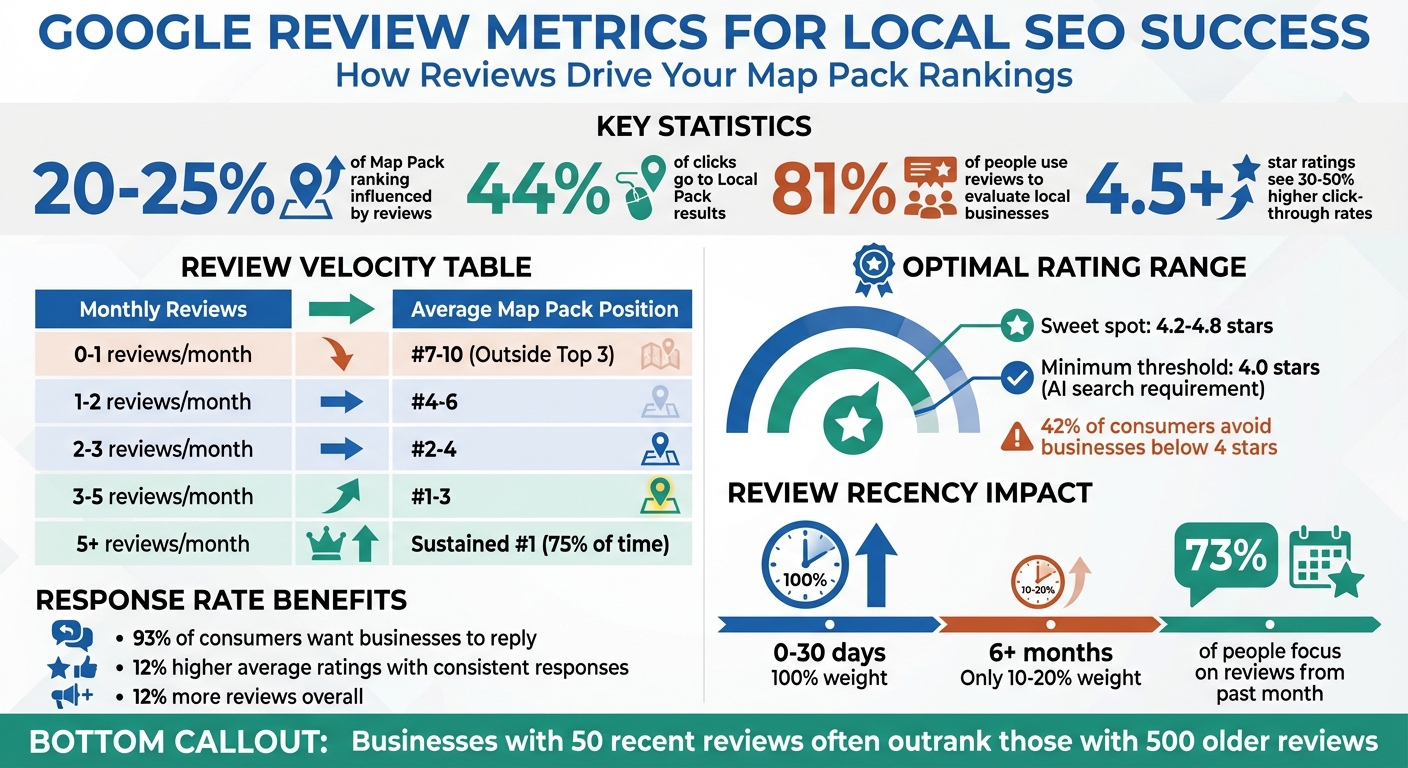
Google Review Metrics Impact on Local SEO Rankings
Mastering Google Reviews for SEO Success and Local Trust – 234
sbb-itb-50c3429
How Google Review Metrics Affect Local SEO Rankings
Google uses three main factors to evaluate local businesses: Relevance, Distance, and Prominence. Reviews play a key role in boosting Prominence, which reflects how well-known and trustworthy your business appears compared to others. For example, if someone searches for "emergency plumber near me", Google doesn’t just consider how close your business is – it also looks at your review profile to decide if you deserve a spot in the Local Pack.
Reviews carry a weight of about 20–25% in local rankings, meaning a consistent flow of new reviews can give you a noticeable edge over competitors. On top of that, the content of customer reviews adds context for local queries. When reviews mention specific services, Google’s algorithm associates your business with those terms in real time.
Let’s break down how reviews tie into Google’s ranking factors.
Google’s 3 Core Local Ranking Factors
Google’s local search algorithm relies on three pillars:
- Relevance: This measures how well your business matches a searcher’s query. Your Google Business Profile management, services, and description all contribute here.
- Distance: This is simply how far your business is from the searcher’s location.
- Prominence: This reflects your business’s reputation and authority, based on what others say about you.
"Google trusts what other people say about you much more than what you say about yourself." – LocalImpact
Reviews directly impact Prominence by serving as third-party validation of your business’s quality. Google sees customer feedback as a trust signal. Businesses with a strong review profile appear more reliable, while those with few or outdated reviews may be viewed as less trustworthy and rank lower. This trust factor is becoming even more critical as AI-powered search engines like Gemini now assign 16% of their recommendation weight to review-based metrics.
Now, let’s dive into how specific review metrics influence your performance in the Local Pack and organic search results.
Review Metrics and Their Impact on Map Pack and Organic Results
The Local Pack – the three businesses highlighted alongside a map at the top of search results – captures over 44% of clicks for location-based searches. Review metrics are a major factor in determining which businesses make it into this prime spot. For instance, consistently earning 3–5 new reviews each month can boost your ranking by 40–60% compared to businesses with stagnant profiles. Interestingly, a business with 50 recent reviews often outranks one with 500 older ones.
While reviews account for roughly 20–25% of the ranking weight in the Local Pack, their influence in traditional organic search results (the "blue links") is lower, around 6%. However, reviews still drive critical behavioral signals like click-through rates and dwell time. Listings with a 4.5+ star rating see 30–50% higher click-through rates in the Local Pack, further increasing their visibility.
"In industries like legal, medical, and home services, a single keyword-rich review mentioning the city name and service type can help listings jump by 1–2 positions in the Local Pack within 72 hours." – Akmal Faizan, Founder, Stech Local
Understanding these metrics is essential for shaping your review strategy and improving your local SEO performance. Reviews aren’t just about reputation – they’re a powerful tool for increasing visibility and driving more traffic to your business.
Key Google Review Metrics That Drive Local SEO
Now that we’ve covered how reviews influence Google’s ranking algorithm, let’s dive into the specific metrics that matter most. Google places a strong emphasis on three key factors: total review count, average star rating, and review recency & velocity. Each of these plays a distinct role in shaping your search visibility and customer appeal. Here’s a closer look at these metrics and why they’re crucial for your review strategy.
Total Review Count
The total number of reviews your business has is a major signal of prominence for Google. Simply put, more reviews generally mean better visibility compared to competitors.
For newer businesses, such as those in healthcare reputation management, building up reviews early on can give an important visibility boost. As your review count grows – typically reaching the 50–100 range – your business starts to gain authority. However, once you surpass 100 reviews, the benefits tend to level off, and Google begins to prioritize the freshness of your reviews over sheer volume.
Interestingly, businesses with over 100 reviews see, on average, 52% higher revenue than those with fewer than 10 reviews. In competitive markets, having the highest review count can also help you stand out in the Local Pack, often drawing more clicks.
Average Star Rating
Your star rating is often the first thing potential customers notice—a critical factor in restaurant reputation management—and it has a direct impact on whether they choose to click on your listing. Businesses with an average rating of 4.5 stars or higher typically see a 30–50% increase in click-through rates.
However, aiming for a perfect 5.0 rating might not always work in your favor – it can seem too good to be true. A more balanced average, somewhere between 4.2 and 4.8, tends to build trust and appears more realistic. In fact, 42% of consumers admit they avoid businesses with an average rating below 4 stars.
As AI search tools like Google Gemini become more common, the stakes have risen. These tools often set a minimum threshold of 4.0 stars, automatically excluding businesses that fall below this mark. Maintaining a strong and authentic average rating is now more critical than ever to remain competitive in search results.
Review Recency and Velocity
The pace at which you collect new reviews – known as review velocity – has become a key ranking factor for Google. For example, a business with 50 recent reviews can outrank one with 500 older reviews because fresh feedback signals ongoing customer interaction.
Google gives full weight to reviews written within the last 30 days, while those older than six months lose much of their impact, contributing only 10–20% of their original value. This aligns with consumer behavior, as 73% of people focus only on reviews written in the past month.
Consistency is essential here. Businesses that consistently gather more than five new reviews each month tend to secure top rankings about 75% of the time. On the other hand, sudden spikes – like gaining 20 reviews in two days followed by long periods of inactivity – can trigger Google’s fraud detection systems, potentially harming your rankings.
| Monthly Review Velocity | Average Map Pack Position |
|---|---|
| 0–1 reviews/month | #7–10 (Outside Top 3) |
| 1–2 reviews/month | #4–6 |
| 2–3 reviews/month | #2–4 |
| 3–5 reviews/month | #1–3 |
| 5+ reviews/month | Sustained #1 (75% of the time) |
"Review velocity – how many new reviews you receive monthly – is the single strongest review metric Google prioritizes." – D&D SEO Services
How to Improve Your Google Review Metrics
Once you’ve identified your key metrics, it’s time to take action. Boosting your Google Review metrics requires a steady, well-planned approach: ask for reviews effectively, respond to feedback professionally, and leverage tools to make the process seamless.
How to Encourage Customers to Leave Reviews
Did you know that 51% of customers will leave a review if you simply ask them to?. The trick is to make the process simple and natural.
Timing is everything. For service-based businesses, ask for a review right after completing the service. If you’re in eCommerce, wait 7–10 days after delivery. SaaS companies can request reviews after key milestones, like onboarding or product success moments.
Make it easy by providing direct links or QR codes that lead straight to your Google Business Profile. You can create these links through the Google Business Profile manager and share them in follow-up emails or text messages. QR codes are another great option – print them on receipts, menus, packaging, or display them at checkout counters. A quick scan takes customers directly to the review form.
Personalization also goes a long way. Address customers by name and reference their specific experience. For example: "Hi Sarah, we’re thrilled you loved your kitchen remodel! Could you share your experience on Google?" Using multiple channels like email and SMS can increase response rates. Businesses that combine both see a 26% response rate, compared to 15% for email alone and 20% for SMS alone. If no response comes through, a polite reminder can help.
One golden rule: never offer incentives like discounts or gifts in exchange for reviews. It’s against Google’s policies and could lead to your profile being suspended. Instead, encourage your team to casually mention how much reviews mean to your business during customer interactions.
| Business Type | Best Time to Ask for a Review |
|---|---|
| eCommerce | 7–10 days after delivery |
| Service-Based | Immediately after service completion |
| SaaS | After onboarding or success moments |
| Hospitality | A few days after the guest’s stay |
How to Respond to Reviews Professionally
Responding to reviews isn’t just polite – it’s expected. A whopping 93% of consumers want businesses to reply to their feedback. Even better, businesses that consistently respond see 12% higher average ratings and receive 12% more reviews overall.
Reply to every review – whether it’s glowing, neutral, or negative. For positive reviews, thank the customer by name and mention the specific service or location. For example: "Thanks, John, for choosing our Seattle location for your roof repair. We’re so happy you had a great experience!"
When handling negative reviews, stay calm and follow a four-step approach: acknowledge the issue, apologize empathetically, take the conversation offline, and keep your public reply short. For example: "We’re sorry to hear about your experience. Please reach out to us at [contact info] so we can make things right." Research shows 62% of customers are willing to give a business another chance if their concerns are addressed thoughtfully.
"A negative review is not the end of the world, but that it is, in fact, the last chance the business will likely be given to make amends and win back the customer." – Moz
If responding to every review feels overwhelming, consider using automation tools to streamline the process.
Using Review Overhaul for Review Management
As your business grows, managing reviews manually can become a daunting task. That’s where Review Overhaul steps in. This platform automates review requests, personalizes responses, and keeps an eye on your online reputation – all while improving your Google Business Profile performance.
With Review Overhaul, you can automate review requests, ensuring they’re sent at the right time without adding extra work for your team. It also helps craft tailored responses that reflect your brand’s voice while incorporating location-specific and service-related keywords – an added bonus for local SEO.
The platform goes beyond just reviews. It also offers tools for Google Business Profile optimization and local listing management, ensuring your business information stays accurate across the web. This integrated approach helps maintain consistent review growth, boost your average rating, and increase your visibility in the Map Pack.
For industries like healthcare, hospitality, legal services, or auto repair, Review Overhaul provides specialized tools to meet your specific needs. It’s a one-stop solution to simplify review management while keeping your business ahead of the competition.
Tracking and Measuring Your Review Metrics
After implementing strategies to improve your review metrics, it’s crucial to measure their impact. Success isn’t just about star ratings – it’s also about increases in calls, rankings, and foot traffic.
How to Track Key Metrics Over Time
Your Google Business Profile (GBP) Dashboard is a great place to start. It provides insights into how people are interacting with your profile – whether they’re calling, requesting directions, or leaving reviews. Check these insights weekly to monitor trends and quickly identify any dips in engagement.
For more detailed tracking, consider using a review management platform. These tools can send alerts for new reviews, consolidate data from multiple locations, and help you monitor review velocity – the speed at which you’re gaining reviews. A consistent flow of 3–5 reviews per month is often enough to secure a top-three spot in the Map Pack.
Set clear benchmarks. For example, aim for 30–50 reviews to establish a solid star rating and over 100 reviews to build trust. Also, track your response rate – responding to over 95% of reviews can increase positive sentiment by more than 10%. Keep an eye on your negative review percentage too; anything above 20% might signal internal issues.
Don’t overlook review recency. Check this manually by sorting reviews by "Newest" in your GBP. You can also use Google Maps’ search bar to identify common keywords like "friendly" or "fast", which can reveal what customers appreciate most.
Once you’re tracking these metrics, evaluate their influence by measuring their impact on your local SEO performance.
How to Measure SEO Improvements
To understand how reviews affect your local SEO, focus on high-intent customer actions in GBP Insights. Metrics like clicks-to-call, direction requests, and website visits can indicate that better reviews are driving more engagement.
"The ultimate goal of a Google Business Profile is to drive those customer actions beyond simple listing visibility." – Localogy
Use Google Search Console to track changes in local keyword rankings. Filter by location-specific landing pages to see if you’re moving up for terms like "best coffee shop in [city]" or "emergency plumber near me". Pair this with Google Analytics to analyze organic traffic by region. If your reviews are improving, you should see more local visitors and conversions.
For a visual perspective, map rank trackers can create heatmaps showing how your rankings shift geographically as your reviews improve. Comparing your review growth and average rating to the top three competitors in your area can also help you gauge your standing.
Pay attention to review justifications – phrases Google highlights from your reviews, like "great for families" or "quick service." These snippets can match search queries, improving click-through rates. Studies show that increasing your rating from 3 stars to 5 stars can boost CTR by up to 25%.
| Metric Category | Key Data Points to Track | Primary Tool(s) |
|---|---|---|
| Visibility | Local Pack Rank, Map Heatmaps | Map rank trackers, Google Search Console |
| Engagement | Clicks-to-Call, Direction Requests, Profile Views | GBP Performance Insights |
| Reputation | Review Velocity, Average Star Rating, Sentiment | Review analytics tools |
| Conversion | Local Organic Traffic, Goal Completions | Google Analytics (GA4) |
Reaching 10 reviews often triggers a ranking boost in Google’s algorithm. Once you hit that milestone, keep the momentum going by maintaining a steady flow of new reviews each month.
Conclusion
Google reviews play a crucial role in determining about 20–25% of your Map Pack visibility. Businesses that dominate local search in 2026 will be those that understand how reviews influence Google’s algorithm and shape AI-driven recommendations.
"Reviews aren’t just social proof. They’re an SEO asset." – Code of Entry
A steady stream of reviews is far more impactful than a static profile. Consistently gathering 3–5 new reviews each month can outperform hundreds of outdated ones. Aim for a natural rating range between 4.2 and 4.5 stars, and make it a priority to respond to every review within 24–48 hours.
Use tools like your Google Business Profile dashboard, Google Search Console, and Analytics to track metrics such as review velocity, response rates, and customer actions like clicks-to-call. These insights help you measure how improved review metrics lead to better rankings and increased conversions, making it easier to refine your approach.
For even greater efficiency, consider using a review management tool. Review Overhaul simplifies the process by automating review generation, crafting professional responses, and keeping tabs on your reputation across platforms. Whether you’re working to surpass the 10-review mark or stay ahead with consistent growth, Review Overhaul equips you with the tools to boost your metrics and climb the rankings. Check out Review Overhaul to streamline your review strategy and strengthen your local SEO results.
FAQs
How many Google reviews do I need to rank in the Map Pack?
There’s no magic number of Google reviews that guarantees a spot in the Map Pack. Instead, what matters more are things like how often you get reviews, how recent they are, and their overall quality. To boost your local SEO, aim for a steady stream of authentic reviews, and make sure to respond to them in a professional and timely manner.
How often should I get new reviews to improve local SEO?
To improve your local SEO, focus on gathering a steady stream of new reviews – around 3 to 5 per month. This consistent flow keeps your review velocity and recency strong, two factors that Google values when determining local search rankings.
Do replies to Google reviews help my local rankings?
Absolutely, replying to Google reviews can help improve your local rankings. Why? Because it sends positive signals to Google’s algorithm. When businesses engage with customer feedback, it shows activity, trustworthiness, and credibility – qualities Google values, especially for local search results.
Responding to reviews also demonstrates that you’re actively involved with your customers. This not only helps improve your visibility but also builds trust with both Google and potential customers who are checking out your business.
