
Are you losing customers over bad information you can't control? An unclaimed Google Business Profile is a public listing for your business that anyone—competitors, disgruntled ex-employees, or just confused customers—can edit. It's a recipe for misinformation that quietly sabotages your hard work.
This isn't a small digital task; it's a silent threat to your revenue. An unclaimed profile with the wrong hours or a bad phone number is like having an invisible competitor actively sending your customers away. It destroys a potential customer's trust before they've even had a chance to speak with you.
At Review Overhaul, we provide a simple 3-step plan to help you reclaim your profile and turn it into your best customer acquisition tool. We’ve guided hundreds of business owners just like you from digital chaos to complete control, ensuring your online reputation drives growth, not frustration.

Your Unclaimed Profile Is Costing You Customers
Have you ever had a customer show up after hours, frustrated because Google said you were still open? Or maybe you’ve stumbled upon negative reviews on a profile you didn't even know you had. It’s a gut-punch feeling for any dedicated business owner.
You’re working hard every day, but this unmanaged online ghost is quietly working against you. This isn't just about a wrong phone number; it's about losing credibility and real dollars with every potential customer who drives to the wrong address or calls a disconnected line.
The Hidden Threat to Your Reputation
This problem is far more common than most business owners think. These unclaimed listings pop up all the time, either created by Google or by a customer checking in at your location. The result is digital chaos that makes it nearly impossible to maintain a professional image.
Think of it this way: an unclaimed business listing is a 'digital squatter' living on your brand's online property. In any given local market, you'll find thousands of these profiles, many filled with outdated or just plain wrong information that you have zero control over.
You can't afford to let it slide. These rogue profiles collect horrible reviews you never see and send paying customers down the wrong path. We cover this and more in our guide on common GBP mistakes to avoid, but it all starts with taking back control.
Why Taking Control Is Not Optional
Leaving your profile unclaimed is a gamble you can’t afford to take with your revenue. The cost of doing nothing is high, but the rewards for taking charge are immediate and powerful.
By claiming your profile, you can:
- Fix Bad Information: Finally, you can make sure your address, phone number, and hours are 100% accurate.
- Talk to Your Customers: You get to respond to reviews (good and bad!), answer questions, and show people there’s a real person behind the business.
- Climb the Local Rankings: A complete, active, and well-managed profile gets preferential treatment from Google, meaning more eyes on your business.
This guide will give you a straightforward plan to take back your digital storefront. It's time to secure your online reputation for good.
How to Find and Claim Your Digital Storefront
Alright, let's get down to business and reclaim your digital territory. Finding an unclaimed Google Business Profile is often the very first hurdle for a business owner trying to wrangle their online reputation.
Believe it or not, your business probably already has a profile on Google, even if you never created one. Google might have auto-generated it, or a customer might have put you on the map. Your first mission is a simple search on both Google Search and Google Maps.
Spotting Your Unclaimed Listing
Go ahead and type your exact business name into the search bar. What you're looking for is that "knowledge panel" that shows up on the right-hand side of the search results—that's basically your business's digital front door.
Once you find it, scan for one critical link. You should see text that says “Own this business?” or “Claim this business.” That’s the dead giveaway of an unclaimed profile. It's an open invitation for you to step up and take control.
Imagine you own a local auto repair shop. A customer created a profile for you years ago but used your old address. Now, potential customers are driving to the wrong location, getting frustrated, and taking their business to your competitor. Seeing that “Own this business?” link is your golden ticket to finally fix that costly mistake.
Initiating the Claim Process
Clicking that link is what kicks off the ownership process. Google will then walk you through a few steps to prove you're the rightful owner. This is where you officially plant your flag and get ready for verification.
Don't freak out if you find more than one listing for your business—it happens all the time.
- Find the main one: Look for the profile that has the most reviews or the most salvageable information.
- Claim the duplicates, too: You'll need to go through the process of claiming any other profiles you find.
- Get ready to merge: Once you own all the listings, you can ask Google support to merge everything into one powerful profile.
This process ensures that all roads lead back to a single, accurate profile that you control.
Here's a reality check: in 2024, Google nuked a mind-boggling 240 million policy-violating reviews and deactivated tons of inactive profiles. You can read more about Google's recent changes on eyemagnetmgt.com.
Once you've found your profile and started the claim, you're officially on your way. For a full walkthrough of setting up a new profile, check out our step-by-step guide to Google Business setup. By asserting ownership, you’re no longer a spectator to your online reputation—you’re its guardian.
Taking Control: How to Verify Your Google Business Profile
Claiming your profile is the first big win, but it's the verification step that officially hands you the keys to your digital kingdom. This is where Google makes sure you’re the real deal, and honestly, it’s where a lot of business owners get stuck. The good news? It doesn't have to be a headache.
Think of it this way: verification protects you and your customers. You wouldn't want a random person changing your business hours, and Google doesn't want to send someone to a location that doesn't exist.
This simple flowchart breaks down the path from finding your business to getting it claimed, which leads right into this crucial verification stage.
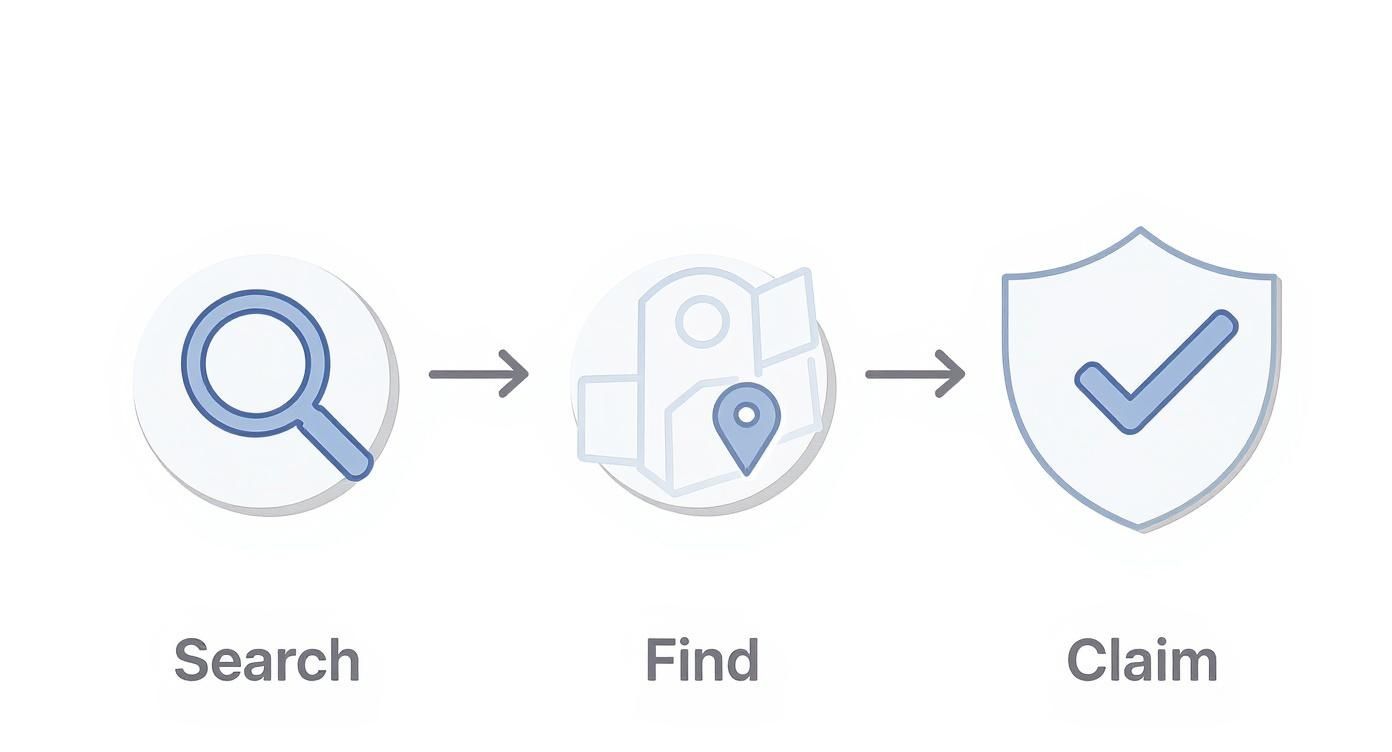
As you can see, once you've located and initiated the claim on your profile, verification is the very next step.
Your Verification Options: What to Expect
Google gives you a few different ways to verify your business, and the options you see depend on your industry. This is a huge point of confusion for many—not every method is available to everyone.
Let's walk through the most common ways you can prove you're in charge.
Google Business Profile Verification Methods
Google offers several verification methods, but the one you get is often determined by their system, not by your choice. Here’s a quick comparison of the most common options so you know what you might be in for.
| Verification Method | How It Works | Best For | Typical Timeframe |
|---|---|---|---|
| Postcard | Google mails a postcard with a 5-digit code to your physical business address. You enter the code online. | Most brick-and-mortar businesses, especially new ones. | 5-14 business days |
| Phone or Text | An automated system calls or texts your business phone number with a verification code. | Established businesses with a trusted, indexed phone number. | Instant |
| A code is sent to your business email address (e.g., you@yourdomain.com). | Businesses with a domain-specific email already known to Google. | Instant | |
| Video Recording | You submit a video showing your location, signage, equipment, and proof of management (like a key). | Many new businesses and service-area businesses without a public address. | 1-5 business days |
| Instant | If your website is verified in Google Search Console, your profile might be verified automatically. | Businesses with a long-standing, well-established web presence. | Instant |
Understanding these paths ahead of time can save you a lot of guesswork. No matter which method you're presented with, the key is to follow the instructions precisely to avoid any delays.
The Old-School Method: Verification by Postcard
For most businesses with a physical storefront, the postcard is still Google's go-to method. It's their most reliable way to confirm you actually exist at the address you’ve listed. The postcard usually shows up within 5 to 14 business days.
Here's a pro tip: after you request the postcard, don't touch your profile. Don't change your name, address, or even your primary category. Any edits can cancel the request, and you'll have to start the waiting game all over again.
Imagine you're a new restaurant owner. You request the postcard, and while waiting, you decide to update your menu link. That small change can reset the entire verification process, leaving your unclaimed google business profile in limbo for another two weeks. Just be patient.
Nailing the Video Verification
Video verification can sound a little intimidating, but it’s actually one of the fastest ways to get verified if you're prepared. Your goal is simple: show Google undeniable proof that your business is real, it's where you say it is, and you're the one in charge.
To make sure your video verification goes smoothly, have these things ready to show:
- Your Location: Start outside. Show your street sign, building number, and any permanent business signage.
- Your Workspace: Walk inside and show the tools of your trade. For a mechanic, that’s a service bay; for a dentist, it's the patient chair.
- Proof of Management: Show you have access by unlocking the front door with a key. You can also show official documents like a business license.
For a deeper dive into all the verification methods and their little quirks, check out our complete Google Business Profile verification process guide. Once you're verified, you can finally start managing your reputation and turning online searches into real business.
Solving Common Ownership Roadblocks
You’ve found your profile, hit “Claim this business,” and… you hit a wall. It happens. This is the exact moment where so many business owners get frustrated and give up, but trust me, these roadblocks are almost always solvable.
The most common snag? Discovering your profile is already claimed. Your heart sinks when you see that dreaded message: “This listing has already been claimed.” Nine times out of ten, the culprit is a former employee, an old marketing agency, or even you, using an email you completely forgot about. Don't panic.
Requesting Ownership from the Current User
When you find out someone else is managing your profile, Google actually has a built-in process for you to request ownership. As you try to claim the listing, Google will show you a partially hidden email address of the current owner.
This action sends an official notification to that person's email. They have a few days to respond. The frustrating part? A lot of the time, these requests go into a digital black hole because the email address isn't even monitored anymore. If you don't hear anything back, you can move on to an appeal.
Gathering Your Proof of Ownership
When you appeal an ownership dispute, Google needs to see some solid evidence. Your goal is to provide undeniable proof that you operate the business at that specific location.
Be prepared to provide things like:
- Official Business Registration: Documents that show your legal business name and address.
- Utility Bills: A recent gas, electric, or phone bill with the business name and service address clearly visible.
- Photos of Your Storefront: A clear picture of your permanent signage from the outside.
- A Business License: City or state licenses that confirm you have the right to operate.
Having this paperwork on hand proves to Google you’re the rightful owner.
Dealing with Duplicate Listings
Another common headache is finding multiple profiles for your one business. These duplicates are bad news—they can split your hard-earned reviews and confuse potential customers.
The strategy here is to claim all existing profiles tied to your business. Once you've successfully verified and gained ownership of each one, you can contact Google support and ask for a merge. This creates a single, powerful source of truth for your customers. For more strategies, our guide on business listing management offers practical tips.
What to Do When Verification Fails
Sometimes, the verification process itself is the problem. Maybe the postcard never shows up, your phone number isn't eligible, or your video submission gets rejected. It can feel like you’re stuck in a frustrating loop.
If your verification attempt fails, don't just keep trying the same method over and over. This can actually flag your account. Instead, take a breath, double-check Google's guidelines, and then contact their support team with your case details.
Persistence and clear documentation will get you through these final hurdles and put you firmly in control of your unclaimed Google Business Profile.
Turning Your Profile Into a Customer Magnet
Alright, you’ve wrestled back control and claimed your Google Business Profile. That's a huge step. Think of it this way: claiming your profile was about playing defense. Now, it's time to play offense.
This is where you stop just existing online and start actively shaping how thousands of potential customers see you. You get to tell your story and show them exactly why you’re the best choice.
From Blank Slate to Local Powerhouse
A fully decked-out profile is like rolling out a digital welcome mat. It gives people every reason to walk through your door instead of scrolling past. This goes way beyond just your name, address, and phone number.
The opportunity here is massive. As of early 2025, there are over 215 million Google Business Profiles out there. But here's the kicker: while about 64% of businesses have bothered to verify their profiles, most of them just stop there. That leaves a huge opening for you.
In some industries, it's even more of a wild west. Fields like auto services and home repair have verification rates as low as 45%. If you’re in one of those fields, a little effort can put you miles ahead of the competition. You can discover how business verification rates vary by industry at searchendurance.com to see just how big the gap is.
Industry-Specific Strategies That Win Customers
Optimization isn't a one-size-fits-all deal. What gets customers excited about a restaurant is totally different from what they need from a law firm. You have to tailor your profile to what your specific audience is looking for.
To get you started, here’s a quick look at how different industries can fine-tune their profiles to attract the right kind of attention.
Industry-Specific Optimization Checklist
| Industry | Primary Optimization Action | Secondary Action | Pro Tip |
|---|---|---|---|
| Restaurants/Cafes | Upload high-quality, drool-worthy photos of food and your ambiance daily or weekly. | Use Google Posts for daily specials, happy hour, or event announcements. | Enable the "Menu" feature and keep it updated. It’s one of the first things diners look for. |
| Healthcare Practices | List all specific services offered (e.g., "Teeth Whitening," "Annual Physicals"). | Proactively answer common patient questions in the Q&A section (e.g., "Do you accept Cigna?"). | Add photos of your clean, welcoming office and friendly staff to help ease patient anxiety. |
| Law Firms | Clearly define distinct practice areas as separate services in your profile. | Use Google Posts to share insightful articles or case studies that establish authority. | Your "From the business" description should highlight your experience, focus, and what makes your firm unique. |
| Auto Service Shops | Detail every service you offer, from "synthetic oil changes" to "transmission repair." | Enable the messaging feature so customers can easily ask for quotes or updates. | Encourage reviews that mention specific services. This builds trust and helps with local search rankings. |
This table is just a starting point. The goal is to get inside your customer's head and give them the information they crave, right when they're searching for it.
The Non-Negotiable Power of Reviews and Q&A
Let's talk about two of the most overlooked—and most powerful—features on your profile: reviews and the Q&A section.
Responding to every single review is non-negotiable. A thoughtful, professional response to a negative review can actually win you more business than ten glowing ones. It shows everyone watching that you're committed to customer satisfaction.
And the Q&A section? It’s your chance to answer questions before they're even asked. Jot down the top 5-10 questions you get on the phone every day and post them on your profile with clear, helpful answers. This saves your team time and shows potential customers you get them.
By actively managing reviews and Q&A, you're not just reacting to feedback; you are controlling the narrative around your business. You're building a public record of excellent customer service that works for you 24/7.
For a deeper look into turning your profile into a customer-generating machine, check out our complete guide to Google Business Profile optimization. This is how you stop just being found online and start getting chosen.
Your Questions About Google Profiles Answered
Diving into the world of Google Business Profiles can definitely spark a few questions, especially when you stumble upon an unclaimed Google Business Profile for your company. Let's walk through some of the most common hurdles I see business owners face and get you some clear, practical answers.
What Happens If I Ignore My Unclaimed Profile?
Ignoring an unclaimed profile is like leaving the front door of your shop unlocked and unattended. You're giving up all control over how people first see your business on the world's biggest search engine.
When a profile is just sitting there unclaimed, anyone can suggest edits. Your hours could be changed, or someone could even mess with your business name. Worse yet, it can accumulate negative reviews that you can't even respond to, which makes it look like you simply don't care.
Can I Claim a Profile a Former Employee Set Up?
Yes, and this happens all the time. If you discover a profile is already claimed, your first move is to formally request ownership from the current manager right through Google's system.
If you don't hear back after a few days, Google allows you to start an appeal. To get through the appeal successfully, you'll need to gather some solid proof that you're the rightful owner. Things like:
- Official business registration documents
- A recent utility bill showing your business name and address
- Clear photos of your permanent storefront sign
It can feel like a process, but it's the only way to get back in the driver's seat.
How Long Does Postcard Verification Really Take?
Google's official line is to allow up to 14 days for that postcard with your verification code to show up. My best advice here is to be patient.
Do not edit your business name, address, or main category while you're waiting. Any of those core changes will instantly void the code on its way to you, and you'll have to start the 14-day clock all over again.
If two weeks go by with no luck, you can request a new card. If the second one also gets lost, it’s time to reach out to Google support directly to see what other options might be available.
How Can I Remove a Fake or Duplicate Profile?
It’s definitely unsettling to find a fake or duplicate listing for your business, but it’s a fixable problem. If you come across a duplicate, the first thing you need to do is claim it, following the exact same steps you did for your real profile.
Once you have verified ownership of both listings, you can contact Google support and ask them to merge the two. This is the best-case scenario, as it pulls all the reviews into your main, correct profile. If a listing is just plain fake, you can report it using the "Suggest an edit" feature and marking it as spam.
Feeling like you're in over your head trying to fix an unclaimed Google Business Profile and turn it into something that actually brings in customers? You don't have to do it alone. The team at Review Overhaul takes the headaches out of local SEO so you can get back to what you do best. Schedule your free reputation audit today and let's get your online presence back under your control.
