
Your Google Business Profile (GBP) is the key to local SEO success in 2025. It drives 75% of local business visibility, with 46% of Google searches now having local intent. Ranking well means more clicks, calls, and customers. Here’s what matters most:
- Proximity: Your location is the #1 factor. Businesses closer to searchers rank higher.
- Relevance: Align your profile with what users search for – categories, keywords, and services matter.
- Prominence: Reviews are a game-changer. More reviews, recent ones, and keyword-rich feedback boost rankings.
- Profile Completeness: Verified, accurate, and detailed profiles outperform incomplete ones.
Key Stats:
- Local Pack results appear in 93% of local searches and grab 44% of clicks.
- Reviews influence 26% of top 10 rankings.
- Businesses with 200+ reviews dominate the top spots.
If you focus on these factors – proximity, relevance, prominence, and a complete profile – you’ll improve visibility and attract more customers. Let’s break it down further.
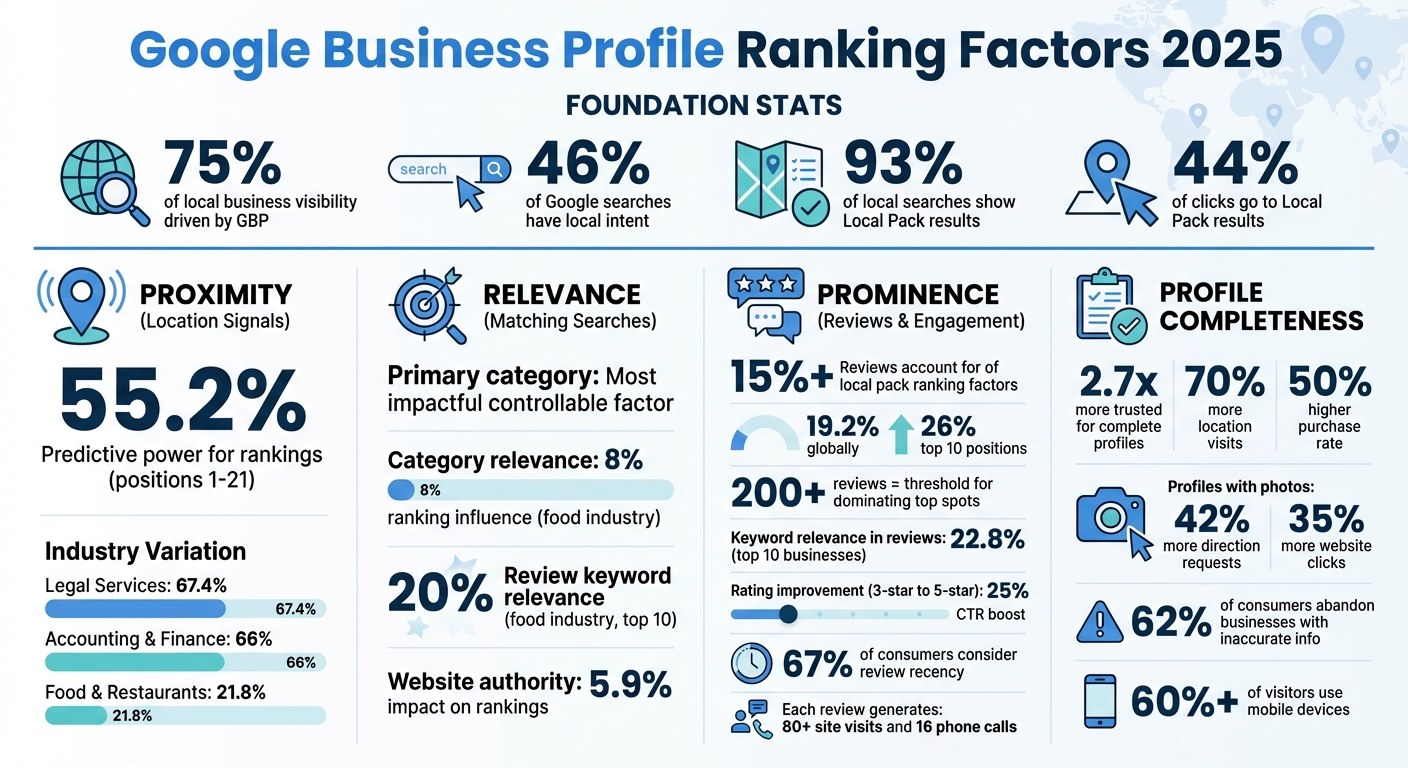
Google Business Profile Ranking Factors 2025: Key Statistics and Impact
Every Google Business Profile Section That Impacts Rankings
Proximity and Location Signals
Proximity plays a major role in search visibility, accounting for 55.2% of predictive power for businesses ranking in positions 1–21. Google prioritizes businesses that are physically closest to the person searching or to the center of the defined search area.
Since your physical location can’t change, it’s crucial to have accurate and consistent location data so Google knows exactly where you are and who you serve. Alex Uria, Founder of Map Ranking, explains it best:
“Proximity is the most unique of Google’s three ranking signals… it is about extending a business’s effective reach and becoming hyper-relevant to a user’s specific location-based query”.
The influence of proximity varies by industry. For example, it holds 67.4% importance for Legal Services, 66% for Accounting & Finance, and 21.8% for Food & Restaurants. This shows that the impact of proximity depends heavily on the type of business.
Accurate Address and Service Areas
Your physical address is the backbone of your local rankings. Google uses your verification address as a key factor, and your visibility diminishes as searchers move farther from that location. A real, verifiable street address is non-negotiable – P.O. boxes, remote mailboxes, and virtual offices won’t cut it.
If you run a service-area business like plumbing or landscaping, you should hide your residential address from customers while still verifying it with Google. Keep your service area realistic – generally no more than 2 hours of driving time from your base. Setting a radius that’s too broad can confuse potential customers and hurt your relevance.
For hybrid businesses that combine a storefront with on-site services, your location must be staffed during business hours and clearly visible to customers. If you’re operating out of a co-working space, ensure your business has clear signage and staff present during the hours you advertise.
| Business Type | Address Visibility | Service Area Setting | Staffing Requirement |
|---|---|---|---|
| Storefront | Must be visible to customers | Not required | Must be staffed during stated hours |
| Service-Area (SAB) | Should be hidden (if residential) | Required (max 2-hour drive time) | Not required |
| Hybrid | Visible to customers | Optional/Required for on-site service | Must be staffed to show address |
When adding your address in your Google Business Profile, use “Address Line 1” for the street address and “Address Line 2” for suite or unit numbers. If Google struggles to locate your street number, manually pin your location on Google Maps to ensure accuracy.
Once your address is set, strengthen your location signals by verifying your online presence with consistent local citations.
Local Citations and Consistency
Keeping your Name, Address, and Phone (NAP) information consistent across online directories is key to building trust with search engines. Inconsistencies can weaken your local ranking. Plus, if two businesses in the same category share the same or nearby addresses, Google may remove one from local results entirely. Regular citation audits are essential – check platforms like Yelp, Yellow Pages, and the BBB to correct any outdated or mismatched details.
“Consistency is critical: Your business Name, Address, and Phone number (NAP) must be identical everywhere online to build trust with search engines.”
– Wes McDowell, Local SEO Expert
Make sure your business name on Google Business Profile matches your physical signage and legal documents. Even small differences, like inconsistently using “LLC”, can weaken your credibility. The goal is to present a unified, verifiable identity that Google can confidently associate with your location.
For service-area businesses, Google uses centroid-based logic to determine proximity based on your defined service area settings. In simpler terms, your service area boundaries directly influence where you appear in local searches. Keep them realistic and focused on areas you can genuinely serve.
Relevance Factors for Matching Searches
Relevance plays a key role in determining whether your Google Business Profile shows up when someone searches for what you provide. While proximity is a major factor, relevance ensures your profile aligns with the searcher’s intent. Google’s algorithm evaluates your profile details – like categories, services, and landing page content – to deliver the most accurate results.
Selecting the Right Business Categories
Choosing the right business categories is essential for aligning your profile with user searches. Your primary category is the most important factor you can control. It tells Google exactly what your business is about. As David Reagan puts it:
“The primary category holds more weight than secondary ones, making it one of the most impactful items you control”.
Secondary categories help broaden your reach, allowing your profile to appear in searches for related services. You can add up to nine secondary categories to attract traffic for additional offerings. However, stick to categories that reflect what you actually provide – overloading your profile with irrelevant terms can hurt your visibility. For example, in the food and restaurant industry, category relevance accounts for about 8% of the ranking influence for businesses in positions 1–21.
Regularly reviewing your categories is a smart move. Google frequently updates its category options, so switching to a more precise category can boost your visibility almost immediately. Checking what top competitors in your area are using can also reveal opportunities to fine-tune your profile.
Adding Service and Attribute Details
Google allows you to list both standard services (predefined options based on your category) and custom services (unique offerings not covered by the standard list). Adding specific details – like “24-hour AC repair” or “veteran-owned” – can help your profile match common search terms.
Even small adjustments can make a big difference. For instance, a restaurant saw its ranking jump from 71 to 1 overnight after correcting a typo, changing “caesar kitchen” to “caesar salad”. This shows how precise service and menu details directly impact relevance.
For restaurants and retailers, including detailed product or menu items (like “Phad Thai”) can improve your ranking for specific searches. In fact, in the food industry, relevance scores and review keyword relevance each contribute roughly 20% to ranking differences for businesses in positions 1–21. These service details work alongside your categories to create a stronger relevance signal.
Using Structured Data and Landing Pages
A well-optimized landing page can significantly enhance your profile’s relevance. Linking your profile to a mobile-friendly, keyword-rich landing page strengthens your relevance for specific searches. Google also evaluates the authority of your linked URL – domain power (website authority) impacts about 5.9% of your average Google Business Profile ranking.
Structured data, like Schema markup, helps search engines understand your content better. Brian Colling, CEO of Colling Media, explains:
“Implementing structured data (Schema.org) helps search engines understand your website content”.
Using the LocalBusiness schema to mark up details like your business name, address, phone number, hours, and services ensures Google can match your profile to relevant queries.
| Factor | Impact on Local Ranking | Primary Benefit |
|---|---|---|
| Landing Page Content | High | Boosts relevance for specific keywords |
| Website Authority | Moderate (5.9%) | Enhances prominence in competitive markets |
| Structured Data | Moderate | Helps Google interpret business details |
| Mobile-Friendliness | High | Vital for mobile-first indexing |
Your landing page should include keywords that align with your primary and secondary categories. Avoid linking to a generic homepage – instead, use a location-specific page that highlights the services and areas mentioned in your profile. Google also tracks “dwell time” (how long users stay on your site) as a measure of relevance, so creating a landing page that meets user expectations can further strengthen your profile’s ranking.
When combined, these strategies build a powerful relevance signal that helps your profile stand out in local searches.
Prominence Through Reviews and Engagement
Prominence is the third key factor in building a strong Google Business Profile (GBP), alongside proximity and relevance. While proximity ensures users can find you and relevance aligns your services with their needs, prominence sets you apart by showcasing how well-known and trusted your business is. This trustworthiness is a crucial signal for Google’s algorithm, and reviews play a huge role – accounting for over 15% of local pack ranking factors. The quantity, quality, and recency of your reviews all contribute to this ranking.
Review Quantity, Quality, and Recency
The number of reviews your business has can significantly influence your ranking. Globally, review count impacts 19.2% of rankings, but this influence jumps to 26% for businesses competing in the top 10 positions. Hitting certain thresholds can make all the difference. As Jeff Schwerdt, Founder of Reviewly.ai, points out:
“The vital 200-review milestone consistently separates businesses that dominate Google’s local search results from those struggling for visibility.”
Businesses in the top three positions typically have 200+ reviews, while those ranked lower often fall short. However, it’s not just about hitting a number. Consistency matters too – aim for at least 10 new reviews per month, with the most recent review no older than two weeks. This regular activity signals to Google that your profile is active and relevant.
What customers say in their reviews is equally important. For businesses in the top 10, keyword relevance in reviews accounts for 22.8% of ranking influence. When customers mention specific services like “best teeth whitening” or “24-hour emergency plumbing”, it boosts your profile’s alignment with those searches, increasing your chances of appearing in results. Beyond keywords, improving your average rating has measurable benefits: moving from a 3-star to a 5-star rating can boost click-through rates by as much as 25%. Additionally, 67% of consumers consider the recency of reviews a deciding factor when choosing a local business. These strategies feed directly into actionable steps for building prominence.
Photos, Posts, and Review Responses
By 2025, Google’s algorithm has shifted to prioritize active profile management over simply having a completed profile. Posting on your GBP three to four times per week can help maintain a high freshness score and increase your visibility across more keywords. Use authentic photos of your team in action or your location – skip the stock images. Geo-tagged photos, in particular, can boost interaction rates and attract more clicks. Encouraging customers to upload their own photos and contribute to the Q&A section builds a sense of community while enhancing your profile’s prominence.
Responding to reviews is another critical engagement tactic. Make it a goal to reply to all reviews – both positive and negative – within 48 hours. Thoughtful responses, ideally between 100 and 120 words, not only address customer feedback but also demonstrate to Google that your profile is actively managed. This level of engagement can significantly boost your local ranking.
User Behavior and Actions
Google evaluates user interactions with your GBP to determine its relevance and usefulness. Actions like clicking on photos, requesting directions, visiting your website, or calling your business indicate that your listing is engaging and helpful, which can improve your local search rankings.
The numbers speak for themselves. On average, each review generates over 80 site visits and 16 phone calls. This creates a positive feedback loop: more reviews lead to greater visibility, which in turn drives more user engagement. Many customers make decisions directly on your GBP – without ever visiting your website – making on-profile engagement a key driver of conversions.
To amplify this engagement, consider activating features like messaging and the Q&A section. Promptly answering customer questions shows that your profile is actively managed and valuable. This pattern of interaction not only builds trust with potential customers but also signals to Google that your business is worth highlighting.
sbb-itb-50c3429
Profile Completeness and Technical Setup
Having a fully completed Google Business Profile (GBP) can significantly enhance your reputation and conversion rates. Businesses with complete profiles are 2.7 times more trusted, experience 70% more visits to their location, and see a 50% higher purchase rate. Google values detailed profiles because they help users make informed decisions with confidence.
Completing Your GBP Profile
Start with the basics: ensure your business name matches your branding exactly, and select a primary category that is as specific as possible. Google frequently updates its category options, so it’s a good idea to review yours every few months to ensure accuracy. Add your physical address or service area, list a local phone number, and include your business hours – don’t forget to account for holidays and special services like brunch or pickup. Write a clear business description that naturally incorporates relevant keywords.
Take it a step further by activating every feature Google offers. Enable messaging (via SMS or WhatsApp), fill out the Q&A section with answers to common customer questions, and select all applicable attributes – such as “women-owned” or “Wi-Fi available”. Include detailed descriptions of your services and, if relevant, add a product catalog or menu. Every completed field strengthens your profile’s authority, building trust with both users and Google. Once the essentials are in place, focus on engaging your audience with visual content and regular updates.
Adding Photos, Videos, and Updates
Visual content is a powerful driver of engagement. Profiles with photos see 42% more direction requests and 35% more clicks to their website. Businesses with over 100 images often receive significantly more search views than average. Use high-resolution images of your team, workspace, and exterior. For logos and cover photos, aim for a resolution of 720×720 pixels to ensure they display clearly. Avoid using stock photos – authentic visuals help build trust.
Post weekly updates to show your profile is active. Share promotions, events, or news, but steer clear of keyword stuffing – it’s ineffective and can appear spammy. Short videos (under 30 seconds) are great for office tours, project highlights, or customer testimonials. When uploading media, use descriptive filenames like commercial-hvac-repair-dallas.jpg to reinforce relevance. A strong GBP profile is more than just static content; it’s about creating a dynamic, user-friendly experience.
Mobile-Friendly Landing Pages
Your connected landing page must deliver a seamless mobile experience. With over 60% of website visitors using mobile devices, and Google prioritizing mobile-first indexing, your page’s mobile performance directly affects your GBP ranking. Responsive design and fast loading times are essential to reduce bounce rates and keep users engaged – key factors Google considers. As Itamar Haim, SEO Team Lead at Elementor, puts it:
“If your site doesn’t work well on phones, you’re missing out on all these people. Plus, Google might show your site as low in search results.”
Make sure your phone number is clickable for instant calls, simplify navigation for touchscreens, and use tools like Google PageSpeed Insights to identify and fix performance issues. Compress images and leverage a Content Delivery Network (CDN) to improve loading speeds. A fast, mobile-friendly landing page not only boosts rankings but also turns visitors into customers.
Using Review Overhaul for GBP Optimization

Managing all the factors that influence your Google Business Profile (GBP) rankings – like generating reviews and maintaining a complete profile – can feel overwhelming for service-based businesses. That’s where Review Overhaul comes in. It takes care of the most time-consuming aspects of GBP optimization, freeing you up to focus on your customers while your local search visibility improves. Plus, it integrates smoothly with your existing local SEO efforts.
Review Overhaul Features
Review Overhaul zeroes in on the key factors that impact GBP rankings. It automates review generation and ensures your profile is fully completed, reinforcing the critical signals that drive better rankings. For example, its review generation tool helps businesses hit the ideal threshold of roughly 250 reviews, which is often required for top rankings, compared to profiles with fewer than 200 reviews. Additionally, the platform offers professional review response services, ensuring timely and thoughtful replies that signal active engagement to Google.
The service also emphasizes GBP optimization by ensuring every profile field is filled out. This matters because 62% of consumers will abandon a business if they can’t find accurate information online. It further supports your local presence through consistent NAP (name, address, phone number) management across directories, which builds consumer trust in your business information.
Beyond these essentials, Review Overhaul includes tools for reputation monitoring, voice search optimization, and even crisis response. For industries like healthcare, legal, and hospitality, it applies tailored strategies to address specific ranking factors. For instance, proximity drives 67.4% of rankings in the legal sector, while review volume and semantic content play a larger role in healthcare and beauty industries.
Pricing Plans
Review Overhaul offers three pricing plans designed to meet different business needs:
| Plan | Monthly Price | Key Features | Best For |
|---|---|---|---|
| Basic Plan | $199 | Review generation, basic monitoring, and response services | Small businesses starting with reputation management |
| Professional Plan | $299 | GBP optimization, local listing updates, plus all Basic Plan features | Growing businesses seeking better visibility |
| Premium Plan | $399 | Crisis response, voice search optimization, plus all available features | Established businesses needing full-service management |
Each plan focuses on the ranking factors that matter most. For instance, review count alone accounts for 19.2% of general GBP rankings and as much as 26% for top 10 positions. The Basic Plan tackles this critical element, while the Professional and Premium plans add advanced optimization and listing management to ensure your profile aligns with Google’s standards and builds trust that turns searchers into customers.
Conclusion
Ranking well on Google Business Profile in 2025 hinges on four key factors: proximity, relevance, prominence, and profile completeness. While proximity acts as a baseline factor that you can’t control, your real edge lies in optimizing aspects like gathering high-quality reviews, choosing the right business categories, and keeping your profile fully updated. As Manick Bhan, CTO of Search Atlas, explains:
“Proximity is the strongest universal driver, while reviews and relevance define competitive advantage”.
Reviews play a pivotal role in boosting rankings. Both the number of reviews and the inclusion of relevant keywords can make a big difference in securing top spots. For service-based businesses, it’s equally important to actively manage review responses, maintain consistent NAP (Name, Address, Phone) information across directories, and keep visual content fresh. Tools like Review Overhaul help streamline these efforts by automating review generation, ensuring profiles are complete, and offering professional response services that show active engagement.
With 46% of Google searches carrying local intent and the top Local Pack position capturing 94% of map clicks, optimizing your Google Business Profile isn’t just helpful – it’s essential. Whether you’re running a healthcare practice, a legal firm, or a hospitality business, focusing on these ranking factors alongside technical basics like verified listings and consistent directory details can set the foundation for long-term local search success.
FAQs
How does proximity influence my Google Business Profile ranking?
When it comes to your Google Business Profile (GBP) ranking, proximity is a major factor. Google tends to favor businesses that are physically closer to the searcher’s location. So, the closer your business is to someone conducting a local search, the better your chances of appearing higher in the results.
Of course, you can’t change where a user is located. But you can focus on other elements, like gathering positive reviews and ensuring your business details are highly relevant. These steps can boost your visibility in local searches beyond just proximity.
What are the best ways to manage reviews on my Google Business Profile?
Encourage your satisfied customers to share positive reviews on your Google Business Profile. Make the process simple for them – whether it’s providing a direct link or guiding them through the steps. When reviews come in, take the time to respond to each one promptly and professionally, regardless of whether the feedback is glowing or critical. This demonstrates that you genuinely value their input.
Also, ensure your profile stays accurate and up-to-date. Regularly check for spam or fake reviews, and report them as soon as possible to maintain the integrity of your profile.
If managing reviews feels overwhelming, a tool like Review Overhaul can be a game-changer. It can handle tasks like sending review requests and tracking responses automatically. This not only helps you stay on top of your online reputation but also saves you time while boosting your business’s visibility.
Why does having a complete Google Business Profile matter for local SEO?
Filling out your Google Business Profile is a crucial step for boosting your local SEO. By providing Google with precise and detailed information about your business, you enhance your profile’s relevance, credibility, and visibility – all critical factors in determining your local search rankings.
An optimized profile ensures potential customers can quickly access key details like your location, services, and operating hours. This not only helps your business stand out in local search results but also strengthens customer confidence, making it more likely they’ll choose you over competitors.
