
Your Google Business Profile (GBP) is one of the most powerful tools to attract local customers. It’s often the first thing people see when searching for your business on Google Search or Maps. But most businesses fail to fully optimize their profiles, leaving potential customers untapped. Here’s a quick guide to get your profile working harder for you:
- Claim and Verify Your Profile: Ensure you own and control your GBP. Use Google’s verification methods like postcards, email, or video.
- Accurate Business Details: Keep your Name, Address, and Phone (NAP) consistent across all platforms. Add your business hours and update them for holidays.
- Categories and Description: Pick the most relevant category for your business and write a concise, keyword-rich description.
- Photos and Media: Add high-quality photos of your location, team, and services. Businesses with over 100 photos see significantly more engagement.
- Interactive Features: Enable messaging, manage Q&A, and use Google Posts to keep your profile active and engaging.
- Reviews and Ratings: Request reviews from happy customers and respond to all feedback promptly. Businesses that respond to reviews see better rankings and customer trust.
- Track Performance: Use GBP insights to monitor views, clicks, and customer actions. Tools like UTM codes can help measure website traffic from your profile.
Optimizing your GBP isn’t a one-time task – it requires consistent updates and engagement. Follow these steps, and you’ll improve your visibility, attract more customers, and build trust in your local market.
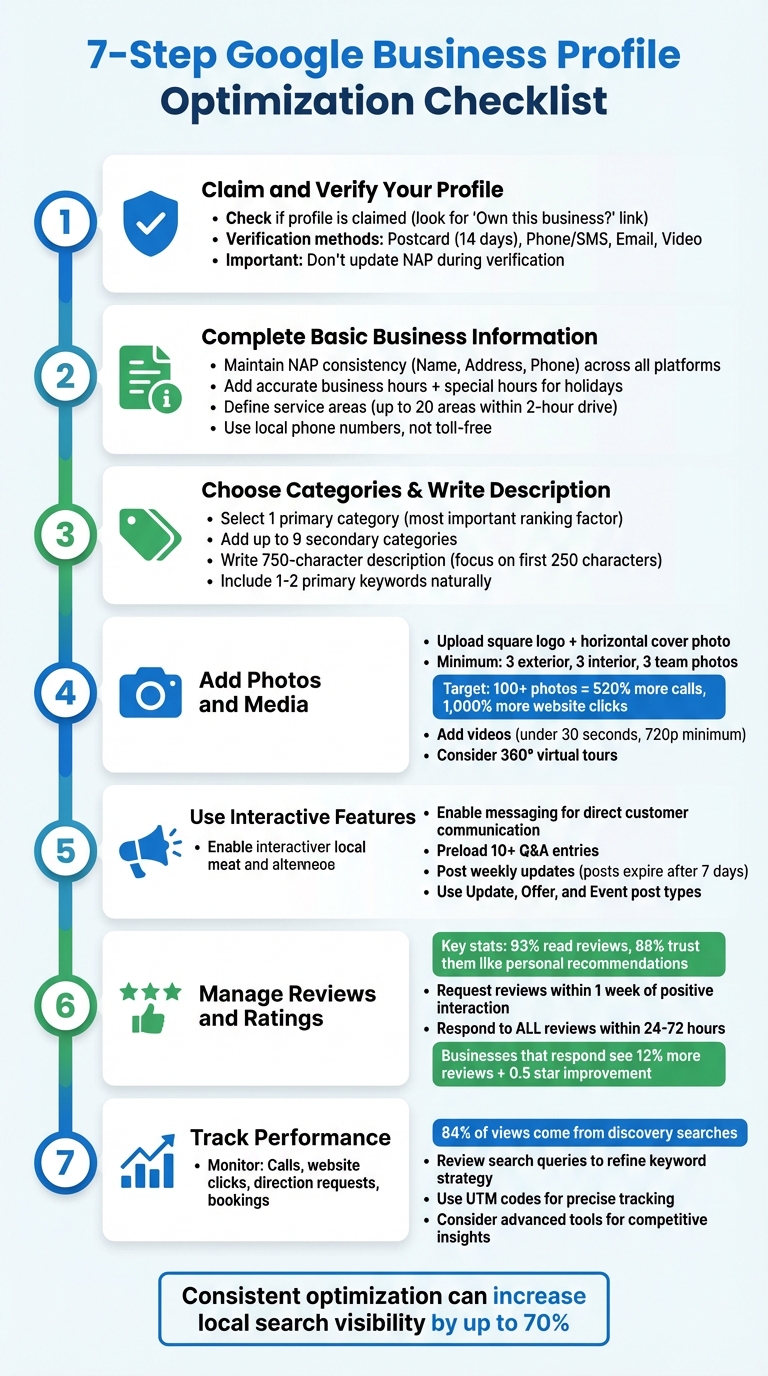
7-Step Google Business Profile Optimization Checklist
How To Optimize A Google Business Profile (Free Checklist For 2025)
Step 1: Claim and Verify Your Google Business Profile
Before diving into optimizations, ensure you’ve claimed your Google Business Profile. Many businesses mistakenly think they already have control, only to find out later that an old employee or a marketing agency still manages it. To check, search for your business name and location on Google and look at the Google Maps Knowledge Panel. This first step lays the foundation for all the improvements you’ll make later.
Check If Your Profile Is Already Claimed
If you see a link that says "Own this business?" or "Claim this listing", your profile is up for grabs. Click the link and follow the instructions to claim it. If the link isn’t there, it means the profile is already claimed. In this case, try logging into the Google Account you think might have access. If you get a message saying the profile is claimed, use the "Request Access" button. The current manager has 3–7 days to respond. If they don’t, you can escalate the issue directly to Google. Securing access to your profile is a crucial step to make sure you can implement future optimizations.
"If you get a message that someone else has already verified the business, you can request ownership of the Business Profile." – Google Business Profile Help
Verification Methods You Can Use
Once you begin the claim process, Google will show you the verification options available for your business. The most common is postcard verification, where Google sends a code to your address within 14 days (sometimes up to 3 weeks). The code expires after 30 days. Other methods include phone or SMS, email, or even video verification, where you show proof of your location and management through a live or recorded video. If you run a service-area business, video verification might be your primary option.
"Verification methods are automatically determined by Google and can’t be changed." – Google Business Profile Help
Important: Don’t update your business name, address, or category while waiting for your verification code. Making changes will invalidate the code and force you to start over. If your website is already verified in Google Search Console, you may qualify for instant verification, skipping the wait entirely.
Step 2: Complete Your Basic Business Information
After your business is verified, the next step is to provide accurate details about your business. This builds trust with both Google and potential customers. Missing or inconsistent information can confuse search engines and turn away customers. One key aspect is ensuring your NAP details are consistent across all platforms.
Maintain NAP (Name, Address, Phone) Consistency
NAP stands for Name, Address, and Phone number. These three details must be exactly the same everywhere your business is listed – Google, Facebook, Yelp, your website footer, and local directories. Even small differences, like using "St." instead of "Street", can create confusion.
"Any discrepancy – ‘St.’ vs. ‘Street,’ ‘Co.’ vs. ‘Company’ – confuses Google and erodes trust, which hurts your ranking." – DigiWeb Insight
To avoid this, audit your local citations on major platforms, social media profiles, and third-party directories. Look for discrepancies and update them. If you can’t edit a listing yourself, contact the site administrators to make corrections. Always use your official registered business name and avoid adding keywords like "Best Plumber in Houston", as this could lead to profile suspension.
For your phone number, use a local number with your area code instead of a toll-free option. Local numbers are more trusted by both customers and search engines.
"NAP consistency isn’t just a technical SEO factor – it’s the foundation of local business credibility." – SEO Business Company
Add Business Hours and Service Areas
Once your NAP details are standardized, the next step is to update your business hours and service areas. Accurate hours help customers avoid frustration and enhance your credibility. Set your standard weekly hours and use Google’s Special Hours feature for holidays or special events – even if your hours don’t change. Google views this as a sign of active profile management.
"Nothing frustrates customers more than showing up to a business that’s supposed to be open, only to find it closed." – Kyle Gromala, Owner, NfiniteLimits
If your business has mid-day closures, list split hours (e.g., 9:00 AM–2:00 PM and 5:00 PM–10:00 PM). For 24-hour operations, select the "24 hours" option instead of manually entering times. You can also use the "More Hours" feature to specify hours for services like delivery, takeout, or senior hours.
For businesses that serve specific areas, define your service areas by city or postal code. Google no longer allows radius-based settings. You can list up to 20 service areas within a two-hour drive from your base. If you don’t serve customers at a physical location, hide your address on your profile and focus on specifying service areas instead. This ensures compliance with Google’s rules and helps you avoid complaints from competitors.
Step 3: Choose Categories and Write Your Business Description
Now that you’ve verified your profile and ensured accurate basic information, it’s time to select the right categories and craft a clear, engaging business description. Your primary category holds a lot of weight – it’s the most influential factor for local rankings. It also determines key features on your profile, like booking buttons for service providers or menu options for restaurants. Optimizing these details strengthens your local search performance and helps you stand out.
Google offers more than 4,000 categories, so accuracy is key. Pick a category that closely matches your business type. For example, a motel should choose "Motel", not a broader or unrelated option. Likewise, a nail salon should go with "Nail salon" instead of "Salon." If your business is seasonal, consider adjusting your primary category to reflect the time of year. For instance, an HVAC company might switch from "Air conditioning contractor" in the summer to "Heating contractor" during colder months. Additionally, you can add up to nine secondary categories to highlight other services you provide. This helps you target specific, long-tail search queries without diluting your main focus.
"Your primary category is considered to be the single most important local ranking factor for a business in the local pack." – BrightLocal
To pinpoint the best categories, tools like GMB Everywhere, Pleper, or Phantom can show which categories your top competitors are using. Make sure your selected categories align with your website’s service pages, and review them every three to six months to see if new, more precise options become available. Once your categories are set, it’s time to refine your profile with a well-thought-out business description.
Write a Keyword-Optimized Description
Your business description is your chance to highlight what makes your business stand out. With a 750-character limit, it’s crucial to make every word count. Focus on the first 250 characters – this is where you should include the most essential details.
Incorporate one or two primary keywords naturally, such as "[Service] in [City]." Avoid overloading your description with keywords, as this can hurt readability and may violate Google’s guidelines. Keep it professional and informative by describing your services, location, achievements, and mission. Stay away from promotional language, all-caps text, emojis, URLs, or pricing details.
Although Google doesn’t directly use the description as a ranking factor, leaving it blank can negatively impact your profile’s completion score and visibility. A well-written, factual description can set your business apart and help convert visitors into customers.
"The business description is the first place potential clients will look to determine if your client’s business is right for them. It’s also the part of the profile that sets the brand apart from the competition." – Lawrence Dy, SEO Strategy Manager, Vendasta
Step 4: Add Photos and Media to Your Profile
Once your business details are polished, it’s time to focus on visuals. Photos and media play a huge role in turning online curiosity into real-world action. Businesses with photos tend to get more driving direction requests and website clicks than those without. Simply put, visuals boost engagement and help shape your online reputation.
Start by uploading a square logo and a horizontal cover photo that reflect your brand. Then, include at least three photos each of your exterior (from multiple angles), interior (highlighting your space and setup), and team members. To go a step further, add five or more "at-work" photos that show your team in action. These images help potential customers visualize your business and feel more confident about choosing you.
"A picture is worth 1,000 words, and that’s especially true when it comes to your client’s Google Business Profile." – Lawrence Dy, SEO Strategy Manager, Vendasta
Make sure your photos are clear, well-lit, and represent your business accurately. Avoid heavy filters or edits that could mislead viewers.
Upload High-Quality Photos
While quality is key, quantity also matters. Businesses that upload over 100 photos see a massive boost in engagement – 520% more calls, 1,000% more website clicks, and 2,700% more direction requests compared to the average. Use your photos to tell a full visual story about your business.
Exterior shots should make it easy for customers to recognize your location, while interior photos can highlight your atmosphere, equipment, and layout. If your building is tricky to find, consider adding a photo of your front door or nearby landmarks to guide visitors. Team photos, on the other hand, add a personal touch, making your business feel approachable and trustworthy.
For your logo, ensure it’s in a square format. If it isn’t, you can adjust the canvas size by adding a white background to fit the required dimensions. Beyond photos, consider using dynamic media to make your profile even more engaging.
Include Videos and Virtual Tours
Videos and virtual tours can take your profile to the next level. Google now autoplays videos in the media carousel, making them a great way to grab attention. Keep your videos short – under 30 seconds, no larger than 75 MB, and at least 720p resolution. Use this opportunity to showcase your business in action, whether it’s a quick walkthrough of your space, an introduction from the owner, or clips of your team providing services. Be mindful of framing your most important content, as Google crops videos to a square 1:1 ratio in the carousel. If your video file is too large, tools like Camtasia or Adobe Express can help you compress it without losing quality.
For businesses where the physical space is a major draw, a 360-degree virtual tour can be a game-changer. It offers potential customers an immersive look at your location, helping them feel more connected before they even step through the door.
sbb-itb-50c3429
Step 5: Use Google Business Tools and Features
With your visuals ready, it’s time to tap into Google Business Profile’s interactive features to convert visitors into engaged customers. These tools allow for direct communication and frequent updates, which are essential for building trust and maintaining visibility in local search results. Businesses that actively use these features show Google they’re responsive and reliable, which can improve local search rankings.
The two standout tools here are messaging and Google Posts. Messaging enables direct communication with customers, while Posts keep your profile fresh with timely updates. Together, they encourage engagement and ensure your business stays top-of-mind.
Turn On Messaging and Manage Q&A
Start by enabling messaging during your first week – it only takes a few minutes. Once activated, customers can easily ask questions or book appointments directly through your profile, streamlining their interaction with your business. Quick response times not only improve customer satisfaction but also lead to higher conversion rates. On the flip side, outdated or incorrect profile information can damage trust, so keep details accurate.
The Q&A section is another powerful feature. It acts as a public FAQ where anyone can ask or answer questions about your business. Since the community can contribute, it’s crucial to monitor this section regularly to prevent misinformation. To stay ahead, you can preload frequently asked questions with clear, keyword-rich answers. Adding 10 or more FAQs can address common concerns and save customers time. For inspiration, check the "People Also Ask" section in Google Search results related to your industry.
"The Q&A section is an underrated area that can drastically increase profile engagement and trust. Most businesses don’t know that you can preload your questions."
– AVINTIV
Keep your profile lively and engaging by pairing Q&A efforts with regular updates through Google Posts.
Post Regular Updates with Google Posts
Google Posts are a great way to keep your profile active and share news, promotions, or events directly in search results. Since standard posts expire after seven days, consistency is crucial. Aim to post at least once a week, though posting daily from Monday to Friday can signal higher activity to Google.
Make the first 250 characters count, as that’s what appears before the "More" button in search results. Each post should include a high-quality image or a short video (30–90 seconds) and a clear call-to-action button like "Book now", "Learn more", or "Call."
Switch up your content to keep things interesting. Use:
- Update posts for general news or blog highlights.
- Offer posts for promotions with specific start and end dates.
- Event posts for things like webinars or in-store happenings.
For a strategic boost, schedule Offer posts on slower days to drive mid-week traffic. Regularly check your Google Business Profile dashboard to see which types of posts perform best, and refine your approach based on what drives the most clicks and views.
Step 6: Manage Reviews and Ratings
Reviews play a critical role in how your business performs in local search rankings. In fact, they’re one of the top three factors that influence your visibility on Google’s Local Pack and Maps. Consider this: 93% of consumers read reviews before making a purchase, 88% trust them as much as personal recommendations, and 97% look at how businesses respond to reviews before deciding to engage. Managing reviews effectively not only enhances your online presence but also drives customer action, complementing the strategies for profile completion and engagement discussed earlier.
Balancing the act of collecting reviews and responding to them is key. Both actions show Google that your business is active and focused on customer satisfaction, which can positively impact your search rankings [43,44]. Interestingly, a mix of both positive and negative feedback tends to build more trust than a flawless 5-star record, which may come across as less genuine.
Request and Respond to Reviews
Now that you understand why reviews matter, it’s time to focus on generating and managing customer feedback. Timing is everything – request reviews within a week of a positive interaction. Personalize these requests by addressing the customer by name and referencing the specific service they received. This personal touch significantly increases the likelihood of a response [38,39,40].
Make leaving a review as simple as possible. Use your Google Business Profile dashboard to create a direct review link (you can even shorten it for convenience). You can also display QR codes on receipts, business cards, or window signage, and set up automated email or SMS campaigns to remind customers 1–2 days after their transaction [39,40]. However, steer clear of offering incentives like discounts or gifts in exchange for reviews – Google strictly prohibits this practice [37,39,40]. Instead, train your team to ask for reviews in person when customers seem satisfied, or implement a review funnel. This approach allows you to direct happy customers (those who rate their experience 4–5 stars) to leave public reviews while guiding less satisfied ones to a private feedback channel.
Example: Between 2024 and 2025, TITLE Boxing Troy saw impressive results by automating their review requests. In just 90 days, they grew their reviews from 21 to 240, claimed the top spot in local search results for "boxing gyms in Troy, Michigan", and tripled their new member signups.
Once reviews start rolling in, make it a priority to respond to every single one – whether positive or negative – within 24 to 72 hours [42,43]. For positive reviews, thank the customer by name, acknowledge their feedback specifically, and mention other services or promotions to encourage them to return. When addressing negative reviews, maintain a professional and empathetic tone. Apologize for their frustration without admitting fault for issues outside your control, and invite them to discuss the matter further offline by providing a contact number or email [43,44,45]. Adding a personal touch, such as signing off with your name or initials, can make your response feel more genuine [41,42].
Businesses that regularly respond to reviews see about 12% more reviews overall and often experience a half-star improvement in their ratings within six months. Additionally, 53% of customers expect a response within seven days, so timeliness matters [42,44,45].
Automate Review Management with Review Overhaul
Keeping up with reviews can be daunting, especially if you manage multiple locations or receive a high volume of feedback. That’s where tools like Review Overhaul come in. This platform simplifies the process by centralizing review generation, automating requests through email or SMS, and using AI to craft on-brand responses in real time [46,47,49].
Review Overhaul also offers sentiment analysis, which tracks keywords and emotional trends in your reviews. This feature helps you identify areas where your service excels or needs improvement [47,49]. Additionally, the tool flags inappropriate content, such as spam or fake reviews, so you can address them promptly [48,49]. By automating these tasks, you can ensure your review management strategy remains efficient and effective without feeling overwhelming.
Step 7: Track Performance and Use Advanced Features
Now that you’ve optimized your profile and managed reviews, it’s time to monitor your performance and tap into advanced tools to refine your strategy even further.
Google Business Profile provides built-in insights to help you track key metrics. These include conversions like calls, website clicks, direction requests, and direct bookings, as well as visibility data across Search and Maps. Pay close attention to branded searches (users searching for your business name) versus discovery searches (users finding you through category or service keywords). Fun fact: about 84% of Business Profile views come from discovery searches – proof that your optimization efforts are attracting new customers.
Here’s another insight to consider: local mobile searches lead to offline sales 78% of the time. If your profile gets 1,260 monthly views and converts at under 5%, that’s about 59 actions per month. Tracking these trends over time reveals how well your optimization efforts are paying off.
Review Insights and Performance Metrics
Your Google Business Profile dashboard is a goldmine for daily performance tracking. It shows the search queries people use to find your business, which can guide your keyword strategy and help you understand customer intent better. You can also compare photo views and engagement rates over time to identify which visuals resonate most with potential customers. For restaurants, tracking menu views can offer valuable insights, while all businesses should monitor messaging performance – like response times – to improve rankings.
Want even deeper insights? Add UTM codes to your website link. This allows you to measure traffic and conversions more precisely in Google Analytics.
While Google’s insights are useful, they lack competitive context. You can track your performance trends but won’t see how you stack up against nearby competitors for specific keywords. That’s where advanced tools come into play.
Use Advanced Tools Like Review Overhaul
If you’re ready to take things to the next level, tools like Review Overhaul can help fine-tune your profile and review management strategy. Beyond basic review automation, advanced features like crisis response and bulk management are ideal for multi-location businesses.
Review Overhaul’s premium features include visibility audits that identify ranking issues and offer specific fixes to help your business dominate local searches. These audits go beyond Google’s standard insights by showing exactly where your profile needs improvement compared to top competitors.
Its crisis response feature is especially handy – it redirects negative feedback into private surveys, allowing you to address issues internally before they turn into public, low-star reviews. For businesses with multiple locations, the bulk management feature ensures real-time synchronization with your existing systems, reducing data inconsistencies. On average, businesses using Review Overhaul see a 25% performance boost within 6 to 12 months.
If you’re considering Review Overhaul, the Professional Plan costs $299 per month and covers Google Business Profile optimization and local listing updates. The Premium Plan, at $399 per month, adds extra features like crisis response and voice search optimization. These tools become increasingly valuable as your business grows and competition heats up.
Conclusion
Your Google Business Profile acts as your online storefront and often serves as the first impression potential customers have of your business. As Peter Coscolin from Marketing Growth Hub explains:
"Your Google Business Profile is the most powerful free marketing tool you have. Most businesses screw this up. They fill out the basics and wonder why they’re invisible".
This checklist covers everything from claiming your profile to managing reviews and tracking performance. Optimizing your profile isn’t a one-and-done task – it’s an ongoing process. Regular updates, responding to reviews promptly, and refreshing photos periodically can increase your local search visibility by up to 70%.
Real-life examples highlight the impact of proper optimization. A downtown bakery saw foot traffic double in just one month, while a local pizza shop boosted sales by 30% on slower weekdays simply by posting weekly specials every Monday. While some results may appear within three months, the most noticeable growth often happens after 9 to 12 months of consistent effort.
For businesses managing multiple locations or struggling with time-consuming manual updates, online review management services like Review Overhaul can make a huge difference. By automating repetitive tasks, businesses have seen an 80% improvement in management efficiency. Features like crisis response and bulk management allow you to focus on serving customers, with many businesses experiencing a 25% performance boost within 6 to 12 months.
The bottom line? Start with the basics, stay consistent, and leverage automation tools when manual management slows you down. An optimized profile works tirelessly to attract customers, build trust, and drive measurable results for your business.
FAQs
How can I keep my Google Business Profile optimized over time?
Maintaining your Google Business Profile (GBP) in top shape calls for regular updates and active engagement. Make it a habit to review your profile every month to ensure your business name, address, and phone number (NAP) are correct and consistent across all platforms. Keep details like business hours, service areas, and descriptions up to date whenever changes occur. Adding fresh photos or videos regularly can also help keep your profile dynamic and appealing.
Engagement is key. Respond to reviews within 24–48 hours – thank customers for positive feedback and address any concerns professionally. Keep an eye on the Q&A section, answering questions quickly and adding helpful FAQs to provide clarity. Posting weekly updates, such as special promotions or upcoming events, signals both customers and Google that your business is active and engaged.
Don’t forget to track your performance using the Insights dashboard. Pay attention to metrics like website clicks, phone calls, and direction requests. If you notice a decline, revisit critical elements like your business categories, attributes, or even the number of photos on your profile to spot areas for improvement. By staying consistent with updates and engagement, you can enhance your GBP’s ability to attract customers and boost your local visibility.
What’s the best way to handle negative reviews on my Google Business Profile?
Responding to negative reviews on your Google Business Profile can be a great way to showcase your professionalism and reassure potential customers. Here’s how to handle it effectively:
- Keep your cool: Always respond with a calm and respectful tone. Avoid letting emotions dictate your reply, as this can harm your business’s image.
- Show you’re listening: Start by thanking the reviewer for their feedback and acknowledge their concerns. This shows empathy and a willingness to understand.
- Provide a path forward: Offer a solution or invite the customer to discuss the issue privately. This approach helps resolve the matter without escalating it publicly.
A well-thought-out response doesn’t just address the reviewer’s concerns – it also signals to others that customer satisfaction matters to you. Use these moments as a chance to turn a negative situation into an opportunity to grow and improve.
How can I choose the best categories for my Google Business Profile?
Choosing the right categories for your Google Business Profile is a crucial step in making sure customers can find you in local searches. Start by picking a primary category that clearly defines your main service. Use the exact term from Google’s list, like "Plumber", rather than something broader or less specific. This choice plays a big role in how visible your business is in local search results.
After that, add secondary categories to showcase any additional services you offer. Ideally, include 5–9 categories that accurately represent what your business does, such as "Water Heater Installation" or "Emergency Plumbing." Be careful not to add unrelated or overly general categories, as this can confuse Google’s algorithm and hurt your profile’s performance.
Lastly, make it a habit to keep your categories current. Check your profile regularly – at least once every quarter – to make sure your primary category reflects your main focus and that your secondary categories match any updates to your services. This proactive approach ensures your profile shows up in the searches that matter most to your business.
