
Responding to customer reviews isn’t just about good manners – it’s a key factor for improving local SEO rankings. Google views review responses as a direct ranking signal, influencing your visibility in local search results. With reviews contributing to 20% of local pack rankings, consistently engaging with feedback can significantly improve your business’s online presence.
Key Takeaways:
- Why It Matters: Review responses build trust and signal activity to Google, improving search rankings.
- Impact: Businesses that respond see a 12% boost in star ratings, 19% more new customers, and 50% higher spending from clients.
- Best Practices:
- Personalize responses by referencing specific details from reviews.
- Use location and service keywords naturally to strengthen local relevance.
- Respond quickly – ideally within 24–48 hours.
- Negative Reviews: Use the "Acknowledge, Apologize, Act" method to address concerns professionally and move discussions offline.
Pro Tip: Tools like Review Overhaul simplify managing responses across platforms, ensuring consistency and saving time. For businesses that need ongoing support, professional GMB management services can handle these updates and optimizations for you.
In short, responding to reviews isn’t just about reputation – it’s a smart SEO strategy that drives visibility, trust, and customer engagement.
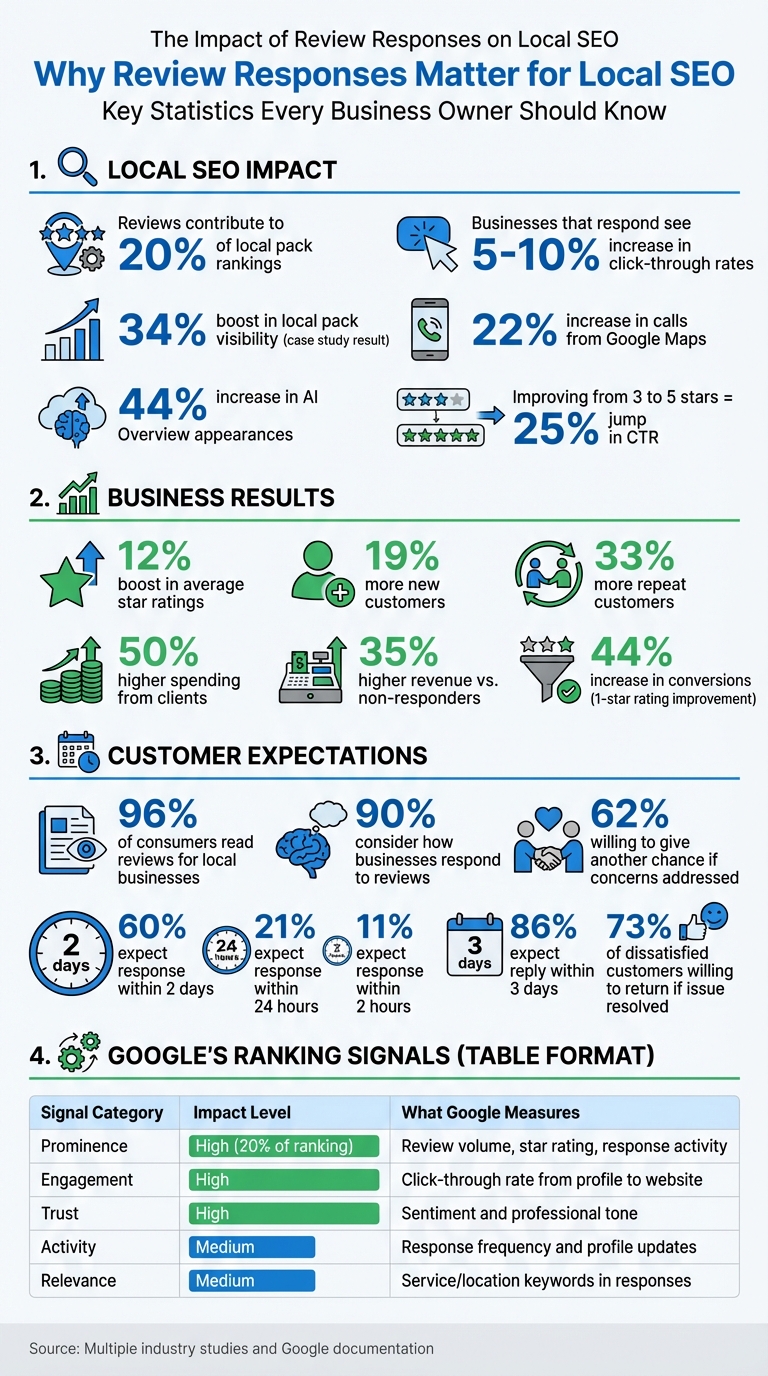
Impact of Review Responses on Local SEO and Customer Engagement
How To Reply To Google Reviews (Good or Bad)
sbb-itb-50c3429
How Review Responses Affect Local SEO Rankings
Review responses directly influence local SEO for service businesses. They help establish your business’s relevance and reliability, which are key factors for improving visibility in local search results. When you respond to reviews, you send clear signals to Google about your business’s activity and engagement.
How Google’s Algorithm Rewards Engagement
Google evaluates review responses using specific metrics like response rate (how many reviews you reply to), response speed (how quickly you respond), and the content of your replies. These factors contribute to your local rankings by feeding into Google’s "Prominence" ranking pillar and the E-E-A-T framework (Experience, Expertise, Authoritativeness, Trustworthiness). Businesses that consistently respond to all reviews often perform better than those who only reply selectively.
Active engagement signals that your business is well-managed and attentive. Plus, your responses become searchable text that Google indexes. Including service and location keywords in your replies – like "happy our HVAC team could assist you in Chicago" – strengthens your relevance for specific search queries through Google’s Latent Semantic Indexing. On the other hand, generic responses like "Thanks!" miss out on this SEO opportunity because they don’t add meaningful content to your profile.
For example, in 2025, a Utah-based automotive repair shop with multiple locations adopted a 24–48 hour response policy and shifted to concise, professional replies. Within 90 days, they saw a 34% boost in local pack visibility, a 22% rise in calls from Google Maps, and a 44% increase in appearances within Google’s AI Overviews.
| Signal Category | Impact on Local SEO | What Google Measures |
|---|---|---|
| Prominence | High (20% of ranking) | Review volume, star rating, and response activity |
| Activity | Medium | Frequency of responses and profile updates |
| Relevance | Medium | Use of service/location keywords in response text |
| Engagement | High | Click-through rate from profile to website |
| Trust | High | Sentiment of reviews and professional tone of replies |
Next, we’ll look at how these algorithmic benefits translate into better customer engagement and improved click-through rates.
Building Trust and Increasing Click-Through Rates
When potential customers see that you actively respond to reviews – especially negative ones – it builds confidence in your business. In fact, 62% of customers are willing to give a business another chance if their concerns are addressed through owner responses. This trust often leads to higher click-through rates (CTR) from your Google Business Profile to your website.
Google interprets higher CTR as a sign that your listing is valuable and relevant to users, creating a feedback loop that further boosts your rankings. Businesses that regularly respond to reviews can see a 5–10% increase in CTR, and improving your average rating from 3 stars to 5 stars can lead to a 25% jump in CTR.
Review responses also play a role in Google’s "Review Justifications", which highlight key services in search results. Google scans both review text and your responses to create these justifications, improving visibility for specific queries like "emergency plumbing" or "family dentist". Every response becomes an opportunity to emphasize what you offer and where.
By 2026, Google’s AI Overviews (the summaries at the top of search results) began analyzing review sentiment and response patterns to recommend businesses. The AI checks for consistency across platforms, so if you have a 4.8-star rating on Google but a 2.5-star rating on Yelp, you might be excluded from recommendations due to conflicting data. To maximize visibility, your response strategy must cover all review platforms.
"Responding to reviews shows that you value your customers and their feedback." – Google Support Documentation
Best Practices for Responding to Reviews
Responding to reviews isn’t just about damage control or acknowledgment – it’s a way to build relationships, improve visibility online, and show you care about your customers. Businesses that consistently respond to reviews often see higher average ratings over time, and customers are twice as likely to choose a business that takes the time to reply to all feedback.
How to Respond to Positive Reviews
Start by thanking your customers and referencing specific details from their reviews to make your response feel personal. Nearly 40% of people leaving positive feedback expect some form of acknowledgment. Keep your replies short – two to three sentences is ideal – and sign off with a name or initials for a personal touch. Match the tone of the review while staying consistent with your brand’s voice. For example, if someone raves about your breakfast burrito, you could respond with something like: "Thanks for the kind words! We’re thrilled you loved our burrito – it’s made with the freshest ingredients just for fans like you."
While it’s tempting to add keywords for SEO, avoid stuffing responses with unnecessary terms. Instead, weave them in naturally. For instance, if a customer mentions your plumbing service in downtown Seattle, you could say, "We’re so glad you trusted our Seattle plumbing team to help with your repair!" This approach keeps things authentic while boosting local search relevance.
"Owner responses are free advertising… wise owners make every word of this free space count in order to create the maximum favorable impression of the business’ quality, professionalism, accountability and exceptional customer service." – Moz
End your response with a friendly invitation, such as, "We hope to see you again soon!" This small gesture can lead to more repeat visits, as shown by a 33% increase in returning customers. Remember, every response you write is visible to future customers, and with 96% of people reading reviews for local businesses, your replies matter.
Now let’s look at how to handle negative reviews with the same level of care.
How to Handle Negative Reviews Professionally
Negative reviews require a thoughtful approach. The goal isn’t just to address the complaint but also to show potential customers that you care and take feedback seriously. Avoid keyword stuffing here, as it can send the wrong signals to search engines.
Use the "Acknowledge, Apologize, Act" method. Start by recognizing the customer’s experience without being defensive. Follow with a genuine apology – this shows empathy to both the reviewer and anyone else reading the review. Finally, offer a solution or invite the reviewer to contact you directly. For example: "We’re sorry to hear about the delay in service, Michael. That’s not the standard we aim for. Please call us at (555) 123-4567 so we can make things right."
Quick responses are crucial. Over 86% of customers expect a reply within three days, and 62% are open to giving a business another chance if their issue is resolved satisfactorily. Your reply isn’t just for the person who left the review – it’s for everyone who might read it later.
For low-rated reviews (1–2 stars), focus on resolving the issue and moving the conversation offline. For 3-star reviews, ask follow-up questions to learn more about the experience and identify areas for improvement. For higher-rated reviews (4–5 stars), you can naturally include relevant keywords to subtly enhance your local search presence.
"Owner responses are public relations media. The responses you write to happy or unhappy reviewers aren’t just for a single customer to read – they’re for all future potential customers to read." – Moz
The key is to act quickly and consistently, as this reinforces your commitment to customer satisfaction.
Response Timing and Consistency
Speed and consistency are critical when responding to reviews. Prompt replies not only build trust but also influence your local SEO rankings. A majority of reviewers – 60% – expect businesses to respond within two days, while 21% expect a reply within 24 hours and 11% within just two hours. Aim to reply to all reviews within 24–48 hours, and prioritize negative reviews with a quicker turnaround of 12–24 hours to minimize potential damage.
Consistency is just as important as speed. Strive for a 100% response rate, particularly on Google, to boost engagement signals. Google’s algorithm tends to favor businesses that actively engage with customers, keeping their profiles updated and relevant.
"Responding to reviews shows that you value your customers and their feedback. And when you show you’re active and engaged, Google is more likely to show your business in local search results." – Google Support Documents
One practical tip: dedicate 15 minutes each morning to review responses. This ensures you stay on top of new feedback without feeling overwhelmed. Use alerts to monitor reviews in real time and track your response time and rate as key metrics for local SEO health. Avoid using instant, automated replies as they can feel impersonal and robotic.
A great example of the impact of timely responses comes from a multi-location auto repair shop in Utah. By committing to a 24–48 hour response policy, setting up alerts, and training staff to write professional, concise replies, the shop saw a 34% boost in local search visibility, a 22% increase in calls from Google Maps, and a 44% jump in AI Overview inclusion within just 90 days.
Responding consistently also encourages more customers to leave reviews, which helps increase both the volume and velocity of feedback – two important factors for local SEO. Even improving your average rating by just one star can lead to a 44% increase in conversions from your Google Business Profile.
Advanced SEO Strategies for Review Responses
Taking your review responses to the next level can transform them into a powerful tool for boosting your SEO. These advanced strategies ensure your responses not only engage customers but also improve your business’s visibility in search results.
Adding Local Keywords to Your Responses
Did you know that Google indexes your review responses? This means that using relevant keywords like "emergency plumbing repair" or "roof replacement" in your replies can help establish your authority in those areas.
Google’s use of Latent Semantic Indexing (LSI) allows it to understand the context of your responses, so carefully chosen keywords can strengthen your local search signals without overloading your website. Review responses directly influence two critical local ranking factors: Relevance and Prominence. While the third factor, Proximity, depends on the searcher’s location and can’t be controlled, your responses can still make a big impact.
Here’s a simple structure to follow: Start by acknowledging the customer and include your primary service keyword. Then, weave in location-based keywords and secondary terms. For example, instead of saying, "Thanks for visiting our store", you could say, "Thanks for visiting our downtown Seattle clinic for your dental cleaning." This approach captures multiple keywords: the location, type of business, and the specific service provided.
Be as specific as possible with locations. Phrases like "our Main Street location in Chicago" or "our branch near Central Park" are far more effective than generic terms. For businesses with multiple locations, this tactic helps differentiate and strengthen individual Google Business Profile listings. You can even include nearby landmarks or neighborhoods that people often search for.
"Your reply gives you a chance to reinforce those keywords… you are adding valuable, relevant text content to your business’s presence." – ReviewsBlender
A generic response like "Thanks for the review" adds no SEO value. Instead, consider something like, "Thanks for choosing our downtown Chicago steakhouse for a dry-aged steak dinner." This not only sounds authentic but also integrates multiple keywords. Given that 97% of people reading online reviews also check the business’s responses, this is a missed opportunity if not done right.
Using AI Tools to Speed Up Responses
AI tools can help you keep up with reviews while ensuring your responses remain personal and timely. Quick response rates are essential, as they influence rankings directly. With 98% of consumers reading online reviews for local businesses, staying on top of responses is crucial.
AI can analyze review sentiment and adjust the tone of your replies to match your brand voice. Whether you want a Professional, Casual, or Friendly-Expert tone, AI tools ensure consistency across all responses.
For straightforward 5-star reviews, AI can generate and post simple, heartfelt "thank you" messages automatically, saving you time. For negative reviews, it’s best to use a "draft and approve" process. AI drafts a calm, empathetic response, which you can review and tweak before posting. This is especially important in industries with strict compliance rules.
"AI review responses generally don’t require a lot of human oversight (with a few exceptions…)" – GatherUp
Speed is critical, but authenticity matters just as much. Businesses that respond to reviews see 35% higher revenue than those that don’t. Always read through AI-generated responses to ensure they sound natural and include specific details. Prompt the AI to integrate your business name, location, and service (e.g., "Glad you enjoyed our roof repair service in Denver") for subtle keyword inclusion. Over time, businesses that follow these practices often see a 12% improvement in their average star ratings.
For an extra boost, you can combine these tactics with technical strategies like schema markup.
Implementing Schema Markup for Reviews
Schema markup is like translating your business information into a format that search engines can easily understand. This structured data enables rich results, such as star ratings, review counts, and snippets, to appear in search results. These features can significantly increase your visibility.
Businesses displaying rich results in local searches typically see a 20–30% jump in click-through rates compared to standard listings. This higher engagement signals to Google that your listing is valuable, which can lead to better rankings.
Since 2019, Google has restricted "self-serving" review stars for LocalBusiness and Organization schema types. However, you can still display star ratings by applying schema to specific Product or Service types. Instead of using the generic LocalBusiness schema, opt for specific subtypes like Restaurant, Dentist, or HairSalon to help Google better categorize your services.
"LocalBusiness schema markup is like hiring a perfect translator – it converts your business details into Google’s native language, ensuring nothing gets lost in translation." – Sebastian Żarnowski, Co-founder & CEO, Localo
For best results, use JSON-LD (JavaScript Object Notation for Linked Data), which Google prefers and doesn’t interfere with your site’s layout. Focus on adding aggregateRating and Review schema to individual product or service pages instead of the homepage. This approach can help regain star ratings in search results. Before going live, validate your schema code using tools like Google’s Rich Results Test or the Schema.org Markup Validator to catch any errors.
Ensure that the data in your schema markup – such as star ratings and review text – matches exactly what’s visible to users. Misleading or hidden structured data can result in penalties from Google, including losing rich results eligibility or being removed from search entirely. Keep in mind that review schema on your website won’t affect the star ratings shown on your Google Business Profile, as those are based solely on reviews submitted directly to Google.
How Review Overhaul Helps with Review Responses
Managing review responses across multiple platforms can be a daunting task. Review Overhaul simplifies this process, making it easier for service-based businesses to handle reputation management and improve local SEO. Here’s a closer look at the features that make this platform a go-to tool for optimizing review responses.
Review Overhaul Features
Review Overhaul is tailored for service businesses aiming to stay engaged with customers while enhancing their local visibility. One standout feature is its Google Business Profile optimization, which fine-tunes your listing to improve rankings in the Local Pack and Google Maps.
The platform also includes a centralized review management system. This feature consolidates reviews from various directories, allowing businesses to monitor and respond efficiently. By integrating your business name and location into responses, the system helps Google connect your reviews to your local listing. Plus, consistent activity on your profile adds a freshness factor, keeping your listing relevant and competitive.
With voice searches on the rise, voice search optimization is another essential tool. As more customers use "near me" queries through voice assistants, this feature ensures your business is prepared to capture those opportunities. Additionally, the platform maintains consistent NAP (Name, Address, Phone) details across all directories with its listing management feature.
The free competitive analysis provides valuable market insights, while every review response doubles as a subtle advertisement for your business. Active management of reviews can even improve average star ratings by up to 12%.
By leveraging these features, Review Overhaul helps businesses maintain consistent, SEO-friendly engagement. Paired with flexible pricing options, it ensures that businesses of all sizes can find a plan that fits their needs.
Review Overhaul Pricing Plans
| Plan Name | Price | Key Features |
|---|---|---|
| Basic Plan | $299/month | Core review response services and basic monitoring |
| Professional Plan | $399/month | Google Business Profile optimization and local listing updates |
| Premium Plan | $499/month | Full-service response management and voice search optimization |
The Basic Plan ($299/month) is perfect for single-location businesses starting to build their online reputation. It covers essential review generation, monitoring, and response services.
The Professional Plan ($399/month) takes things further by boosting local search visibility. It includes Google Business Profile optimization and local listing management, making it ideal for businesses looking to compete more effectively in local search results.
For those who need a comprehensive solution, the Premium Plan ($499/month) offers everything from crisis response to voice search optimization. One standout feature guarantees "40+ Reviews in 90 Days" with "Zero Work" required from the business owner, making it a great choice for busy professionals who want results without the extra effort.
Conclusion
Responding to reviews isn’t just good customer service – it’s a key part of local SEO. Review responses directly impact your visibility in Google’s Local Pack and Maps results. With 96% of consumers reading reviews before making a purchase and 90% factoring in how businesses respond, your approach to reviews can shape both your online reputation and customer decisions. A consistent response strategy shows Google and potential customers that your business is engaged, reliable, and focused on customer satisfaction.
The formula is simple but demands commitment: respond to every review – whether it’s glowing, critical, or neutral. Personalize your replies by addressing the reviewer by name, referencing specific details from their feedback, and weaving in location-based or service-related keywords to enhance your local relevance. For negative reviews, keep responses short, empathetic, and avoid overloading them with keywords. Aim to move the discussion offline within 12–24 hours.
This thoughtful approach pays off. Businesses that actively manage review responses enjoy a 12% boost in average star ratings, attract 19% more new customers, and see 33% more repeat business. With 60% of consumers expecting a reply within two days and 73% of dissatisfied customers willing to give a business another chance if their issue is resolved, staying silent could mean losing both trust and traffic.
"Owner responses are free advertising… wise owners make every word of this free space count in order to create the maximum favorable impression of the business’ quality." – Moz
If juggling responses across multiple platforms feels unmanageable, tools like Review Overhaul can simplify the process. From centralized monitoring to crafting SEO-friendly replies, these tools let you stay engaged with customers while keeping your focus on running your business. Consistency in review responses not only strengthens customer relationships but also enhances your local search presence.
FAQs
How do I add local keywords without sounding fake?
Incorporating local keywords into your content works best when done naturally and seamlessly. Think of it like having a conversation with someone in your community – mentioning familiar places, events, or terms that resonate with your audience. For example, if you run a coffee shop in Seattle, casually referencing "Seattle’s love for artisan coffee" or "rainy mornings spent at our downtown café" feels authentic and relatable.
The key is to make these keywords flow with the context of your message. Instead of awkwardly stuffing them in, weave them into sentences that add value or paint a picture. For instance, a bakery in Austin might write, "Our freshly baked sourdough has become a weekend favorite at the Austin Farmers’ Market." This not only uses the keyword naturally but also connects with local experiences.
Keep the tone conversational and engaging. Overloading your content with keywords can come across as robotic or overly salesy, which might turn readers off. Instead, focus on creating a genuine connection through language that feels personal and relevant to the area you serve.
Should I respond to every review or only bad ones?
Responding to reviews – whether glowing or critical – is a must. It shows that you appreciate feedback, care about your customers, and are committed to improving. Plus, it’s great for local SEO. Research indicates that most people expect businesses to reply to every review. When you do, it not only strengthens your reputation but also boosts your visibility in search results. Thoughtful responses reflect professionalism and can help build lasting connections with your audience.
What should I do if a review is unfair or spam?
If a review feels unjust or appears to be spam, take action by using the platform’s review management tools to dispute or report it. Additionally, consider responding in a professional manner. This gives you a chance to show your commitment to customer satisfaction by addressing the issue thoughtfully and highlighting your willingness to resolve concerns.
