
Service Area Businesses (SABs) – like plumbers or mobile groomers – need precise Google Business Profile (GBP) settings to succeed in local SEO. Here’s what you need to know:
- Service Areas Define Reach: GBP lets you outline where your business operates with up to 20 cities, ZIP codes, or counties. Avoid vague radius settings.
- Rankings Depend on Proximity: Google uses your verified address (even if hidden) as a baseline. Listings typically lose ranking strength beyond 5–10 miles from this location.
- Accuracy is Key: Overstating your service area or using invalid addresses (e.g., PO Boxes) can hurt rankings or lead to profile suspension.
- Optimize for Local Searches: Dedicated landing pages for each service area, targeted keywords, and structured data (like LocalBusiness schema) can boost visibility.
- Community Engagement Matters: Local sponsorships, customer reviews, and hyperlocal content enhance trust and authority.
Google Maps SEO Service Area Optimization
sbb-itb-50c3429
Problems with Incorrect Service Area Settings
Getting your service area settings wrong can confuse both Google and your customers, leading to a hit on your local SEO visibility and reputation. This doesn’t just mean fewer leads – it can also damage how your business is perceived online.
Lower Rankings in Local Pack and Google Maps
Google relies on your verified address for proximity ranking, even if that address is hidden. Adding extra cities or regions to your service area won’t boost your local rankings. As Code of Entry puts it:
"Service areas are descriptive – not authoritative. It is generally agreed that listing more cities or ZIP codes does not make a business rank better in those locations."
The real trouble starts when businesses overreach with their service area claims. For example, if you claim to serve an entire state but only operate in a small region, Google may penalize your rankings across all listed areas. To avoid this, Google advises keeping service areas within a two-hour driving radius of your base and limits profiles to a maximum of 20 service areas.
Another major misstep is using a UPS Store, PO Box, or virtual office as your business address. This violates Google’s guidelines and can lead to profile suspension. A Chicago plumbing company learned this the hard way in late 2025 when it was suspended for "Deceptive Content" after claiming the entire state of Illinois using a UPS Store address. Once they switched to a hidden residential address and narrowed their service area to 15 ZIP codes, their listing was reinstated within two weeks, and their conversion rates jumped by 15%.
Confusion for Potential Customers
Incorrect service area settings don’t just hurt rankings – they also confuse your customers. One common mistake is not hiding a residential address for a service area business. When customers see this address, they often assume it’s a physical location they can visit, which can lead to frustration.
Inconsistent service area details across platforms like Google, Yelp, and your website only add to the confusion. This mismatch wastes customers’ time and can cost you bookings. Worse, listing areas where you don’t actually provide services sets the stage for negative reviews when customers from unsupported areas receive poor service.
Considering that review signals make up about 17% of local pack ranking factors and that Google removed over 7 million fake business profiles in one year to combat misinformation, getting your service area settings right is critical. Accuracy here isn’t just about rankings – it’s about maintaining trust with both Google and your customers.
How to Set Up Google Business Profile Service Areas
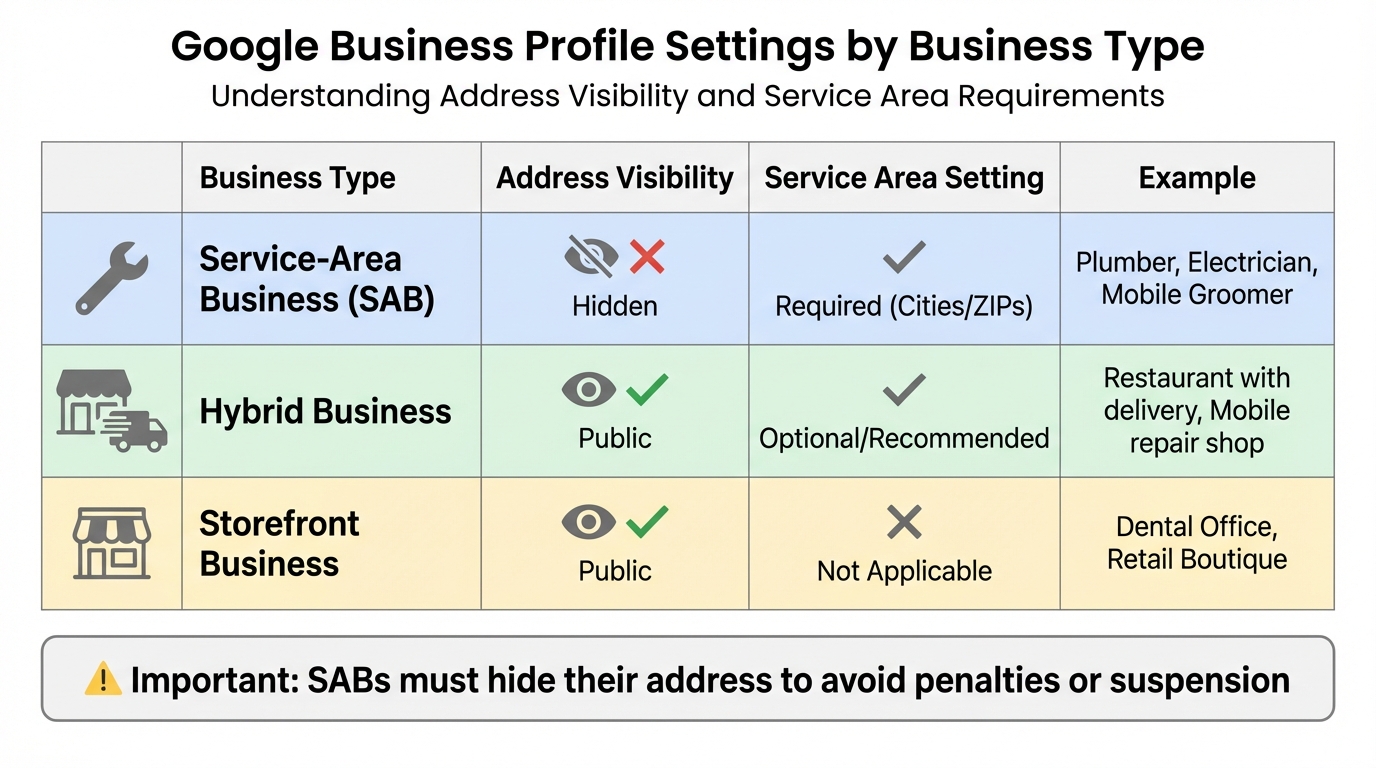
Service Area Business Types and Google Business Profile Settings Guide
Getting your service areas right is a game-changer for local rankings. The more precise you are, the better your chances of showing up where it matters most.
Setting Accurate Service Areas
Google allows you to define up to 20 service areas using specific cities, ZIP codes, or counties. Skip vague radius settings – they often include areas that aren’t relevant to your business. Instead, focus on specific locations that align with how potential customers search. For instance, if someone searches "plumber in Eugene", Google prioritizes businesses that explicitly list Eugene as a service area over those relying on a generic map radius.
Stick to service areas within a 2-hour drive and limit your list to 20 specific locations. Even though service area businesses (SABs) hide their physical address, Google still uses your verification point as your "home base." Your ranking strength usually fades significantly beyond 5 to 10 miles from this point, a limitation often referred to as the "digital leash". Listing service areas tells Google where you operate, but it doesn’t automatically make you rank higher in far-off places.
| Business Type | Address Visibility | Service Area Setting | Example |
|---|---|---|---|
| Service-Area Business (SAB) | Hidden | Required (Cities/ZIPs) | Plumber, Electrician, Mobile Groomer |
| Hybrid Business | Public | Optional/Recommended | Restaurant with delivery, Mobile repair shop |
| Storefront Business | Public | Not Applicable | Dental Office, Retail Boutique |
If your business doesn’t serve customers at its physical address, you must hide that address to avoid penalties or suspension. For hybrid businesses – those that serve customers both on-site and at their locations – keeping the address public is fine. Review your service areas every quarter to make sure they still reflect your actual operations. Pairing these settings with locally relevant keywords can make your profile even more effective.
Adding Service Area Keywords
Once your service areas are set, you can take things up a notch by adding targeted keywords to your profile. This means weaving service area keywords into your business description, services list, and website content. Mention specific neighborhoods, landmarks, or even local challenges your service addresses. For example, a plumber in a colder area might talk about freeze-thaw cycles, while an HVAC company could highlight local building codes.
Encourage customers to include their city or neighborhood in reviews. These details contribute to about 17% of local pack ranking factors tied to review signals. On your website, use title tags like "Emergency Plumbing in Eugene, OR | 24-Hour Help" for service area landing pages. This natural use of keywords works better than cramming multiple city names into one field, which can come across as spammy.
Implementing LocalBusiness Schema Markup
To strengthen your local SEO even further, structured data can help. LocalBusiness schema allows you to extend your service area details to other search engines like Bing and Yahoo. Ryan Bradley from Authority Networks explains:
"Adding service areas to GMB is the most important for Google, however, adding Schema on top of that would expand your service area information to Bing and Yahoo as well."
Use the areaServed property in JSON-LD format and place the script in the <head> section of your homepage or service area landing pages. For businesses with one location, add it to your homepage. If you serve multiple areas with different services, use the Service property to specify which services are available in each area.
To avoid confusion with cities that share similar names, include the sameAs property and link to authoritative sources like Wikipedia or Wikidata. For larger areas, list the county using "@type": "AdministrativeArea" rather than naming every individual city. This approach sends strong technical signals to search engines, reinforcing your Google Business Profile settings and improving your chances of appearing in relevant searches.
Building Landing Pages for Each Service Area
Creating dedicated landing pages for each service area is a smart way to align your business with local search intent. These pages work hand-in-hand with your service area settings and keyword strategies. For example, when someone searches for "plumber in Lakewood" or "HVAC repair in Puyallup", Google often prioritizes location-specific pages over generic homepages. These targeted pages not only provide relevant details for potential customers but also signal to search engines exactly where you operate.
What to Include on Service Area Pages
For each service area page, focus on localized content that highlights your expertise in that specific region. Include city-specific service descriptions and references to local landmarks, neighborhoods, or main roads (e.g., "Serving homes along SR-512 in Lakewood"). This makes the page more relatable to local customers.
Don’t overlook the technical side. Optimize URLs (e.g., /services/plumbing-in-eugene) and write clear title tags (55-70 characters) that include the city and your service. Display your Name, Address, and Phone (NAP) prominently, even if your office isn’t physically located in the area. Embedding a local map can also help clarify your service coverage.
Take Joe, for instance, the owner of an auto repair shop in Tacoma, WA. In July 2025, he added service area pages for Lakewood, Puyallup, and Spanaway. He included customer reviews and mentioned local roads like SR-512. Within three months, his traffic from nearby cities jumped by 60%, and weekly online quote submissions skyrocketed from 8 to over 30.
Preventing Duplicate Content Issues
Avoid creating "doorway pages", which Google penalizes for being thin, repetitive content that merely swaps out city names. As Google explains:
"Doorway abuse is when sites or pages are created to rank for specific, similar search queries. They lead users to intermediate pages that are not as useful as the final destination."
To steer clear of this issue, make sure each page is unique. Highlight market-specific challenges, local events, or neighborhood-specific concerns. For example, you might address pothole damage in one area or seasonal weather needs in another. You can also include localized FAQs, city-specific statistics (like the number of jobs completed), or even mention local sponsorships to make the content stand out.
Connecting Google Business Profile to Landing Pages
Linking your Google Business Profile (GBP) to these location-specific landing pages is another way to boost local SEO. Instead of directing all profiles to your homepage, link each GBP to its corresponding page. This ensures users land on content tailored to their location, improving their experience and your local map rankings.
Elizabeth Rule, a Local SEO Analyst at Sterling Sky Inc., emphasizes:
"The page you link your Google Business Profile (GBP) to directly impacts local map rankings."
In February 2023, Sterling Sky worked with a personal injury lawyer who had offices in Queens and Staten Island. Initially, the Staten Island GBP linked to the homepage, which was optimized for Queens. After switching to a dedicated "personal injury lawyer Staten Island" page, the Staten Island GBP saw dramatic ranking improvements within just a month. Using UTM parameters on these URLs also allowed the team to track traffic coming directly from the GBP. This method ensures a seamless connection between your GBP and your website, reinforcing the local SEO strategies discussed earlier.
Increasing Local Authority in Your Service Areas
Once you’ve optimized your service areas, the next step is to establish local authority. This involves earning trust within your community and showing active engagement. Building this authority can lead to stronger connections through involvement in local events, collecting customer reviews, and leveraging technical tools.
Showing Community Involvement
Getting involved in your local community is one of the best ways to strengthen your presence. Even businesses that don’t naturally align with community-focused activities can benefit from this approach. As Moz highlights:
"A so-called ‘boring’ business can reinvent itself as a true community champion. By actively promoting local initiatives, sponsoring others, and becoming a go-to source for hyperlocal information, your brand can become a household name within its community."
Sponsoring local events is a great place to start. Whether it’s a youth sports team, a charity fundraiser, or a neighborhood festival, these activities often come with the added bonus of backlinks from the event’s website. For instance, an HVAC company sponsoring a high school football team could earn a link from the team’s athletics page, boosting its visibility in that specific area.
Joining organizations like your local Chamber of Commerce or business associations can also help. These groups often list members on their websites, providing high-quality backlinks. Hosting educational workshops is another way to demonstrate expertise while connecting with the community. For example, a plumber could host a workshop on preparing pipes for winter, which might even attract local media coverage.
Don’t overlook the power of hyperlocal blog content. Write posts that address specific challenges in your area, cover local regulations, or highlight upcoming events. This type of content helps position your business as a trusted local expert.
| Community Activity | SEO Benefit | Target Signal |
|---|---|---|
| Local Event Sponsorship | High-quality local backlinks | Geographic Relevance |
| Chamber of Commerce Membership | Authoritative local citations | Prominence & Trust |
| Hyperlocal Blog Content | Long-tail keyword ranking | Topical Authority |
| Educational Workshops | Brand mentions & social signals | Community Authority |
| Local Media Interviews | High-authority backlinks | Domain Authority |
Getting and Managing Customer Reviews
Customer reviews are essential for confirming your local presence. Search engines often cross-check reviewer locations to verify your service area. If you claim to serve a specific area but have no reviews from there, your credibility may take a hit.
Aim to collect 2–4 new reviews per service area each month to maintain steady growth. Automating review requests through your CRM or point-of-sale system can help ensure consistent feedback.
When responding to reviews, timing and personalization matter. Reply within 12–24 hours and mention the customer’s location in your response. For example, saying, "We’re glad we could help with your plumbing issue in Lakewood, Sarah!" adds a personal touch while reinforcing your local relevance.
Tools like Review Overhaul (https://reviewoverhaul.com) simplify review management by centralizing feedback from platforms like Google and Yelp. They also offer services such as automated review requests, professional response templates, and Google Business Profile optimization, helping you maintain a strong reputation across all service areas.
Using Structured Data for Better Visibility
Structured data is another tool to boost your local authority. It provides search engines with detailed information about your business, including where you operate and what services you offer. This is especially important for businesses without a physical storefront in every service area.
Start by using the most specific schema subtype for your industry. For example, instead of the generic LocalBusiness type, use more tailored options like HVACBusiness, Dentist, LegalService, or PlumbingBusiness. If you don’t have a location in every area you serve, properties like areaServed or serviceArea can help define your geographic coverage.
Adding precise GeoCoordinates ensures search engines can accurately map your business. You can also nest Service schema within your LocalBusiness markup to highlight specific offerings, such as "Emergency AC Repair" or "Residential Plumbing", which signals commercial intent.
Yue Zhu, Product Manager at Seenos.ai, explains:
"AI search engines are becoming the new local directory. When someone asks ChatGPT for ‘the best Italian restaurant near me,’ your local schema determines whether you’re in that conversation."
Make sure your NAP (Name, Address, Phone) information in your schema matches your Google Business Profile exactly. Even minor inconsistencies can affect your ranking. Additionally, use the sameAs property to link your schema to verified social profiles, further strengthening your authority. Regularly validate your structured data with tools like the Google Rich Results Test to ensure accuracy.
Conclusion
Defining accurate service areas is a game-changer for building strong local visibility. By specifying cities or zip codes instead of relying on vague radius settings, you give Google clearer, more actionable data. Pair that with unique landing pages for each location, and you’ll strengthen your local presence while overcoming proximity challenges that might otherwise limit your reach.
Establishing local authority goes beyond technical tweaks – it’s about engaging with your community, collecting localized reviews, and using structured data to confirm your genuine presence in each area. These steps are essential for businesses aiming to succeed in local SEO. After all, 46% of all Google searches are for local information, and businesses that dominate across multiple service areas understand this well.
Once your service areas are locked in, the focus shifts to managing your online reputation and technical details. This includes handling reviews, optimizing schema markup, and refining your Google Business Profile. Tools like Review Overhaul can simplify this process by helping you collect local reviews, maintain consistent NAP data, and improve visibility across all your service areas.
With a clear plan – accurate service settings, location-specific landing pages, and a commitment to building authority through reviews and schema markup – you’re equipped to thrive in every market you serve.
FAQs
Why doesn’t adding more service areas improve rankings?
Expanding your service areas won’t necessarily boost your rankings because Google places a heavy emphasis on physical proximity and location-based signals. Stretching your service areas too far doesn’t impact the core local ranking factors. Instead, concentrate on fine-tuning your Google Business Profile and strengthening location-specific signals to improve your visibility where it matters most.
How far can an SAB rank from its hidden address?
A service area business (SAB) usually ranks within a radius of 1 to 5 miles from its hidden address. However, the exact range can vary based on factors such as the level of local competition and how effectively the business has been optimized for local SEO.
How do I avoid doorway pages for service areas?
To steer clear of doorway pages, make sure every service area page offers unique, meaningful content tailored to that specific location. Avoid copying content or using shallow, generic text across multiple pages. Instead, highlight details that set each location apart – such as local services, customer testimonials, or references to the community.
The goal is to craft high-quality, location-specific content that genuinely benefits users. When done right, this approach not only enhances the user experience but also aligns with local SEO best practices, helping to improve rankings and steer clear of penalties.
