
Google Reviews are more than just star ratings – they’re a powerful tool for improving your business and connecting with customers. Here’s what you need to know:
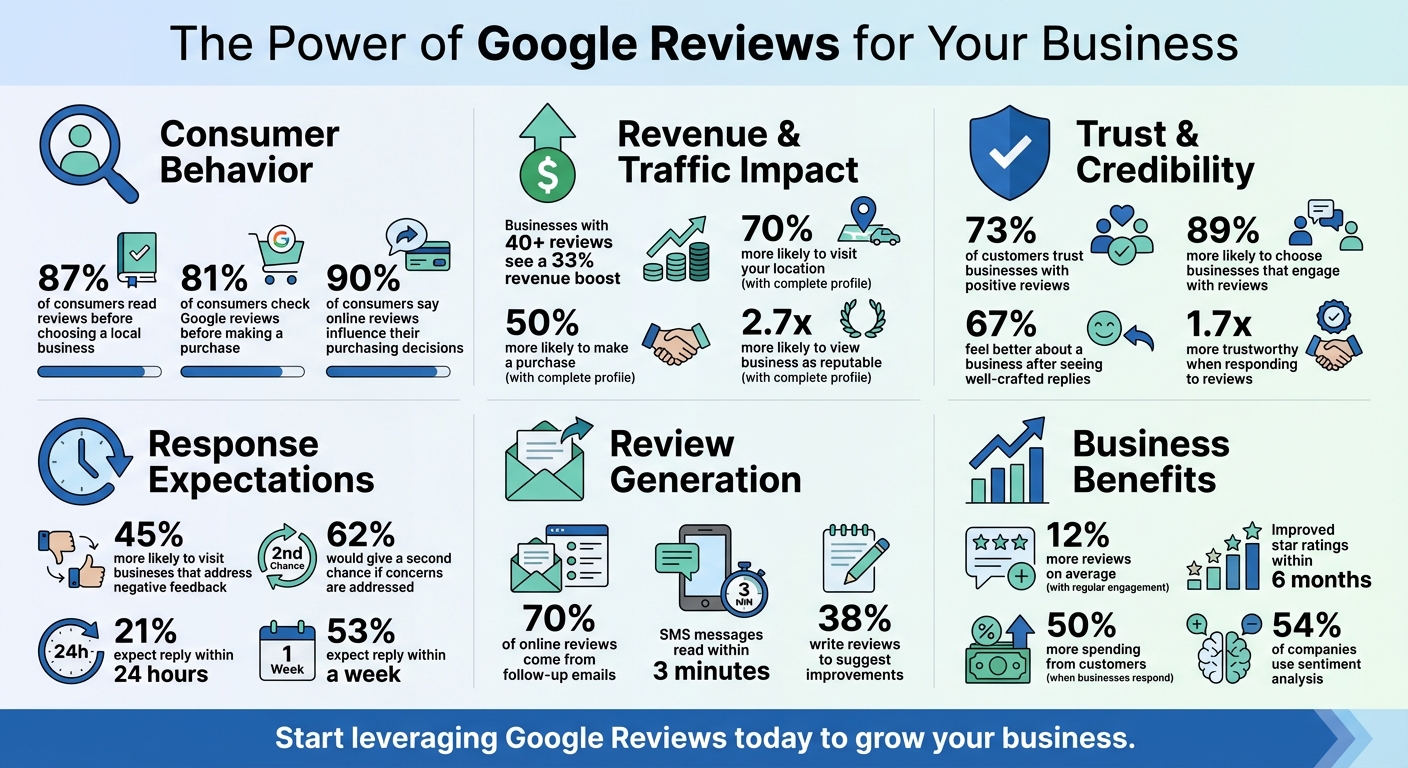
- 87% of consumers read reviews before choosing a local business, and businesses with 40+ reviews can see a 33% revenue boost.
- Reviews influence Google search rankings, helping your business appear higher in search results like "best plumber near me."
- They provide unfiltered customer feedback, highlighting strengths and areas to improve.
- 73% of customers trust businesses with positive reviews, but a mix of feedback feels more genuine.
- Responding to reviews matters – 45% of customers are more likely to visit businesses that address negative feedback.
To get started, claim and optimize your Google Business Profile. Then, encourage reviews by sharing direct links or QR codes and responding promptly. Use reviews as insights to make meaningful changes that improve your service and reputation. Tools like Review Overhaul can simplify managing feedback and help you stay on top of your online presence.
Google Reviews Impact on Business: Key Statistics and Benefits
Claim and Optimize Your Google Business Profile
Why You Need to Claim Your Profile
Claiming and verifying your Google Business Profile is essential if you want to manage how your business appears on Google Search and Maps. Without verification, you won’t be able to control your profile or interact with customer feedback at all.
Taking this step has a real impact. For instance, customers are 2.7 times more likely to view a business as reputable when it has a complete profile. They’re also 70% more likely to visit your location, and 50% more likely to make a purchase from your business. Ignoring your profile means missing out on these opportunities to connect with potential customers.
Keep in mind, only businesses with face-to-face customer interactions – whether through a physical storefront or a service-area model – are eligible. Online-only businesses don’t qualify. To claim an existing profile, search for your business on Google Maps by name and city, click "Claim this business", and then "Manage now." If your business isn’t listed, head to business.google.com/add to create a profile. Google will guide you through the verification process, which can take up to 5 business days. Verification options include phone, SMS, email, video recording, or a postcard that typically arrives within 14 days. Once verified, you’ll be able to manage reviews and shape your online presence.
How to Optimize Your Profile
Claiming your profile is just the first step – optimization is where the real benefits come in. Start with the basics: ensure your business name matches exactly what’s on your storefront or branding. Avoid adding marketing taglines or extra keywords. Your address should be precise, including details like suite or floor numbers. Use a local phone number instead of a generic 1-800 number, and link to a functional website.
Consistency is key when it comes to NAP (Name, Address, Phone). Make sure the information on your Google profile matches what’s on your website and signage. Inconsistent details can confuse customers and may even lead to profile suspension. Beyond the basics, fill out every field in your profile. Add a high-quality logo, a representative cover photo, and regular business photos or videos to keep your profile engaging. Set accurate main hours, and include "Special hours" for holidays or "More hours" for specific services like delivery or senior hours.
Choose the most specific categories that describe your business. For example, "Golf Resort" is better than the more generic "Hotel." Add attributes like Wi-Fi availability, outdoor seating, or whether your business is Black-owned to help your profile stand out in filtered searches. Craft a business description (up to 750 characters) that reflects your mission, history, and services. Keep it engaging but avoid promotional language or links. During verification, don’t make changes to your business name, address, or category, as this could delay the process.
| Information Type | Acceptable Example | Unacceptable Example |
|---|---|---|
| Business Name | TD Bank | TD Bank, America’s Most Convenient Bank |
| Business Name | Regal Pizzeria | Regal Pizzeria Open 24 hours |
| Address | 3247 Poppy Street, Suite 200 | 3247 Poppy Street (near the big oak tree) |
| Category | Pizza Delivery | Delivery Restaurant |
| Phone | Local area code number | 1-800 Premium rate numbers |
Once your profile is fully optimized, you’ll be in a great position to engage with customers and encourage meaningful feedback.
sbb-itb-50c3429
How to Get 100+ Google Reviews FAST (My Exact System)
Get Customers to Leave Reviews
Once your profile is optimized, the next step is encouraging customers to leave reviews that can help your business grow.
Create Direct Review Links
Make it easy for customers to leave reviews by providing a direct link. To do this, log in to your Google Business Profile, click "Read reviews," and then select "Get more reviews" to copy a short URL. You can even generate a QR code in the same section, which customers can scan with their phones to access the review form instantly. These QR codes are perfect for receipts, invoices, business cards, or checkout counters, bridging the gap between in-person interactions and online feedback.
For digital sharing, shorten the URL for better readability when sending it via email or SMS. Interestingly, 70% of online reviews come from follow-up emails after a purchase, and SMS messages are often read within just three minutes.
Timing is key, so consider when to ask for reviews to capture authentic customer experiences.
When to Ask for Reviews
The best time to ask for a review is when the experience is still fresh in the customer’s mind, and they feel positively about your business. For service-based businesses, ask for feedback immediately after completing a job. In eCommerce, wait about 7–10 days after delivery, giving customers time to use the product.
Pay attention to verbal or behavioral cues. If a customer shares their satisfaction during a conversation or phone call, that’s an ideal moment to request a review. Similarly, if you’ve just resolved a support issue and exceeded their expectations, they may be more inclined to share their positive experience. Keep in mind, 90% of consumers say online reviews influence their purchasing decisions.
Once you’ve identified the right moment, explain why their feedback is so important.
Explain Why Feedback Matters
Customers are more likely to leave reviews when they understand how their feedback makes a difference. Let them know their input not only helps you improve but also assists others in making informed choices. Asking for feedback also shows that you genuinely value their opinions.
"The goal of making the request personal isn’t just to get a review. It’s also about making the customer feel valued and appreciated."
- Vlado Pavlik, Content Operations Lead, Semrush
Personalize your requests to make them more meaningful. Use the customer’s name and reference specific details about their experience, like “We hope you enjoyed the blueberry cheesecake” [7]. Restaurant reputation management strategies often use these specific details to make requests feel more personal.”. You can also guide them with questions such as, “What did you enjoy most about your visit?” or “How was your interaction with our team?” to help them write more detailed reviews.
Read and Respond to Reviews
How you respond to reviews says a lot about how you treat your customers. Businesses that engage with feedback are seen as 1.7 times more trustworthy than those that don’t, and customers tend to spend 50% more with businesses that take the time to respond. Collecting reviews is just the first step – responding to them closes the loop, builds credibility, and can even guide improvements in your business.
Each response is a chance to show your professionalism and earn trust. Plus, replying to reviews signals to Google that your business is active, which can boost your visibility in local search results. Companies that regularly engage with reviews see, on average, 12% more reviews and often notice improved star ratings within six months.
Aim to reply within 24–72 hours. Over half of customers expect a response within a week, and one in three hopes to hear back in under 24 hours. By responding promptly, you strengthen healthcare patient trust while improving your online presence.
Respond to Positive Reviews
Positive feedback deserves more than a simple "Thank you!" Use these moments to reinforce what makes your business stand out and encourage customers to return. Personalize your reply by addressing the reviewer by name, referencing specific details they mentioned (like a product they loved or an employee who helped them), and signing off with your name or initials to make it feel genuine.
For example, if someone compliments your fast service, you could say:
"Hi Sarah, we’re thrilled you enjoyed your visit! Our team works hard to keep wait times short. – Mike, Manager."
This type of response not only acknowledges the customer but also subtly highlights your business’s values for others who may read it. You can also mention upcoming events or new products to pique their interest in returning. However, avoid offering discounts or deals in your replies – it can come off as insincere or like you’re trying to buy their praise.
Now, let’s talk about handling negative reviews with the same level of care.
Handle Negative Reviews
A well-handled negative review can turn things around – 62% of customers say they’d give a business a second chance if their concerns are addressed. The trick is to respond with empathy and professionalism, not defensiveness.
Start by addressing the reviewer by name and acknowledging their frustration. Offer a sincere apology and take responsibility, even if you don’t fully agree with their account. Then, move the discussion offline by providing a direct phone number or email to resolve the issue privately. For example:
"Hi John, we’re truly sorry your experience didn’t meet our standards. This isn’t the level of service we strive for. Please call us at (555) 123-4567 so we can make this right. – Lisa, Owner."
"Responding to negative reviews… [is] an excellent opportunity to showcase empathy, compassion, and commitment to customer satisfaction."
- Elizabeth Rule, Platinum Product Expert, Google Business Profile
Stay away from sarcasm, defensive remarks, or anything that could imply legal responsibility. A thoughtful, professional reply shows all readers that you genuinely care about customer satisfaction.
Analyze Reviews for Business Improvements
Once you’ve collected and responded to reviews, the next step is to dig into them for clues on how to improve your business. With 81% of consumers checking Google reviews before making a purchase, these reviews aren’t just feedback – they’re a goldmine of insights. Treat them like free focus groups, helping you identify what’s working and what needs fixing. By organizing and analyzing this feedback, you can uncover patterns and prioritize changes that matter most.
Find Common Themes
Break down your reviews into three main categories: quantitative data (star ratings, review frequency), qualitative feedback (what customers are saying), and contextual details (timing of reviews, types of customers leaving them). This combination helps you see both the big picture and the finer details.
Use tools like topic modeling to identify recurring themes in customer feedback. For instance, you might notice frequent mentions of delivery speed, staff behavior, or cleanliness. If 40% of your reviews mention "staff", it’s clear that this is a key driver of customer satisfaction. Similarly, tracking keyword frequency can pinpoint specific issues. For example, if the word "wait" appears repeatedly in Friday evening reviews, it could reveal a staffing problem tied to peak hours.
Sentiment analysis goes a step further by categorizing reviews as positive, neutral, or negative. Aspect-based sentiment analysis drills even deeper, highlighting specific strengths and weaknesses. For example, you might score 4.5 out of 5 for "location" but only 2.1 for "cleanliness", giving you a clear area to focus on.
"Google reviews are way more than just a number. They are a treasure trove of information that can give you a real insight into what your customers actually think about your business."
- Krunal, Founder of WiserReview
Advanced AI tools can make this process even more precise. Instead of broadly flagging categories like "Food", they can highlight specific complaints like "the pool water is too cold" or "no vegan breakfast options". With 54% of companies using sentiment analysis to mine reviews and social media for insights, this technology is becoming an essential tool for businesses.
Once you identify recurring themes, focus on addressing the most pressing issues first.
Decide Which Changes to Make First
Not all feedback is created equal – some issues demand immediate action, while others can wait. Start with a simple rule: anything that affects customer safety or health should be addressed immediately. After that, look for recurring problems. If multiple customers mention slow delivery, for example, that’s a clear sign of a systemic issue worth prioritizing. With 38% of consumers writing reviews to suggest improvements, these recurring complaints practically hand you a to-do list.
Next, tackle the quick wins – small, easy fixes that don’t require much time or money. This could be as simple as restocking a popular item or correcting outdated business hours online (an issue that causes 52% of negative reviews). These minor adjustments can quickly boost your reputation.
For larger operational changes, use trend tracking to justify the investment. For example, if positive reviews about product quality have been steadily declining over six months, it’s time to revisit your suppliers or quality control processes. Regularly review feedback – whether monthly or quarterly – to ensure your efforts are paying off.
| Priority Level | Type of Issue | Action Required |
|---|---|---|
| Critical | Safety, Health, Legal | Immediate operational change and customer outreach |
| High | Recurring Service Complaints | Staff retraining or policy updates |
| Medium | Product Quality/Inventory | Supplier review or quality control adjustments |
| Low | Inaccurate Online Info | Update business listings |
Use Tools to Manage Reviews
Keeping up with reviews across multiple platforms can feel like an endless task. That’s where review management tools come in handy. These tools handle the grunt work, freeing you up to focus on your business. By pulling reviews from platforms like Google, Yelp, and Facebook into one centralized dashboard, they ensure you never miss a comment. Plus, they can send automated review requests via SMS or email right after a service is completed, helping you gather more positive feedback effortlessly. It’s all about simplifying the process while staying on top of your online reputation.
What Review Overhaul Offers
Review Overhaul is designed specifically for service-based businesses looking to take control of their online reputation. It offers a range of features, from optimizing your Google Business Profile to automating review generation. The platform doesn’t just stop at setup – it posts weekly updates, including photos and videos, and keeps an eye on reviews across multiple platforms.
What sets Review Overhaul apart is its hybrid response system. Routine positive reviews are handled by AI for quick replies, while human experts step in to craft thoughtful, empathetic responses to more complex or negative feedback. This combination ensures every review gets the attention it deserves.
Additionally, the service integrates keywords and location-specific details into review responses, which helps boost your visibility in local search results. Pricing starts at $299/month for basic reputation management. For those looking for more, there are options like Google Business Profile optimization at $399/month or full-service management, including crisis response, at $499/month. And if you’re unsure, there’s a 30-day money-back guarantee for peace of mind.
"After working with Review Overhaul, our profile went from invisible to one of the top in local searches. We’re seeing more calls and foot traffic every week."
- Jessica H., Salon Owner
Benefits of Automated Review Tools
Beyond the features mentioned, automated review tools deliver some serious operational perks. Consistent and timely responses are key to building customer trust, and these tools make that easy by ensuring feedback is addressed within 24–48 hours. They also save you hours every week by consolidating reviews and streamlining engagement.
But that’s not all. These tools can turn your glowing reviews into marketing gold. For instance, you can embed live review feeds on your website or transform top reviews into branded social media posts, boosting your credibility. On top of that, their data analysis features help you spot recurring themes in feedback, whether it’s a common complaint to address or praise to build on. This means you can make smarter business decisions without wading through endless reviews manually.
Key Takeaways
This guide outlines how steps like profile optimization and timely responses can turn Google Reviews into a goldmine of customer insights. These reviews go beyond simple star ratings – they offer real, actionable feedback. Start by making it easy for customers to leave reviews. Share short links or QR codes right after a transaction to simplify the process.
Timing matters. Send review requests while the experience is still fresh, and aim to respond to reviews within 24–72 hours. This aligns with customer expectations, as 21% expect a reply within 24 hours, and 53% within a week. Quick responses show you’re paying attention – 89% of consumers are more likely to choose a business that actively engages with reviews.
Use these responses as a way to improve your service. Treat every review as valuable feedback. If customers repeatedly mention a specific issue or praise a particular aspect of your service, adjust your operations to address these points. For negative reviews, cross-check with internal records to figure out what went wrong and prevent similar issues in the future.
When dealing with negative feedback, a thoughtful response can make a big difference. Research shows that 67% of people feel better about a business after seeing a well-crafted reply, and 62% are open to giving it another shot. Keep your responses professional, personalized, and focused on resolving the issue.
To stay on top of reviews, consider using tools like Review Overhaul. These platforms can help you manage feedback, automate requests, and ensure no important comments get overlooked. The ultimate goal? Turn customer feedback into ongoing improvements, building trust that leads to better visibility and more business.
FAQs
How do I get my Google review link or QR code?
To grab your Google review link, log in to your Google Business Profile at business.google.com. Once inside, find the "Ask for reviews" option, copy the link provided, and share it with your customers. Want to make it even easier? Use a free QR code generator to turn your review link into a scannable code. If you don’t see the option, simply search for your business on Google and locate the review link directly on your profile.
What should I say when replying to a negative review?
When responding to feedback, it’s important to act quickly, stay professional, and acknowledge any shortcomings. A sincere apology goes a long way, like saying, "We’re sorry your experience didn’t meet expectations. Please contact us directly so we can address this."
Avoid sharing personal details or reacting defensively. Instead, focus on showing that you value the feedback and are dedicated to finding a solution. Thoughtful, constructive responses demonstrate a commitment to resolving concerns and improving overall experiences.
How can I spot patterns in reviews to decide what to fix first?
Analyzing reviews effectively requires a blend of quantitative data, like star ratings and review frequency, and qualitative feedback from written comments. Numbers can uncover patterns – such as recurring issues or consistently high ratings – while written reviews provide deeper insight into specific concerns or standout praises.
To streamline this process, consider using review analysis tools. These tools can quickly identify trends, like frequent complaints about a product feature or consistent compliments about customer service. Armed with this information, you can prioritize changes that will have the biggest impact.
By balancing both types of data, you can focus on the areas that matter most, helping to improve your reputation efficiently.
