
Voice search optimization means making your business easier to find when people use voice assistants like Siri, Alexa, or Google Assistant. Voice searches are longer, more conversational, and often ask questions like "Where’s the nearest coffee shop?" Unlike text searches, voice assistants usually give one direct answer, often pulled from "Position Zero" (featured snippets).
Key Takeaways:
- Why it matters: Over 1 billion voice searches happen monthly, and 58% of users look for local businesses this way.
- Google Business Profile (GBP): Keep your profile updated with correct business details, hours, and reviews. This helps voice assistants find and recommend you.
- Content strategy: Use natural, question-based phrases like "What’s the best pizza place near me?" Add FAQ sections and structure your answers clearly.
- Technical setup: Use schema markup (like LocalBusiness and FAQPage) to help search engines understand your content. Ensure your site is fast and mobile-friendly.
Voice search is growing fast, and businesses that optimize now can stay ahead.
The Truth About Voice Search Registration & How to Get Found
Optimizing Your Google Business Profile for Voice Search
Your Google Business Profile (GBP) plays a key role in your voice search strategy. When someone asks their smart device, "Where’s the best coffee shop near me?" Google Assistant pulls answers directly from these profiles. If your profile isn’t complete, your business risks being left out of those results.
Complete and Verify Your Profile
Start by claiming and verifying your GBP through phone, email, or mail to confirm ownership. Without verification, your profile won’t appear in voice search results, and you’ll miss out on potential customers.
Once verified, invest in Google Business Profile optimization to ensure every field is complete. Write a detailed description (up to 750 characters) that highlights what sets your business apart. Select a primary category that best matches your business, and add 2-3 secondary categories to reflect seasonal or specific services. For instance, a sporting goods store might choose "ski equipment" in winter and "camping gear" in summer.
Consistency is critical when it comes to your Name, Address, and Phone number (NAP). Ensure your NAP matches across your GBP and all other online directories. Even minor discrepancies – like "Avenue" versus "Ave." – can confuse Google and lower your rankings. Update your business hours regularly and use the "Special Hours" feature to account for holidays or special events.
Visuals also matter. Upload high-quality photos of your storefront, interior, products, and team. Businesses that include images see 42% more requests for directions on Google Maps. Short videos, like virtual tours or clips of your storefront, can further boost engagement.
Once your profile is complete and verified, customer reviews become the next big focus for improving your voice search rankings.
Get and Manage Customer Reviews
Customer reviews play a major role in voice search results because Google uses them to measure "Prominence", one of the key factors in local rankings. Voice assistants typically provide only the top one or two results, so your review count and star rating will heavily influence whether your business is mentioned.
"The number of reviews and the average star rating of those reviews are an increasingly important factor in how high you show up in search rankings." – Eoghan Geoghegan, Uberall
Encourage customers to leave reviews after every service. The more reviews you gather, the stronger your profile’s prominence signal becomes. Be sure to respond to all reviews, both positive and negative, to demonstrate that your business values feedback and remains active.
Tools like Review Overhaul can simplify this process. These platforms automate review requests, keep track of incoming feedback, and help you craft professional responses efficiently. Staying on top of reviews not only keeps your GBP active but also strengthens the prominence factor needed to rank higher in voice search results.
Creating Content for Voice Search
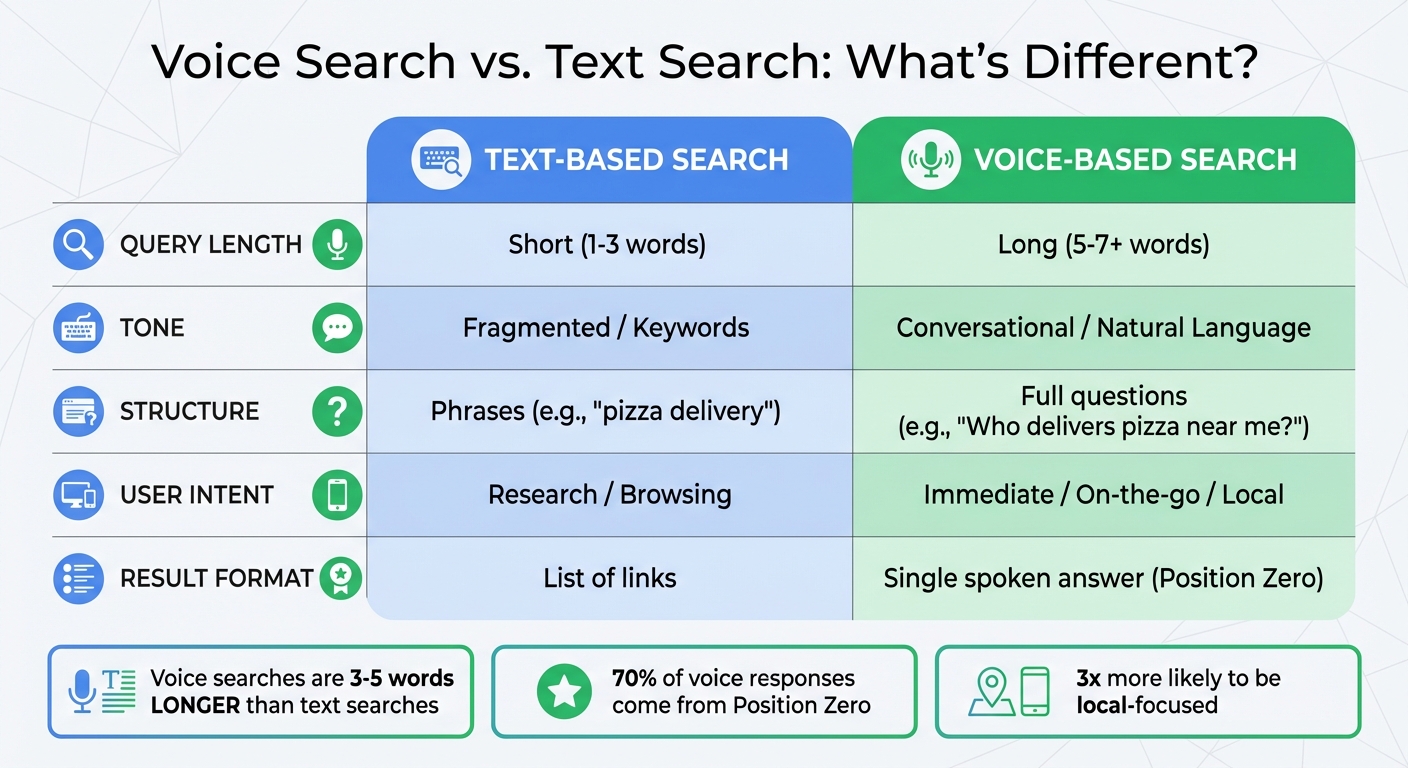
Voice Search vs Text Search: Key Differences for Local Businesses
Once you’ve optimized your Google Business Profile, the next step is to tailor your website content to match the way people naturally speak. Voice searches tend to be longer and more conversational, often resembling full questions like, "What is the best pizza place in New York City?". Adjusting your content to reflect these patterns ensures your site aligns with the needs of voice search users and complements your keyword and structural optimizations.
Use Conversational Keywords
Voice searches are typically 3–5 words longer than traditional text queries, often framed as complete questions. When users interact with voice assistants like Siri or Google Assistant, they often start their queries with words such as "who", "what", "where", "when", "why", or "how". To identify these conversational phrases, tools like AnswerThePublic or Semrush Keyword Magic Tool can help uncover the specific questions your audience is asking. For instance, instead of focusing on a short keyword like "emergency plumber", you might target a more natural phrase like, "I need a plumber who can come to my house right now".
Voice searches are also heavily localized – mobile voice searches are three times more likely to focus on local information, and nearly half of voice search users look for local business details daily. To cater to this behavior, incorporate local references and longer, conversational phrases that mimic how people talk. Modern search engines rely on Natural Language Processing (NLP) to interpret the intent behind spoken queries. Avoid using technical jargon or stuffing keywords into your content. Instead, aim for natural, easy-to-read language, ideally at a 9th-grade reading level, so it’s clear and accessible when read aloud by a voice assistant.
Structure Content for Voice Queries
Beyond choosing the right keywords, structuring your content effectively is crucial for voice search optimization. Voice assistants often pull their answers from featured snippets, with 70% of responses coming from this "position zero" spot. To increase your chances of being featured, organize your content into concise, direct answers that are easy to read aloud.
Start by creating FAQ sections on your site, particularly on service pages or at the bottom of key pages. Use full questions as headers (H2 or H3) that mirror common spoken queries, and provide clear, direct answers immediately below. Keep these answers brief – ideally 40–60 words or a single paragraph – to match the preferred format for voice responses. For example, a bakery might include a question like, "What time does your bakery open on Sundays?" followed by a short, straightforward answer.
For instructional or "how-to" content, use numbered lists or bullet points to provide step-by-step guidance. Voice assistants prefer structured formats for delivering instructions aloud. Always place the most important answers or steps at the beginning to improve their chances of being featured in voice results.
Lastly, implement structured data (schema markup), such as FAQPage, HowTo, and LocalBusiness schemas. These help search engines better understand and classify your content, making it more likely to be retrieved for voice queries.
| Feature | Text-Based Search | Voice-Based Search |
|---|---|---|
| Query Length | Short (1-3 words) | Long (5-7+ words) |
| Tone | Fragmented / Keywords | Conversational / Natural Language |
| Structure | Phrases (e.g., "pizza delivery") | Full questions (e.g., "Who delivers pizza near me?") |
| User Intent | Research / Browsing | Immediate / On-the-go / Local |
| Result Format | List of links | Single spoken answer (Position Zero) |
sbb-itb-50c3429
Technical Setup for Voice Search
To make your website compatible with voice assistants like Siri, Google Assistant, or Alexa, technical optimization is a must. Without it, even the best content might not reach users who rely on voice search for quick answers.
Add Schema Markup
Think of schema markup as a "cheat sheet" for search engines. It provides structured data that helps voice assistants understand your business details – like what you offer, where you’re located, and when you’re open. For example, when someone asks, "What time does the pharmacy close on Sundays?" voice assistants pull that information directly from your structured data.
"Schema markup is like giving search engines a cheat sheet about your business. It’s structured data that helps voice assistants understand exactly what your business offers." – Gombos Atila Robert, PhD, CEO of Jasmine Business Directory
At a minimum, local businesses should use the LocalBusiness schema to define their name, address, and phone number (NAP). Other useful schemas include:
- FAQPage schema: Perfect for answering conversational queries like "What is your return policy?"
- HowTo schema: Breaks down step-by-step instructions, great for voice-guided tasks like recipes or DIY projects.
- Speakable schema: Marks specific sections of content for audio playback, ideal for news and summaries.
Consistency is key – your schema data should match your Google Business Profile and other directory listings. Conflicting information can confuse voice assistants. Use tools like Google’s Rich Results Test or the Structured Data Markup Helper to validate your markup. If you’re on WordPress, plugins like AIOSEO, Yoast SEO, or Rank Math can simplify adding schema without coding.
| Schema Type | Role in Voice Search | Best Use Case |
|---|---|---|
LocalBusiness |
Shares NAP data, hours, and location. | Essential for "near me" searches. |
FAQPage |
Highlights questions and answers. | Captures conversational queries. |
HowTo |
Breaks down instructions into steps. | Great for voice-guided tasks like recipes. |
Speakable |
Marks content for audio playback. | Ideal for news and summaries. |
Review |
Highlights ratings and customer feedback. | Answers queries like "best-rated nearby." |
In addition to structured data, your site’s speed and mobile performance play a major role in voice search success.
Improve Website Speed and Mobile Performance
Voice search is heavily used on mobile devices, where users expect quick responses. If your site takes more than three seconds to load, you risk losing potential customers. Studies show that 61% of mobile users won’t return to a site if it’s hard to access, and 40% will head straight to a competitor after a poor experience.
To boost site speed, use tools like Google PageSpeed Insights to pinpoint slow-loading elements. Optimize images, enable browser caching, use a CDN, and reduce HTTP requests to speed up your pages.
But speed isn’t the whole story. Your site also needs a responsive design that adjusts seamlessly to any screen size. Make sure buttons are large enough and spaced for easy tapping, and remove annoying pop-ups that are hard to close on mobile devices. These small tweaks not only improve user experience but can also prevent search penalties. Use Google’s Mobile-Friendly Test tool to confirm that your site meets usability standards and delivers the smooth, frustration-free experience voice search users expect.
Preparing for the Future of Voice Search
Voice search is changing the way local customers discover businesses. With its usage steadily increasing, it’s clear that this trend is here to stay. In fact, the number of voice-assisted technology users in the U.S. is expected to hit 157.1 million by 2026. Ignoring this shift could mean missing out on a massive audience of potential customers.
The technology behind voice search is advancing quickly. Search engines are now capable of scanning individual paragraphs, while AI-powered assistants are getting better at interpreting context, understanding local dialects, and handling follow-up questions. Voice search isn’t just limited to phones anymore – it’s embedded in in-car systems and smart home devices, making it easier than ever for customers to find businesses while on the go.
"Voice search optimization is essential in today’s digital landscape, as it not only expands your reach to the growing number of voice-assistant users but also ensures your content aligns with the evolving, natural language patterns of search queries." – Connor Wilkins, CMO, Direction.com
Despite its growth, many businesses still underestimate the potential of voice search. This presents a golden opportunity for early adopters to capture high-intent traffic while competitors lag behind. As voice commerce evolves, customers are beginning to complete transactions – like booking appointments or placing orders – using simple voice commands. Acting now can give businesses a real edge in this emerging landscape.
Key Takeaways for Local Businesses
Here’s how local businesses can position themselves for success in the voice search era:
- Optimize Your Google Business Profile: Keep your hours updated and actively manage reviews. Voice assistants tend to prioritize businesses with strong ratings and a high volume of reviews.
- Use Conversational Language: Adjust your content strategy to reflect how people naturally speak. Focus on long-tail, conversational phrases like, “Where can I get a pizza delivered right now?” instead of relying solely on short keywords.
- Answer Questions Clearly: Structure your content to respond to direct questions using natural language headings (e.g., Who, What, Where, When, Why, How). Creating detailed FAQ pages can help you secure the coveted "Position Zero", which voice assistants often read aloud.
- Utilize LocalBusiness Schema Markup: This helps voice assistants quickly access essential details like your business hours, location, and contact info. Also, make sure your website loads in under three seconds and is optimized for mobile, as most voice searches happen on smartphones.
- Ensure Data Consistency Across Platforms: Keep your business information consistent across directories. Siri relies on Apple Maps and Yelp, while Alexa pulls data from Bing and Yelp. Uniform data prevents confusion in search algorithms, keeping your business visible.
FAQs
How is voice search different from traditional text-based search?
Voice search takes a different approach compared to traditional text-based searches. Instead of relying on short, keyword-heavy phrases, it uses spoken, conversational queries that sound more like everyday speech. These queries are often longer and more specific, reflecting how people naturally ask questions.
For instance, while someone might type "best pizza near me" into a search engine, a voice search user might ask, "What’s the best pizza place nearby that’s open now?" This shift toward natural language requires businesses to adjust their content to align with how people talk, helping them stay visible in voice search results.
Why is schema markup essential for optimizing voice search for local businesses?
Schema markup plays a key role in optimizing for voice search by helping search engines better understand and display a business’s details. With schema markup, local businesses can organize critical information – like their address, phone number, operating hours, and customer reviews – into a format that makes it easier for voice assistants to access and share this data with users.
This structured data also improves the likelihood of appearing in rich snippets or featured snippets, which voice assistants often rely on to deliver quick, accurate answers. For local businesses, this means a greater chance of being highlighted in voice search results when users look for nearby services, restaurants, or stores. As voice search continues to grow in popularity, schema markup serves as a valuable tool to increase visibility and attract more local customers.
How can optimizing my Google Business Profile improve voice search results?
Optimizing your Google Business Profile for voice search is a smart move for local businesses aiming to capture attention in voice-driven queries like “Where’s the closest coffee shop?” or “Who delivers pizza near me?” By keeping your profile complete and accurate – think address, phone number, business hours, and services – you make it easier for voice assistants to recommend your business to nearby customers.
To increase your chances of being the go-to result, weave conversational keywords and common questions into your content. This strategy can boost your visibility in voice search results, leading to more foot traffic, phone calls, and inquiries from customers who are ready to act.
