
Want to improve your local business strategy? Start by analyzing your competitors.
Here’s the key: Study how your competitors engage with customers through Google Business Profiles, social media, and online reviews. This helps you identify what works and what doesn’t in your market.
Key Takeaways:
- Google Business Profiles: Look at review counts, star ratings, response times, and activity like posts or Q&A. Businesses with over 100 reviews and ratings above 4.2 stars tend to perform better.
- Social Media Insights: Use hashtags, geotags, and tools like the Facebook Ad Library to see what content and campaigns are driving engagement.
- Review Metrics: Track review volume, response speed, and negative feedback to pinpoint customer pain points your competitors might be missing.
Tools like Review Overhaul can simplify this process, helping you stay ahead by tracking reviews and responses effectively.
The goal? Outperform your competition by focusing on better engagement and resolving customer concerns faster.
How to Find Your Local Competitors
Search Engines and Google Business Profiles
Start by conducting a Google search with your service and city name – examples include "personal injury lawyer Chicago" or "HVAC contractor Austin." This will bring up the Local 3-Pack, which highlights the top three businesses Google considers most relevant for that search.
To dig deeper, click on "More Places" to explore a full list of competitors on Google Maps. Pay attention to each profile’s details like ratings, review counts, and whether they have optimized their Google Business Profile. This broader view uncovers not only the top players but also smaller competitors who might be gaining traction. Unclaimed profiles, in particular, can indicate businesses that aren’t maximizing their online presence – potential opportunities for you to stand out.
Take it a step further by searching competitors’ names along with "reviews." This often reveals their presence on platforms like Yelp, Avvo, or Healthgrades. For home service businesses, check sites like Houzz or Angi, while professional services often show up on Avvo or similar platforms. It’s worth noting that 79% of people rely on Google for reviews, making it your primary research tool. However, these additional review sites can provide a clearer picture of competitor strategies and customer feedback.
Beyond search engines, social media platforms also offer valuable insights into your competition.
Finding Competitors on Social Media
Platforms like Facebook and Instagram are excellent for discovering local competitors. Use location tags and local hashtags to identify businesses. For instance, hashtags like #DenverPlumber or #MiamiCafé can reveal which businesses customers are talking about. Instagram’s geotagging feature also allows you to see businesses tagged at specific locations.
Local Facebook groups or community pages are another goldmine. Residents often share recommendations or voice complaints about local businesses in these spaces. Similarly, Nextdoor serves as a hyperlocal platform where neighbors discuss service quality and reliability. These conversations can provide unfiltered insights into which competitors are trusted – or not.
For a sneak peek into your competitors’ marketing strategies, check out the Facebook Ad Library. By searching for their names, you can view their active campaigns and promotions. This can help you understand how they’re engaging with their audience and what offers they’re pushing.
sbb-itb-50c3429
How to Spy on Local SEO Competitors and Optimize GMB Categories in 2025
What Engagement Metrics to Track
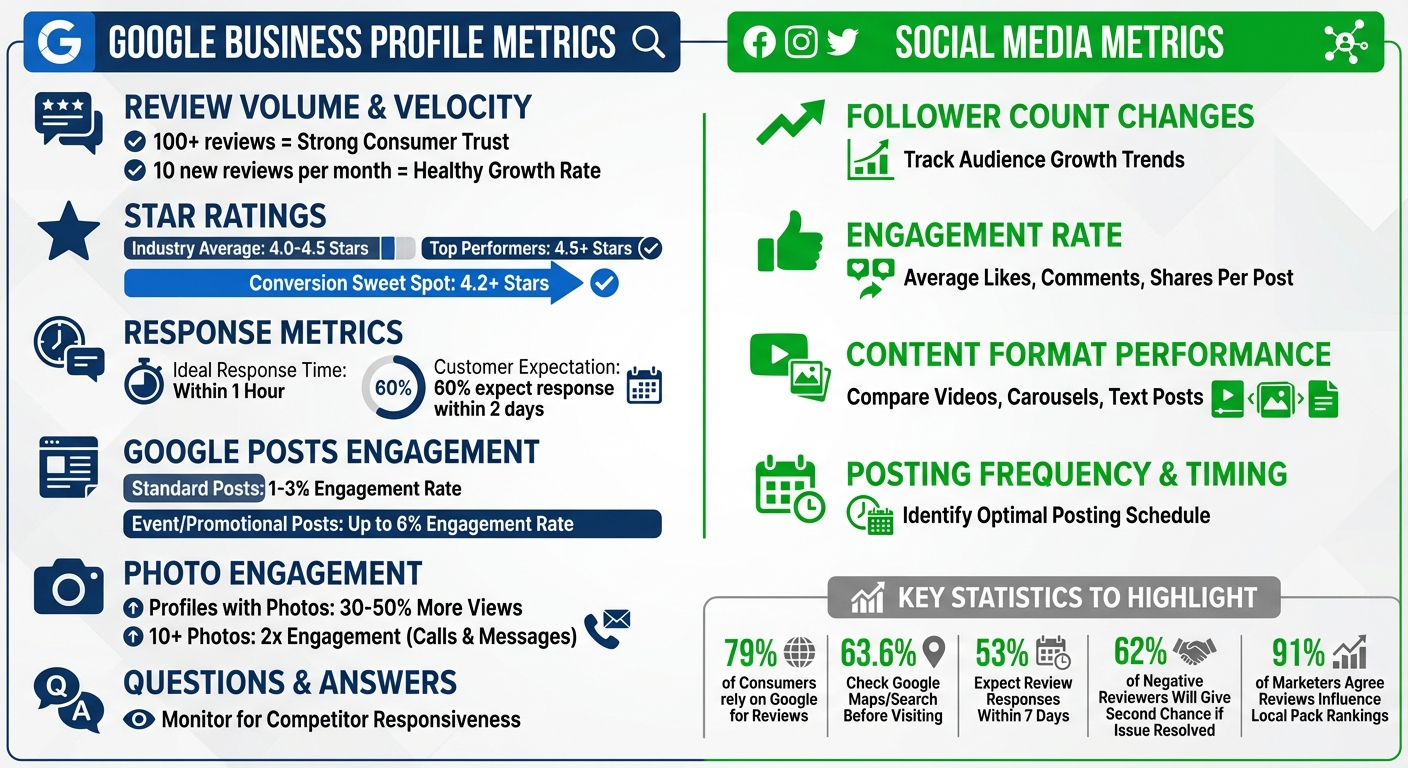
Local Business Competitor Engagement Analysis: Key Metrics Comparison Chart
Google Business Profile Metrics
When analyzing competitors’ Google Business Profiles, focus on review volume and velocity to assess their credibility. For instance, having 100+ reviews often signals strong consumer trust. Additionally, a steady increase in reviews – around 10 new ones per month – indicates a healthy growth rate.
Pay attention to average star ratings as well. While most industries hover between 4.0 and 4.5 stars, businesses with ratings above 4.5 tend to perform exceptionally well. Interestingly, conversion rates often improve when ratings hit 4.2 or higher.
Another critical factor is response rates and speed. Businesses that reply quickly – ideally within an hour – see a noticeable boost in customer sentiment. Keep in mind that 60% of consumers expect a response within two days.
Don’t forget to evaluate Google Posts activity. These posts typically generate engagement rates between 1% and 3%, but event or promotional posts can reach as high as 6%. Also, check the Questions & Answers section to see if competitors are addressing common concerns effectively. Lastly, photo engagement is a key metric. Profiles with photos get 30%–50% more views, and businesses with 10 or more photos often see double the engagement in terms of calls and messages.
Social Media Metrics
Social media metrics can provide additional insights into how competitors build their community and expand brand awareness. Start by tracking follower count changes to measure audience growth. A steady increase in followers indicates a solid strategy, while stagnation might highlight opportunities for you to capture more attention.
To gauge engagement, calculate the average number of likes, comments, and shares per post. Additionally, evaluate how different content formats – like videos, carousels, or text posts – perform. Keep an eye on posting frequency and the timing of posts to identify when their audience is most active. These insights can help you refine your own approach.
Tools for Tracking Competitor Engagement
When it comes to analyzing engagement metrics, using tools to monitor competitor reviews and their response patterns is essential. These insights can help you refine your own strategies.
Review Platforms to Monitor
Google reviews dominate the landscape, with 79% of consumers relying on them, and 63.6% checking Google Maps or Search before visiting a business. To get a full picture of your competitors’ performance, search their name along with the word "reviews." This will reveal key details like total review count, average rating, and response speed.
Beyond Google, platforms like Yelp, Facebook, and Tripadvisor can also play a role, depending on your industry. A simple Google search for "[Competitor Name] + reviews" will highlight which platforms their customers are most active on. Pay attention to how competitors respond to reviews – look for personalized touches, such as addressing customers by name or referencing specific services. These are signs of effective review management.
Another valuable metric is review velocity – how many reviews a competitor has received in the last 90 days. Reading negative reviews can also uncover potential weaknesses in their operations, like pricing issues, service gaps, or product flaws. These insights could help you address similar challenges in your business.
By leveraging these tools, you’ll be better equipped to identify gaps in competitor engagement and refine your own approach.
How Review Overhaul Helps Track Engagement
To simplify review tracking and response management, platforms like Review Overhaul can be a game-changer.
Review Overhaul centralizes the process, making it easier to manage reviews and optimize your Google Business Profile. For example, businesses that actively request reviews see an average rating of 4.34 stars, compared to 3.89 stars for those relying on unprompted feedback.
The platform also ensures timely responses to reviews – a critical factor, as 53% of consumers expect replies within 7 days, yet 63% report receiving none. Thoughtful, SEO-friendly replies can make a big difference, especially since 62% of negative reviewers say they’d give a business a second chance if their issue were resolved. These strategies not only enhance your reputation but also help build stronger customer relationships.
How to Close Engagement Gaps
Create a Comparison Chart
Start by building a spreadsheet to analyze your top 3–5 competitors. Focus on those who consistently show up in the local map pack – tracking too many can spread your efforts thin and waste valuable time.
In your chart, include key metrics like search rank, lifetime reviews, 90-day review volume, average star rating, and response percentage. The 90-day review metric is especially useful because it highlights businesses actively engaging with customers in the present, rather than relying solely on past performance. Be sure to use an incognito browser to gather unbiased data.
Pay close attention to the quality of responses. Are competitors personalizing their replies? This can reveal a well-managed customer engagement strategy. For example, a business with 200 reviews and a 4.7-star average sends a stronger trust signal than one with just 30 reviews at a perfect 5-star rating.
Use this data to identify areas where you can make quick improvements and plan for more significant changes over time.
Steps to Improve Your Engagement
Once you’ve identified the gaps, focus on actions that can immediately enhance your engagement. Start with quick wins that take just a few days to implement. For instance, if competitors have more complete Google Business Profiles, update yours right away by adding missing photos or updating business attributes. Check if they’ve claimed specific attributes like "Wheelchair accessible" or "Late-night food" – details you might have overlooked.
For larger gaps, consider adopting strategies that are clearly effective for your competitors. If they’re posting team photos or video testimonials that resonate with their audience, try incorporating similar content into your own approach. Additionally, review negative feedback for recurring issues and adjust your operations accordingly. As Andrew McDermott from Moz points out:
A competitor audit shows you… what competitor’s customers are unhappy about [and] the core issues and challenges costing your competitors leads, sales and revenue.
Personalized responses are another key factor. 62% of negative reviewers are willing to give you a second chance if you respond in a way that effectively addresses their concerns. Tools like Review Overhaul can help you craft thoughtful, SEO-friendly responses that not only resolve customer issues but also naturally incorporate relevant keywords.
Conclusion
Competitor engagement analysis isn’t about chasing perfection – it’s about doing better than your local rivals in the areas that matter most. Keep a close eye on metrics like review volume, response rates, star ratings, and the quality of interactions on platforms like Google Business Profiles and other industry-specific sites.
By focusing on these numbers, you can turn raw data into actionable steps. This process helps you pinpoint customer frustrations and operational gaps that might be costing you revenue. Considering that 91% of marketers agree review factors directly influence local pack rankings, staying on top of this information provides a clear path for improvement.
Start with simple, impactful actions: update your Google Business Profile, respond to reviews within 24 hours, and address any overlooked weaknesses. Then, move on to larger strategies, like routinely asking for feedback after every customer interaction.
Tools like Review Overhaul make this process easier by automating review requests, crafting responses optimized for SEO, and managing your reputation all in one place. Their three-step approach – Systemize, Engage, and Amplify – turns competitor insights into tangible improvements that deliver measurable results.
In a fast-moving local market, consistent engagement analysis is your edge. By regularly assessing what’s working for competitors and adapting accordingly, you’re not just keeping up – you’re setting your business apart. These strategies help you go beyond meeting customer expectations, positioning your business to win over those actively comparing their options.
